
Solved!
Go to SolutionAurora R7 psu missing proprietary cable
it is true that many discussion posted already to use third party ATX psu to replace R7 psu as long as the non-Dell psu has two separate 4 pin CPU/EPS connectors, one for the oem board cpu socket, the other for GPU_PWR which is mandatory to make the board POST. this discussion is about the Dell proprietary 24 to 4 pin adapter. not sure what the DP/N is or whether there is third party selling the same adapter.
so if I am planning to get a stock 460w psu, I need to get both the psu and the adapter. most psu sellers do not include the adapter. although R7 and XPS 8930 share 460w psu, the adapter is not needed for 8930.

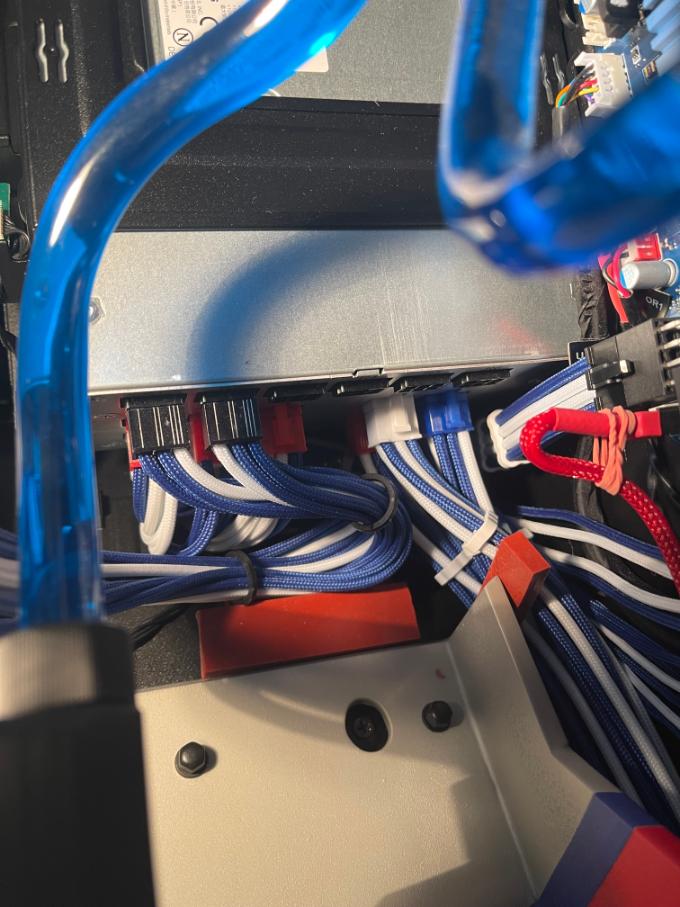
the higher power oem psu 850w or 1000w (proprietary modular) provides two cables for cpu and MB GPU_PWR respectively, colored white and black on MB side. strange that the psu side has three red sockets labelled CPU/MB and R7, R8, R9, only two needed. not sure if there is an R8 cable included at all. in this pic R7 and R9 are used. The proprietary cable are also labelled R7 and R9 respectively so it is user friendly. note the same 850w/1000w psu are used in Area 51 R2 etc. The A51 R2 motherboard also has this Dell proprietary 8 pin GPU_PWR socket at lower right corner to be plugged in.
cheapest 850 oem psu here https://www.ebay.com/itm/385463022116?

(edited)
0
0
Posted August 17th, 2023 01:04
The Dell proprietary psu cable for 850W is labelled at psu side for easy plug in. in this pic the R9 cable is available which has a black end suitable for the GPU_PWR of motherboard side. seller does not say but it seems it is missing the R7 cable with white connector motherboard side. If you want to power a R7 or R8 board, you need both R9 and R7 cables. If you just want to use the Dell psu for standard 24 pin motherboard, you only need the R7 cable.
R9 cable is GP6MV, 4 pin black on MB side, labelled R9 on psu side red connector.
ASSY,CBL,PWR,850W,CPU,4P,R5. 


(edited)
0
0
Posted August 17th, 2023 01:47
the 6 pin connector is for Dell proprietary 850/1000 w psu side. love it or hate it. this discussion is neutral to clarify some oem details. what I just realize today is that the oem cable set labelling is confusing because they read like R7, R9, R12 etc., which makes one think the cable is designed for specific Aurora models. No, those R# are for specific modular ports on oem psu side. and had nothing to do with Aurora model number. This is elucidated so another user would not get confused again.


MD63V is R7 cable - 8-pin white on MB side. This plugs in R7 port of oem psu. R7 is also labelled at red psu connector side.
ASSY,CBL,PWR,850W,PCIE,8P,R5. 

(edited)
0
0
Posted August 17th, 2023 00:22
Mostly true. You can replace the Aurora R7 PSU with a standard ATX format PSU. You should consider a fully modular PSU that is no longer than 150mm. As you mentioned, be sure the new PSU has at least 2 EPS 8-pin (4+4) power cables.
EDIT: sorry, I thought this was a question from someone and I did not check the OP. carry on.
(edited)
0
0
Posted August 17th, 2023 01:31
@redxps630 Dell REALLY loves 6 PIN connectors for everything on their modular PSU's. It's almost like they got an awesome deal years ago on 6 PIN connectors and are trying to use up all the stock...

0
0
Posted August 17th, 2023 02:08
A51 R2 has 8 pin EPS and 8 pin GPU_PWR (called PCIE_PWR1 on motherboard).
How does psu R7, 8, 9 connect to these ports.
R7 cable is white 8 pin (EPS) for MB cpu.
since R9 has only 4 pin black on MB side, then the additonal R8 must be the one supplying the additional 4 pin of PCIE_PWR1 on MB. so the R9 and R8 cable MB side connectors are plugged in PCIE_PWR1 side by side.
I am assuming this Dell design is considering the A51 R2 board needs to support multiple high power gpu in SLI (up to three can be installed on A51 R2 board). but if you have only one gpu installed, perhaps you can skip the R8 cable and it would work fine any way.
(edited)
0
0
Posted August 17th, 2023 02:48
@redxps630 The PSU in the photo I dropped is Area-51 R5 1500 watt, but I believe the R2 had the same. I honestly can't say how the OEM cables were connected. I wanted to keep the OEM Alienware 1500 watt PSU and after much consultation I ordered a set of custom cables from CableMod designed for the Corsair AX1600i PSU. I had those shipped direct to the Alien Master, who re-pinned the PSU end of the cables with the correct color matching 6-pin connectors. Each of the CPU/MB ports has 3 12v and 3 ground, so I think there was some optionality in choosing the 16 wires (8 12v and 8 ground) for the two EPS 8-pin cables. In my current configuration the R8 port only has 4 wires connected, 2 wires going to each 8-pin connector.
(edited)

redxps630
11 Legend
•
16327 Posts
•
82876 Points
0
0
Posted August 17th, 2023 00:51
Re: not sure what the DP/N is or whether there is third party selling the same adapter.
I find the answer. NRX72
https://www.ebay.com/itm/175436472173
(edited)