
UNSOLVED
JA
jim anonymous
1 Rookie
•
2 Posts
•
2 Points
0
163
March 31st, 2026 16:22
Creating External Pushbutton with PCB
As an OEM, we generally have our PCs connected to an 2ndary external push button as we dont keep the PCs in easily accessible positions.
The specific header we need to mate with is shown below (designator “PWR SW”). Can you provide the vendor and vendor part number of this header pin on the PCB?
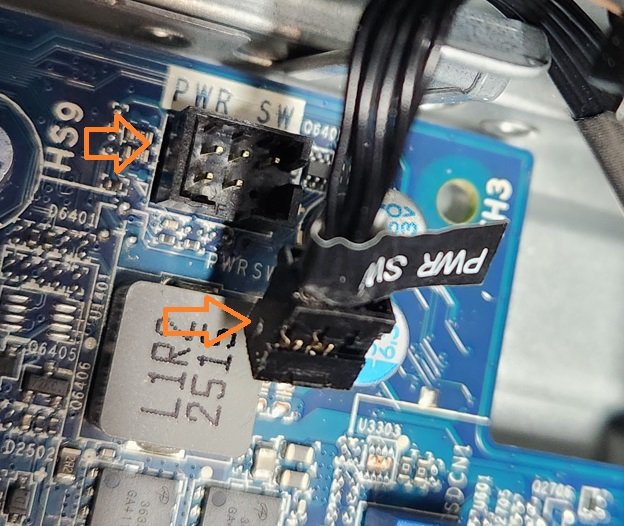
we basically automatically do a "push" to turn the PC
0
0
Posted April 1st, 2026 22:21
While proprietary, many 5-pin Dell headers utilize the side pins for the momentary power switch function.
You can test the power by briefly connecting the two pins assigned to the switch function (often the outermost pins on the side of the 5-pin connector).
0
0
Posted April 6th, 2026 11:54
I appreciate the responses but this is not really what i am asking for.
We want to mate a connector with the one that is shown above. We need to know who makes the connector. IE it made by SAMTEC or Hirose and what is the manufacturer part number.
we already do this with other computers and some model dell.
0
1
Posted April 6th, 2026 22:21
Dell part number depends on the
model of dell desktop pc.
a generic switch cable can be found
Standard Power Reset Front Panel to Mini 5 Pin Cable for Dell 7010 - MODDIY

anne_droid
5 Journeyman
•
2076 Posts
•
7707 Points
0
0
Posted March 31st, 2026 18:08
Hi
Dunno.
I would investigate the WAKE-ON range of BIOS options.
Also, I would probably slice/splice into the wiring loom and add a switch in either series or parallel.
Please can you confirm the Make Model and OS, along with any configuration details like touch screen, backlit keyboard, SFF or tower etc etc.
Kind Regards
anne_droid