
UNSOLVED
JR
Jose.romero
1 Rookie
•
1 Message
0
4951
February 22nd, 2023 12:00
Latitude 7400 Gets Extremely Hot
Hello,
I'm writing this out of frustration with Dell Support. I have a Latitude 7400 laptop that is constantly running extremely hot. Also there chat in their website is greyed out so I'm forced to use my smart phone in order to contact them. I explained to them that the laptop that the user was using is running extremely hot. The fan is constantly running and not cooling the laptop enough that is not so hot to the touch. Don't know if the laptops fan is enough to cool this laptop or not. Now they started to make me do all of these tests even though we bought the Warranty. I feel like I have run every test imaginable and nothing is working. I wonder what else are they going to think of next! I'm starting to feel that these guys are pulling my chain and not wanting to honor their warranty and product. I should not have to do all of this if my employer bought the warranty!
Its been close to 2 weeks with the back and forth and yet the laptop still runs hot and the issue is not solved.
Dell Support used to be great but recently they have changed my mind totally!
0
0
Posted April 9th, 2026 13:16
@computerguy6900 does this overheating causes the display to get damaged?
I have one i play games on that it was fine at first, but now the display is full of lines.
But the lines disappears overtime and a huge white spot appears everytime no matter what i do.
0
0
Posted April 10th, 2026 03:33
@computerguy6900 I have made those adjustments to see if that will help. Stay tuned.
My solution to decrease the occurrence of unit overheats is to only use it on a hard surface to prevent heat build up. Additionally I noticed that my unit’s temperature whenever an update is being pushed out. Once the update has downloaded the fan and overheat condition stops. Weird and poor performance management. Have you experienced that?169
0
Posted February 22nd, 2023 12:00
Has the system ever had a thorough internal cleaning -- along with a replacement of the thermal pads that sit between the CPU and heatsink?
If not, given that the system is approaching four years old, that's overdue and may solve the issue.
Service manual is here:
https://www.dell.com/support/home/en-us/product-support/product/latitude-14-7400-laptop/docs
0
0
Posted February 12th, 2024 01:34
Turn off Turbo Boost in the BIOS. I'm using one right now to type this and it's been running cool to the touch for hours. This is a known issue and even the latest BIOS and drivers from Dell Command Update won't fix this issue. Also make sure your power optimization is set to "Optimized" and not "Ultra Performance" or "Cool", this will ramp up the fans significantly. Download CoreTemp and monitor the CPU temperatures. They should be within 35c to 65c. Yes, there will be a slight performance impact but not as bad as the CPU throttling from all the heat. If you continue to experience these issues after doing all of the steps above, which 99% of the time you won't, I would get another computer, transfer all of the information over before the motherboard KOs itself, and cut your losses.
(edited)
0
0
Posted September 1st, 2024 16:41
This is just a bad design from dell. The fans are getting smaller so they can fit in the slim laptops. The heat sink copper is so thin you might as well not even have anything. The integrated Cpu with the graphics chip are all in one chip basically, so even after cleaning and putting fresh thermal grease, doesn't matter, the graphics chip heats up the cpu and the cpu heats up the gpu. Thats why the older laptops had them separate, so they didn't heat up each other. But that take more thinking, and costs more to do, let's face it cost is the main issue. How can a fan that is 2 inches in diameter, and a quarter inch thick cool off a laptop. The only way to keep this running cool is to, go to power settings, change the percentage of cpu used. If you limit it to 90 percent it will run ok. But using the full cpu speed, when you click on anything then it spikes to turbo, thats when that thing will hit 220 degrees, so with the turbo off it will run ok. I still use a laptop fan. As the small vents and the small legs that lift up the laptop, or any make laptop is not high enough to suck in cool air, and if you put it on a table cloth or your legs, the heat will go crazy. Its funny in all these movies you see people putting the laptops on their beds. That doesn't last long, as it will heat up so bad, your graphics chip solder will melt and disengage from mother board causing a dead laptop. I am a dell fan, but they need to take some lessons from apple, no vents on bottom and they run cool
(edited)
0
0
Posted September 1st, 2024 16:55
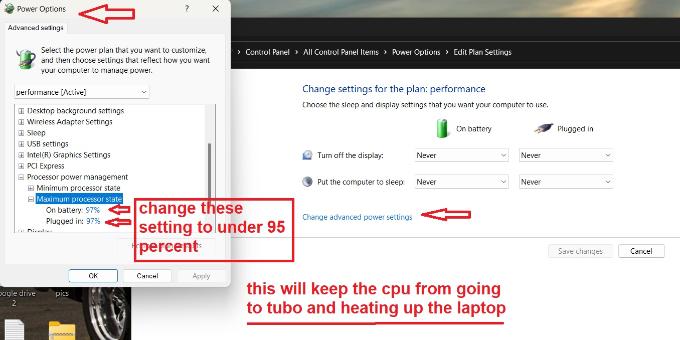
@GlobAlmgr I have 3 of these, experimented with all of them. You can change the thermal grease, clean out vents. Just a bad design. The only thing I found that works is going to power settings, under cpu power, change it from 100% to 90%. That will keep the turbo from kicking in and will run at a decent temperature. I wouldn't mess with the bios and turn off turbo, as most people should be careful changing settings in bios unless you know what you're doing. But i promise this will bring down the temp to about 115 and when doing a scan will probably go up to 150 degrees. For sure lift that laptop off its surface, to help it cool. Maybe a fan or put a 1 inch book in the back, but don't cover vents. I'm going to take off the back of laptop drill some extra holes so it can breathe better, have done this in the past and did help. Thats why i like older laptops, they were built strong with a thick copper heatsink and a much bigger fan. Im not an expert but in all the years i have worked and experimented on how to keep laptops cool, this is my opinion. Worked for me.
(edited)
0
0
Posted September 1st, 2024 18:31
@ejn63 I own 3 of these. Got them on eBay, for a good price. Anyway, from the factory there is a big glob of thermal paste covering the cpu and the gpu , they are on one chip. It doesn't just cover the dies, it's all over the chip, just a mess, that is the wrong way to apply. The heat sink copper is so thin, i can't see how it disperses any heat at all, you have to be careful taking off or it will bend in half thats how cheap these are made. I have used the best thermal grease, i even tried putting the pads on them, really doesn't make a difference. I have tried putting .075 thick copper shims on top of the cpu and the gpu die, thinking that might help, nope. The copper heat sink that is screwed down to the mobo, is so thin, then the copper piece that goes to fan is about a .250 wide, and less than 1/8 thick, it's not beefy enough to do anything. Then having a fan that is less than 1/4 thick and 2.00 in diameter, what is that going to do, nothing. Since it has a quad core it will use more power, and when the Tubo kicks in, i checked my cpu temp, it was at 220 degrees. Every time you click on something it kicks in the turbo and heats up. If you have it flat on a surface, those little vents under laptop can't suck enough cool air to do anything. You have no choice but to limit the CPU from kicking in the turbo. Lift up the back, so it's an inch off a surface, don't put it on a tablecloth or your bed. Your not going to get real high performance, but it will be good enough for school, streaming vids, even ok on some cad programs. Thats why i like older laptops, having beefy heatsinks, separating the CPU from the gpu, having much thicker and bigger fans. I am a windows guy all the way, tried a apple, they have no vents under their laptops, but they don't heat up, guess that's why they are so expensive. I have built over 300 laptops in my life. i do have experience. Don't call Dell unless you want to send it back, they won't know what is going on, you're wasting your time, plus you probably won't even be able to understand them, as it will be from india. I dont think they even check the first model coming out to see how it performs, they just start mass producing them, then when they have problems oh well.Here is a pic check it out this will definitely help you
(edited)

GlobAlmgr
1 Rookie
•
2 Posts
0
0
Posted January 25th, 2024 13:10
I have this problem too! Need to understand what update or part is causing this to happen now