
UNSOLVED
Closed
C2722DE, KVM doesn't disconnect screen when switching
I have my C2722DE monitor set up with a Surface laptop on the USB-C input, and a desktop PC using HDMI and USB-B ports.
On the Surface I have set up the display to extend from the Surface screen to the C2722DE monitor, and it works just fine.
However, if I switch inputs to the desktop PC, the Surface doesn't see that the screen has been disconnected, and still thinks that it has two monitors. Therefore my apps open on this (now) invisible second monitor.
If I unplug the USB-C cable from the Surface, it recognizes that the screen has gone away and adjusts accordingly.
The KVM should be disconnecting the screen from USB-C when switching to a different input.
729
0
Posted September 7th, 2022 17:00
Yes, that is my setup, and the settings are as per your screenshots.
721
0
Posted September 8th, 2022 04:00
Do you have another Laptop there with USB-C out port to replace the Surface and retest?
DELL-Chris M (old account)
#IWork4Dell
715
0
Posted September 8th, 2022 17:00
No - unfortunately not.
Is this behaviour the expected behaviour, or not? What do your tests show?
652
0
Posted September 15th, 2022 05:00
I have a Surface Laptop running Windows 11 21H2 connected via USB-C to my C2722DE monitor. When the monitor is switched to the USB-C input, the laptop correctly sees and uses the mouse, keyboard and network which are connected to the monitor.
However, when I switch inputs to my other PC, which is connected through USB-B & HDMI, the laptop continually displays "USB device not recognized" popups. As the other PC now has all of the USB devices connected to it (and they work perfectly) the laptop shouldn't be seeing any USB devices. I have tried with multiple cables with the same result.
This does not happen every time I switch away from the laptop, but when it does happen (about 70% of the time) the popups are continuous (about one every 5 seconds).
If I then switch the input back to the laptop, all the connected devices function perfectly (and the popups stop).
109
0
Posted July 20th, 2023 23:00
I also have this issue with a S2722QC. Just got this monitor but this seriously kills its usefulness as a hub and I'm probably going to return it if i there is no solution. Any solution for this?

DELL-Chris M
Community Manager
•
56891 Posts
•
232143 Points
737
0
Posted September 7th, 2022 07:00
C2722DE User's Guide
This is your setup =
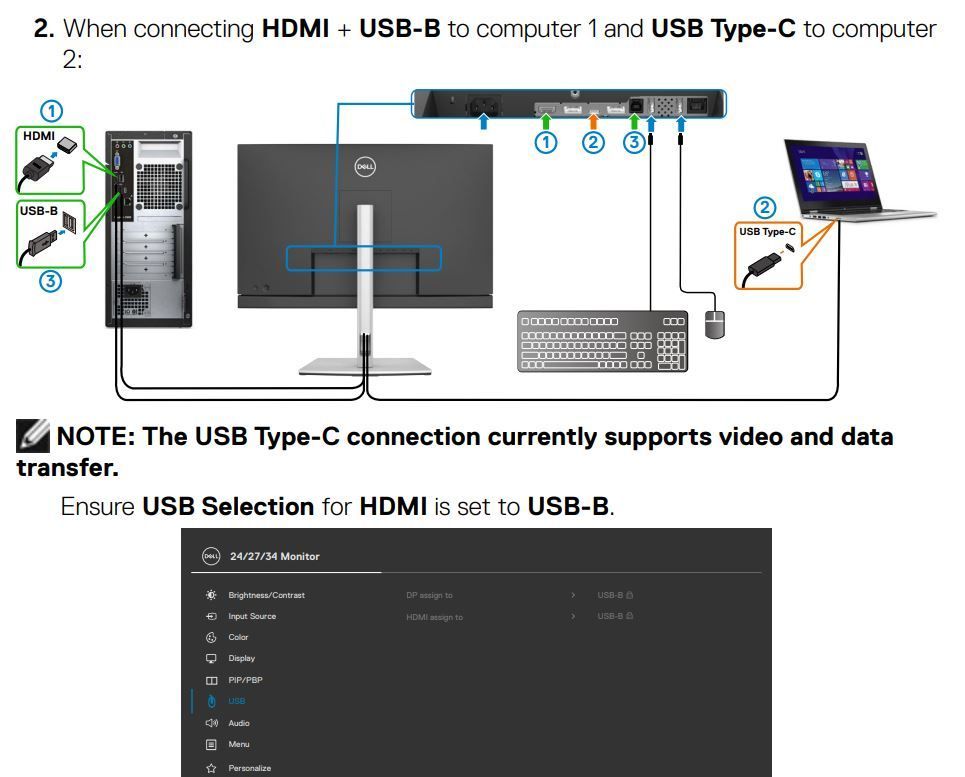
Is Auto Select set to On and Auto Select for USB-C set to Prompt for Multiple Inputs?
DELL-Chris M (old account)
#IWork4Dell