
Solved!
Go to Solution
Dell Optiplex 3040 boot guard verified failed
Whenever I turn on my dell 3040 it shows the following
Boot Guard verified failed System will shutdown Press any key
I tried a bios reset but the system just hangs and the power button blinks orange 3 times, stops, then 6 times, stops and goes back to three and continues forever (dose that mean anything?). I also tried a new CMOS battery, new HDD, new sata cables, and pressing f12 on startup to force it to boot to windows (which didn't work). Any idea of the issue and do I need a new mainboard to fix it?
Thanks for any ideas!!!
7410
1
Posted June 13th, 2021 14:00
7401
1
Posted June 13th, 2021 16:00
Neither of those solutions worked with a 4gb fat32 formatted usb with the BIOS_IMG.rcv. it still says "boot guard verified failed" any other ideas?
*Update* (5 minutes later)
I kept on turning it off, pressing esc and ctrl and repeating untill it gave me the option to reflash the BIOS!!!!
Thank you for all the help that you provided
7393
1
Posted June 13th, 2021 17:00
4gig flash drives are FAT16 not fat32
https://www.dell.com/support/kbdoc/en-us/000132453/
16 gig or 32 gig USB2.0 FAT32 flash drive is REQUIRED for full recovery including windows reinstall.
The other reason is that once bios is fixed you can use the SAME USB 2.0 flash drive with the media tool to make WIN10 installer.
SDCZ60-032G-A46
FAT16 EXFAT NTFS etc are not supported. Small 4 and 8 gig drives are too small for the base image now.
The media tool works
https://go.microsoft.com/fwlink/?LinkId=691209
They are not horribly expensive but they are often faked.
which is why you should buy retail to ensure you arent getting a fake one.
https://www.bestbuy.com/site/sandisk-cruzer-32gb-usb-2-0-flash-drive-black/9288807.p?skuId=9288807
6104
0
Posted November 18th, 2021 07:00
Omg thanks!!!
A friend gave me his Dell Optiplex 3050 and it had the same exact problems as what OP had. I tried everything, including pressing the Ctrl and Esc together when turning on the computer, nothing worked and I was about to give up and bin it.
Then I found this thread and followed your advice using the USB method on a FAT32 USB 16Gb stick. For this model, it was a direct rename of the latest bios to BIOS_IMG.rcv in the command prompt to my USB stick. No need for any messing around with HDR or ROM as some Dell models require.
This time, pressing Crtl and ESC together when turning on the computer worked! A menu loaded giving me the option to flash the bios with the one I provided or going back to the default. I chose the one I provided and everything works now. Awesome!
0
0
Posted February 29th, 2024 15:59
My dell 3040ssf same problem
0
0
Posted March 1st, 2024 01:43
What have you tried so far to fix it?
0
0
Posted December 4th, 2024 00:48
Solution : Run BIOS Recovery Tool
If you encounter the “Boot Guard verified DXE that is failed” error and cannot boot into the system after updating BIOS, then it may indicate that the BIOS gets corrupted. In this case, the BIOS Recovery tool is a good option that can help repair a corrupt BIOS. It can recover BIOS using the recovery files from a hard drive or a USB drive.
Step 1. Turn on your Dell laptop, and then press and hold the Ctrl + Esc keys until the BIOS Recovery screen appears.
Step 2. Select Recover BIOS under the BIOS Recovery Options and press Enter to start the BIOS recovery process.
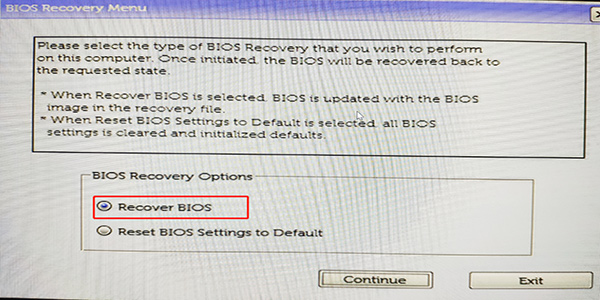
–image from dell community
Step 3. Once this process is complete, restart your system and check if the Boot Guard verification failed error gets fixed.
0
0
Posted October 22nd, 2025 03:37
i have the same error. "boot guard verified failed". 3046 sff desktop still not fixed. lights indicator blink amber 3 white 7 blinks
ʕ•́ᴥ•̀ʔっ
(edited)


speedstep
11 Legend
•
46969 Posts
7420
1
Posted June 13th, 2021 13:00
Boot Guard DXE failed system verify due to a corrupt BIOS. The affected user encounters the error message right after the manufacturer’s logo is shown when the system is powered on.
Bios recovery with USB2 fat32 device may be only option.