
UNSOLVED
K
Kris1Master
1 Rookie
•
7 Posts
•
2 Points
0
151
August 26th, 2024 18:28
R815 server power on issue
Hi I have problem with on of my server r815 that everything was OK except that under load was turning of after some time so I decide to change place where is but was no change under load was generate heat. I change thermal paste on mx-6 but still was heat and I was trying reset bios but after reset don't want to post anyway after couple of minutes is turning of and I see on motherboard that is flashing lights I will try provide pictures or video. I have same 2x r815 and with same configuration and thermal paste and work very well. Not sure what can be wrong I could change thermal paste on new need to order. Can't find any documentation about this lights.
0
0
Posted August 28th, 2024 08:50
So I clean this one and is boot but no post but its not turning off. I leave 2 motherboards,1psu with board and cable,1cpu with heatsink,1or 2 ram a1 and a2, control panel, 1 cable to control panel and 1 cable to panel,6 fans. And it's like minimum to post but its not post.....anyway on my second r815 all working cool but I swap raid controller and doesn't won't to post anymore as well now I swap back but no post anymore so I put on minimum post and is same like first one boot but no post. I've tryied take everything to minimum as showing blue panel on front, so I take everything and one by one when panel telling me that is missing something so I add this but this doest post so I doing something wrong. I will provide pictures and video how is look like and will try fix. I did ones that's on minimum post its go straight to bios but I didn't do nothing just bios tell me that was some changes and I saved and after reboot not post anymore. I clear bios by jumper and take battery but doesn't seems work. It's like have to take something or maybe add but not sure to make the post.
0
0
Posted August 28th, 2024 09:34
Anyway this is showing me how jumper should be there but I had diffrent before and was working. Didn't know about this.
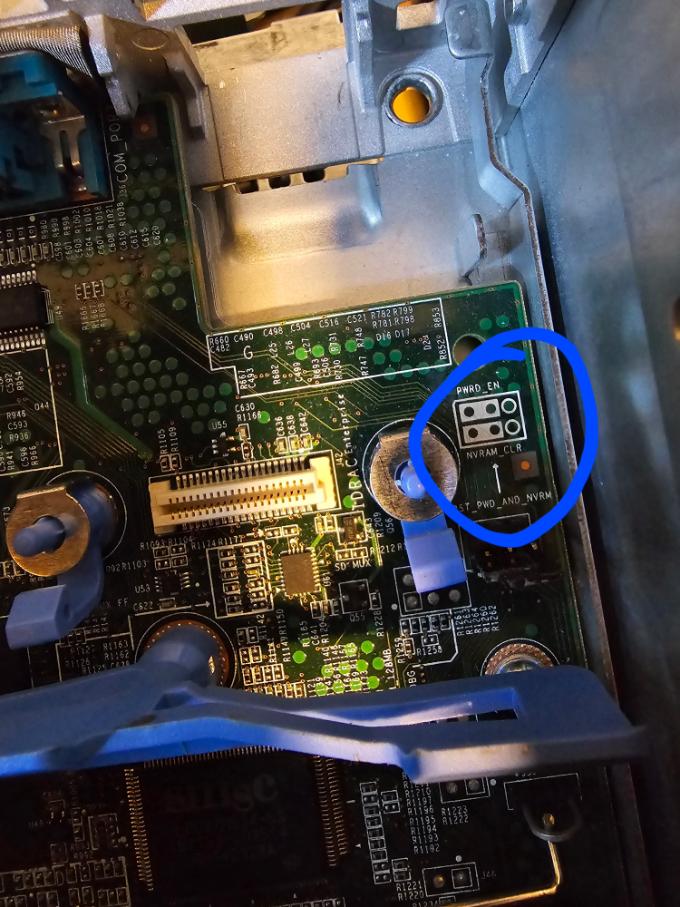
here is how it's on my working one and post every time. I know but I have to press space or enter sometimes f1-f4 to post and this is not about jumper think so but I discover this long time ago but wasnt something special but without pressing keyboard doesn't post.....

Here is by number what I have plugged to boot but no post. 2 motherboards installed

1.Powe supply
2.Cable to turn on server
3.Rise
4.Rise
5.Without this plug something there is nothing on led panel front and when start is full power fans like..... Not sure it's idrac panel. I've tried to connect via idrac on lan repair input - on back special card but don't know it's not working or I do something wrong maybe the router can find server connected but there is no ipv4 address. On idrac led front panel can find ipv4 number but doesn't work when I'm on same network with my pc and on browser can't find. Need check if I could fix this post.
6.Battery
7.Fans
8.Cpu with heatsink I change this and clean 2-3 times same results no post
9.1 or 2 ram on a1 and a2. There are working one cuz I run before and was all good but even if I change them is same no post.
10. Cable to board for control panel. Has to be cuz the idrac front led panel doesn't work I mean the power button.
11. This control board like don't need plugged the panel is still blue without but I've tried different configurations. Need more probably....
12.The connection to the idrac led front panel. Without no power on-off button work as usb and vga.
About this vga connector it's like working on my servers and it's working but maybe on default settings don't won't...anyway was working on factory settings but maybe... this is from hdmi to vga cuz I don't have vga input to TV.

0
0
Posted August 28th, 2024 09:46
My idrac ipv4 address, router see this but only showing me ipv6 this server address. I put this address on browser and nothing.

0
0
Posted August 28th, 2024 10:31
Hi,
- Can you ping the iDRAC?
- Do other remote protocols like SSH respond?
- Are the fans running at full speed, or do you see an initialization error during POST?
If these checks indicate iDRAC initialization errors, try draining the flea power for 5 minutes. If the issue persists and iDRAC is not a daughterboard, consider replacing most likely the motherboard.
If you’ve installed any non-Dell parts, they might be causing the issue. Alternatively, some of the original parts could be defective. Try setting up the system with the minimum configuration needed to complete POST and see if there’s any change. If there is, add one component at a time to pinpoint the faulty part. If there’s no change, the problem is likely with one of the essential components for POST.
For the PowerEdge R815, the minimum components needed to complete POST are:
- System board
- I/O board
- Risers
- Processor (CPU1) with heatsink
- Power supply
- Power distribution board
- At least 2 DIMMs in sockets A1, A2 (lock-step pair)
- Control or I/O panel board
- Control panel with cable
DELL-Erman O
Social Media and Communities Professional
Dell Technologies | Enterprise Support Services
#IWork4Dell
Did I answer your query? Please click on ‘Mark as Accepted Answer’. ‘Thumbs up’ the posts you like!0
0
Posted August 28th, 2024 10:54
1. Tried doesn't respond.
2. Need check not sure how check this.
3.They are running fine sometimes when take battery or reset jumper and plug power cable it's running full but the this small guy do the work.

After 10 sec it's back to normal without this it's all time full speed so it has to for idrac and controller on led front panel display.
I have 3 servers now because I reset battery and can't post all same 1 cpu 1 or 2 ram like on minimum post and doesn't post....and they did normally but I all of them did something that they couldnt post and decide to take to minimum but nothing change just led sreen showing after power on its booting system after keyboard showing light and then nothing usually keyboard drop light for 1 sec and it's post but its not happened and don't know why...I have one working and I'm not gonna factory this no way. Maybe when I find how to run from reset factory. I read something that after reset bios server going on factory mode that is not possible boot. Need check don't remember. Yes seems like something prevent from post like some plugged to the server but I clean and check them and leave only for minimum post. Need time.
0
0
Posted August 28th, 2024 11:19
System board
I/O board
Risers
Processor (CPU1) with heatsink
Power supply
Power distribution board
At least 2 DIMMs in sockets A1, A2 (lock-step pair)
Control or I/O panel board
Control panel with cable
1.The fans should be in? anyway the led front panel showing me error.
2.lock-step pair what is mean that has to be same model? Is but I have from different company ram as well.
Need time to check. If is all correct.
0
0
Posted August 28th, 2024 12:19
The all servers have same address on led front panel 192.168.0.120 cuz I reset bios to factory anyway I connected this which work post -port 3 and which doesn't post - port 4 and none has ipv4 on router setting just ipv6. I think this could be because my router has different pool like 192.168.178.1 or this is doesn't matter? I can change but need be sure cuz need this router working but there is no Internet connection. Anyway router is on factory settings.


DELL-Young E
Moderator
•
5421 Posts
•
37 Points
0
0
Posted August 27th, 2024 03:35
Hello thanks for choosing Dell and welcome to our community.
Did you say the server turned off itself? I'm wondering if there's any event that we can find before it turned off. It's best to have your logs and have it looked at by your local support.
https://dell.to/3ACJj8R
How to Extract SupportAssist Logs Using iDRAC 9
https://dell.to/4dY7qNM
You can raise an official ticket from the link above.
Let us know if you have any further questions.
Respectfully,
Social Media and Communities Professional
Dell Technologies | Enterprise Support Services
#IWork4Dell
Did I answer your query? Please click on ‘Mark as Accepted Answer’. ‘Thumbs up’ the posts you like!