
UNSOLVED
MJ
mahmoud.jundi
9 Posts
0
2962
June 29th, 2017 12:00
Raid 5 issue
Hello,
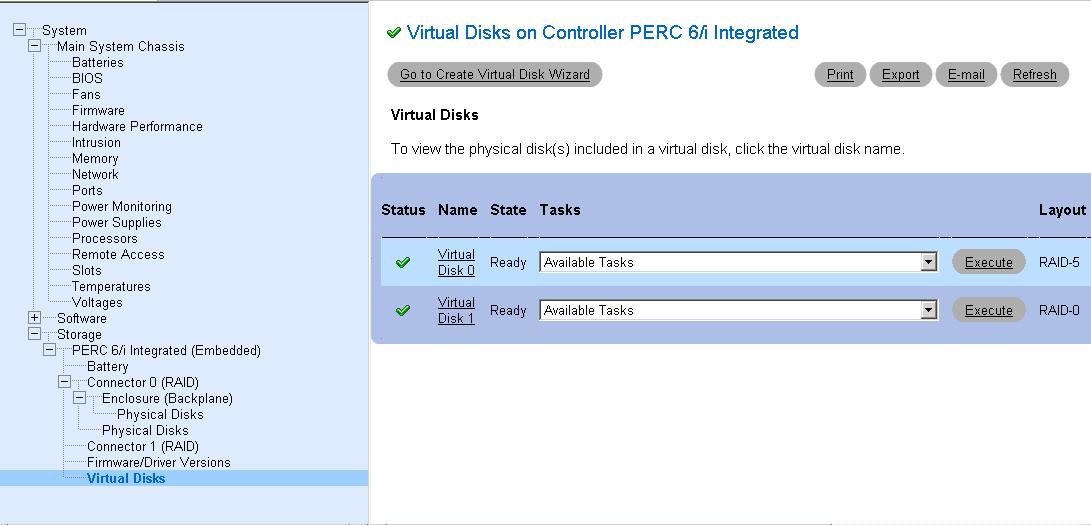
I have the following situation for Dell Server 2950 with Perc 6/i Raid Controller, the server has 3 Disks Configured as Raid 5 with SAS 300 GB each and one SATA Hard Disk configured as Raid 0 .
When Clicking Virtual Disk using open manage it shows the following :
Physical Disk 0:0:0 - Online
Physical Disk 0:0:1 - Online
Physical Disk 0:0:2 - Online
Physical Disk 0:0:1 down , we tried to replace it with 600 GB but it did not rebuild but it shows like this in Physical Disks : 0:33 (check attached) Online
We assign it as as "Global Hot Spare" (which is Wrong) and new hard drive has been built as hot spare.
Today we received new 300 GB, so we replaced the 600 and it has been built without issues, the Led blinking Amber instead of Green and Virtual Showing like this :
Physical Disk 0:0:0 - Online
Physical Disk 0:0:1 - Removed
Physical Disk 0:0:2 - Online
Physical Disk 0:33 - Online
And status of Virtual Disk is Green
Is this OK ? Can we restart the server ?
2085
0
Posted June 30th, 2017 14:00
Hello,
check below link for raid Controller log , I have some posts here had the same issue with number 0:33 and it solved after boot but wanted to make sure , the issue happned on 22 June Hot Spare with 600 GB has been used and on 29 June replaced with 300 GB
Thanks in advance
2085
1
Posted June 30th, 2017 14:00
Yes, VD 0 (RAID 5) and VD 1 (RAID 0) both appear to be optimal.
You may have an issue with slot 1. I show at the beginning of April PD1 failed, was rebuilt with the same drive, and then that drive was replaced and the new drive was rebuilt. I am seeing the same time out issues across multiple drives on PD1. All of the drive failures on PD1 were caused by time out issues, the drive was unresponsive to command requests from the controller. If the drive does not respond within a certain time period the command will time out. If several of these occur the drive will eventually be put into a failed state by the controller.
The controller is still reporting errors communicating with PD1. This is likely a logical issue because it has assigned the disk you put into slot 1 to slot 21, and that disk appears to be working. That is a logical slot assignment, so communication on the physical slot appears functional.
I suggest that you power the server down, disconnect the power cables, and disconnect the battery from the controller for about 1-3 minutes. This will drain flea power and clear volatile memory. The controller should lose its stored information on the array and pull information from the drives. This will force the controller to recreate the metadata it has stored on the arrays. This may help resolve the logical issue with PD1.
If you have another drive fail in slot 1 I would look at replacing the backplane.
Thanks
2085
0
Posted June 30th, 2017 15:00
Many thanks Daniel for prompt response, I will check in a good and post the results.
Thanks again
2085
0
Posted July 3rd, 2017 09:00
Hello
Today I have rebooted the server and everything is normal, the Led become green during boot.
Just one General raid-5 question, what if I have failed drive in Raid-5 and Virtual Drive degraded , is it going to boot?
2085
0
Posted July 3rd, 2017 10:00
Yes, it will boot and be accessible, but performance will be degraded and it will be more prone to data corruption and errors, so replace/rebuild as soon as possible.
1824
1
Posted October 9th, 2018 07:00
I would highly recommend I was very satisfied with their service, which was extremely professional and effective. I will definitely use this company in the future.

Daniel My
12 Elder
•
6205 Posts
2085
0
Posted June 29th, 2017 15:00
Hello
0:33 is not a valid slot number. When drives show up on odd slot numbers like this it is typically an indication of a communication issue.
I don't know, I'm not sure what exactly has taken place. If you aren't sure what information to provide for someone to assist then I would recommend exporting a controller log and uploading it to a text sharing site like pastebin. You can then provide a link to that log here. Please don't copy and paste logs into the forums.
If this is the disk status from within the virtual disk then it is still degraded. A disk will not show as a removed if it has been successfully rebuilt.
Thanks