
UNSOLVED
BR
besta rachi
1 Rookie
•
1 Message
0
5253
September 7th, 2023 14:58
offline or missing virtual drives with preserved cache
offline or missing virtual drives with preserved cache
Our server is out of service
problem: offline or missing virtual drives with preserved cache
0
0
Posted July 26th, 2025 10:29
This is a recurring fault on this 2022 out of warranty PowerEdge R430.
It is set on RAID 5. It has PERC H730 Mini (Embedded).
I've done the firmware upgrade 25.5.9.0001
iDRAC8 2.86.86.86 (Build 6)
Lifecycle Controller 2.86.86.86(edited)
0
0
Posted July 28th, 2025 00:08
Hi,
If you have updated the firmware and the issue still reoccur, there might be a hardware issue which could lead to this error. It would be the PERC battery which has cached reserve or a drive failure resulting that error message. You will need support to analyze the server logs, PERC logs and OS logs to check thoroughly what could lead to this error. Have you also tried checking the iDRAC/LCC logs by yourself? https://www.dell.com/support/manuals/en-us/idrac8-with-lc-v2.05.05.05/idrac8_2.05.05.05_ug/viewing-system-event-log-using-web-interface?guid=guid-f78e301b-8382-4e1e-b96b-b9e58d1343c0&lang=en-us
DELL-Joey C
Social Media and Communities Professional
Dell Technologies | Enterprise Support Services
#IWork4Dell
Did I answer your query? Please click on ‘Mark as Accepted Answer’ if I did.
0
0
Posted July 28th, 2025 20:03
My operating system on the Dell R430 is Opensuse 15.6
The common Fault is Faulty Hard Drive. SAS ST6000NM0054 D5 4 Drives
I have used the LifeCycle Test Tool when the system boots to Test the Hard Drive, no errors.
I have Enabled this
Enhanced Auto Import Foreign Config Enabled In the hopes that RAID Cache fault would go away.
Today the Operating system by the Hard Drive (RAID) did what I can switched off, even though the computer was on.
So just a blank screen. Did a CTRL+ALT+DEL . About 10 lines of Text showed up saying it's going to reboot, then stopped. So had to do a Hard Shutdown.
2025-07-28T18:56:09-0500
USR0030
Successfully logged in using root, from 192.168.0.16 and GUI.
2025-07-28T18:41:52-0500
USR0030
Successfully logged in using root, from 192.168.0.100 and GUI.
2025-07-28T18:15:55-0500
USR0032
The session for root from 192.168.0.100 using GUI is logged off.
2025-07-28T17:33:52-0500
USR0030
Successfully logged in using root, from 192.168.0.100 and GUI.
2025-07-28T17:33:52-0500
LOG007
The previous log entry was repeated 1 times.
2025-07-28T16:24:06-0500
SYS1003
System CPU Resetting.
2025-07-28T16:24:05-0500
SYS1000
System is turning on.
2025-07-28T15:37:21-0500
SYS1003
System CPU Resetting.
2025-07-28T15:37:20-0500
SYS1001
System is turning off.
2025-07-28T15:33:32-0500
USR0032
The session for root from 192.168.0.100 using GUI is logged off.
2025-07-28T15:30:01-0500
USR0030
Successfully logged in using root, from 192.168.0.100 and GUI.
2025-07-28T15:23:29-0500
VDR32
Background initialization has started for Virtual Disk 0 on Integrated RAID Controller 1.
2025-07-28T15:19:22-0500
PDR1017
Drive 2 in disk drive bay 1 is operating normally.
2025-07-28T15:19:20-0500
PDR1017
Drive 0 in disk drive bay 1 is operating normally.
2025-07-28T15:19:17-0500
PDR1017
Drive 1 in disk drive bay 1 is operating normally.
2025-07-28T15:18:20-0500
ASR0001
The watchdog timer reset the system.
2025-07-28T15:18:17-0500
UEFI0082
The system was reset due to a timeout from the watchdog timer.
2025-07-28T15:18:17-0500
PST0089
A problem was detected during Power-On Self-Test (POST).
2025-07-28T15:18:17-0500
LOG007
The previous log entry was repeated 1 times.
2025-07-28T15:17:39-0500
SYS1003
System CPU Resetting.
2025-07-28T08:45:30-0500
PDR1001
Fault detected on drive 2 in disk drive bay 1.
2025-07-28T08:45:26-0500
PDR1001
Fault detected on drive 0 in disk drive bay 1.
2025-07-28T08:45:22-0500
PDR60
Error occurred on Disk 2 in Backplane 1 of Integrated RAID Controller 1 : (Error 2).
2025-07-28T08:45:21-0500
VDR31
Controller cache is preserved for missing or offline Virtual Disk 0 on Integrated RAID Controller 1.
2025-07-28T08:45:21-0500
PDR1001
Fault detected on drive 1 in disk drive bay 1.
2025-07-28T08:45:21-0500
PDR60
Error occurred on Disk 1 in Backplane 1 of Integrated RAID Controller 1 : (Error 2).
2025-07-28T08:45:21-0500
PDR60
Error occurred on Disk 0 in Backplane 1 of Integrated RAID Controller 1 : (Error 2).
2025-07-28T08:45:21-0500
VDR7
Virtual Disk 0 on Integrated RAID Controller 1 has failed.
2025-07-28T08:45:21-0500
PDR3
Disk 2 in Backplane 1 of Integrated RAID Controller 1 is not functioning correctly.
2025-07-28T08:45:20-0500
PDR3
Disk 1 in Backplane 1 of Integrated RAID Controller 1 is not functioning correctly.
2025-07-28T08:45:20-0500
PDR3
Disk 0 in Backplane 1 of Integrated RAID Controller 1 is not functioning correctly.
2025-07-28T08:02:38-0500
NIC101
The NIC Embedded 1 Port 2 network link is started.
2025-07-28T08:02:33-0500
NIC100
The NIC Embedded 1 Port 2 network link is down.
2025-07-28T07:55:19-0500
USR0032
The session for root from 192.168.0.100 using GUI is logged off.
2025-07-28T07:39:48-0500
USR0030
Successfully logged in using root, from 192.168.0.100 and GUI.
2025-07-28T07:39:35-0500
USR0031
Unable to log in for root from 192.168.0.100 using GUI.
2025-07-28T07:39:35-0500
LOG007
The previous log entry was repeated 1 times.
2025-07-28T07:25:33-0500
SYS1003
System CPU Resetting.
2025-07-28T07:25:32-0500
SYS1000
System is turning on.
2025-07-28T06:12:44-0500
SYS1003
System CPU Resetting.
2025-07-28T06:12:44-0500
SYS1001
System is turning off.
As you'll see on the recent picture the Hard Drive goes from Hot Spare to Magically RAID SAS Hard Drive


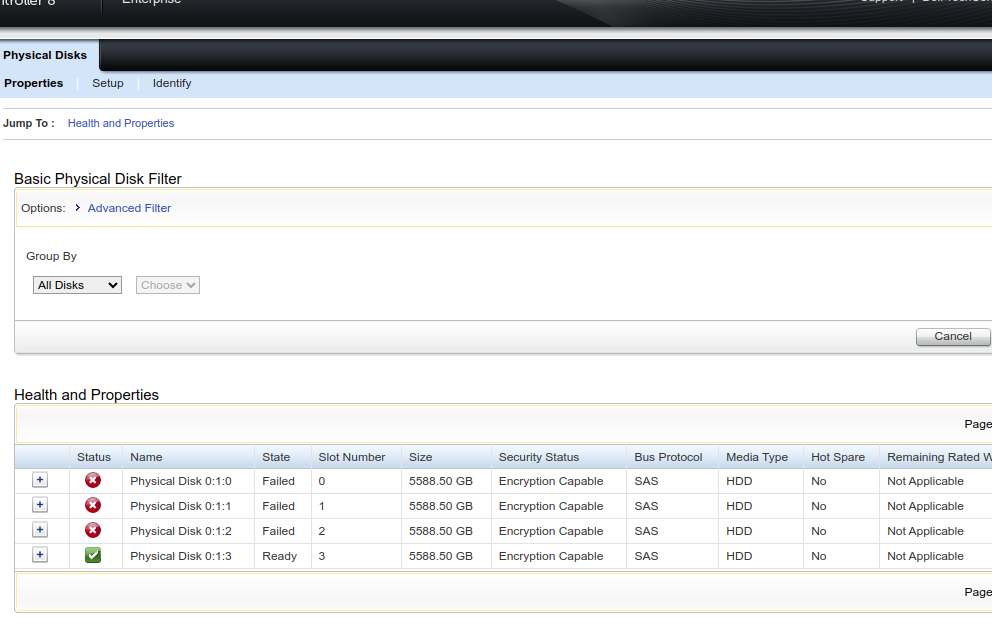


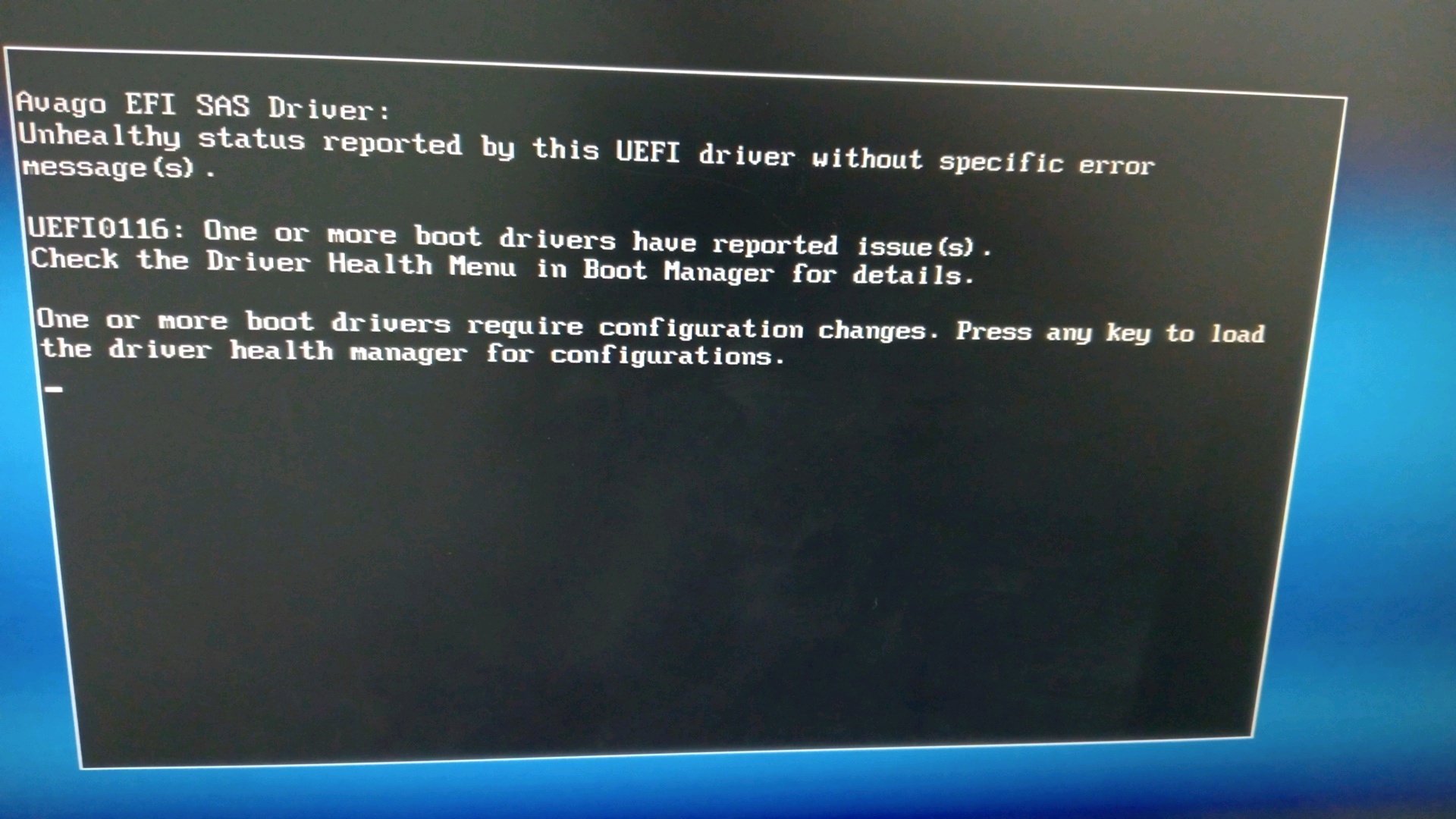
(edited)
0
0
Posted July 28th, 2025 20:36
Linuxisthbom,
The error you are seeing is caused when a physical disk is removed or fails without following proper procedures (e.g., not marking it offline first), the RAID controller (e.g., PERC or LSI) may retain preserved cache for the affected virtual disk. This cache contains write operations that were not yet committed to disk.
Now I have to ask if you have a complete backup of the data, as some steps we may need to take can risk the integrity of that data. So if you don't have a complete backup you may want to consider a data recovery specialist.
If you do have a backup then what I suggest you start with is if you have OpenManage then go to the Virtual and Physical Disk page and see if there is anything listed as Foreign. If so then you may want to try importing the foreign.
If that isn't an available option then let us know. as we may have to look at clearing the preserved cache.
Let me know what you see and if this helps.
(edited)
DELL-Chris H
Social Media and Communities Professional
Dell Technologies | Enterprise Support Services
#IWork4Dell
Did I answer your query? Please click on ‘Mark as Accepted Answer’. ‘Thumbs up’ the posts you like!0
0
Posted July 29th, 2025 06:25
Thank you for the reply. I have delt with the clearing of the preserved cache. In actual fact this server is a refurbished dell server which I sent back to the dealer it was bought from to sort out the preserved cache fault. This is still a recuring fault.
https://drive.google.com/file/d/1t_5saAa4SLUJ1YSDZqGHFebo9ahZNk2B/view?usp=drive_link
https://drive.google.com/file/d/1IuEJ6cBLaFK5DbjhibqjAT0nj59Xowzv/view?usp=drive_link
0
0
Posted July 30th, 2025 19:32
The two links are PDF's .
Putting this on, below picture. I don't get this error preserved cache

It takes about 3 hours then it has the below error

I Hard Shutdown on the Power Button. Switch the Dell Server back on. The Operating system boots up correctly. 0 to 2 on the HDD has gone back to online RAID.
Global Hot-spare has now turned to Ready.
0
0
Posted July 31st, 2025 05:19
Can nobody on this community tell me your Hardware is broken, we are just as dumbfounded as you, you'll need to replace the PERC. :-(
0
0
Posted July 31st, 2025 22:36
Hi,
For this community, we only troubleshoot the issue until there isn't much else that can resolve, replacement hardware is next best thing. But before that, knowing which hardware is faulty is difficult. In the logs, it did state that the backplane is also having an issue, and it could be the PERC card also.
DELL-Joey C
Social Media and Communities Professional
Dell Technologies | Enterprise Support Services
#IWork4Dell
Did I answer your query? Please click on ‘Mark as Accepted Answer’ if I did.
0
0
Posted August 2nd, 2025 05:57

The Server HDD are working 100% without the 1 SAS Installed. So the Operating system is working.
Now to figure out a way forward.

Gatto Sama
1 Rookie
•
93 Posts
0
0
Posted September 7th, 2023 15:49
Experiencing offline or missing virtual drives with preserved cache on a server can be a serious issue that needs prompt attention. Here are some steps you can take to troubleshoot and potentially resolve this problem:
Check Hardware Connections:
Access RAID Controller Utility:
Verify Drive Health:
Rebuild RAID Arrays:
Check for Cache Preservation:
Update RAID Controller Firmware/Driver:
Data Backup:
Consult Manufacturer Support:
Remember that working with RAID configurations and data recovery can be complex, so it's essential to proceed with caution and, if necessary, seek professional assistance to avoid data loss or further complications.