
UNSOLVED
Closed
B
bradthetechnut
9 Technologist
•
9649 Posts
•
40713 Points
0
1503
July 22nd, 2023 12:00
Precision 3620 RTCRST
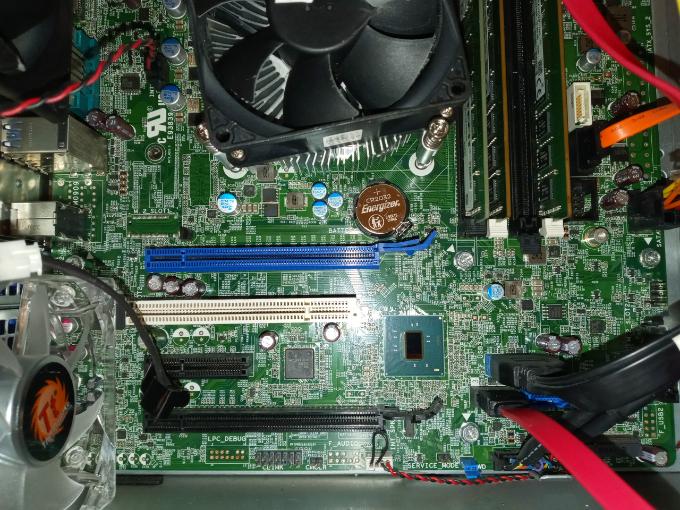
To reset BIOS on my Precision 3620, I can't find the RTCRST jumper pins. Is it CMCLR as seen in the bottom middle of the photo?
Please pardon if this question is too easy. Everything I dug for told me "RTCRST." I'm newer to the 3620 and don't want to mess with things I don't know about.
(edited)
109
0
Posted July 22nd, 2023 13:00
Thanks @Chino de Oro . I Googled "cmclr" and resetting BIOS came up, so I gave it a try.
The SSD boot drive in my 2nd hot swap bay kept getting corrupted. First Windows would freeze, then windows and desktop would disappear, then BSOD and restarts. Couldn't reload. Other boot drive wouldn't work in same spot either - stuck on Dell logo and waiting circle.
Since I already started it, I had to reload the SSD, but not the other VelociRaptor boot drive.
104
0
Posted July 22nd, 2023 14:00
Plus I replaced the CMOS battery. Probably would’ve saved some trouble if I did that first like I usually do with refurbs. Old battery didn't even light up the tester.
107
0
Posted July 22nd, 2023 14:00
So that was the reason you wanted to reset CMOS on this newly setup system.
If I had to guess, you are using hot swap docks for each boot drive with power switch independently on the dock.
It can be done and will boot smoothly if BIOS settings for boot mode is matching with boot partition from each drive, and is set to Windows Boot Manager. Otherwise, set it to Legacy ROM and adding both drive to boot option. When system is power on, it will boot to second drive if first boot is switched off.
With your broad knowledge, you probably have gone through all the system files scan and drive scan already. If you plan to reload one of the drive (SSD), try to get the system to work properly with the VelociRaptor first, then loading OS on the SSD with the same BIOS settings.
104
0
Posted July 22nd, 2023 14:00
Thanks again and not to worry. So far, it's working as smooth as it did on my Optiplex.
I did just that, made sure the VelociRaptor would work first. Using reloaded SSD now.


Chino de Oro
11 Legend
•
8458 Posts
•
46451 Points
116
0
Posted July 22nd, 2023 12:00
Hello Brad, that is the correct pins. With the system removed from AC power, press and hold power button for 15 seconds before working on motherboard components. Remove the blue jumper from Password and short the pins of CMCLR (CMOS CLEAR) for 5 seconds. Put the blue jumper back to Password pins and you are done.
Enjoy your new workstation by the way.