
UNSOLVED
B
bobdole776
1 Rookie
•
1 Message
0
3325
June 1st, 2022 11:00
Upgrading CPU cooler on Precision 5820
Hello,
Have an engineer at my place of work who's just jamming the 10980xe in his precision 5820, and it overheats and lags up his workloads due to thermal throttling. I bought a Noctua NH-U92 as it's compatible with the cpu socket, but the actual bracket it came with for this socket won't work with the dell mobo. Dimensions wise everything fits just fine. If anyone has any ideas of a bracket I could use to get this to work, I'd appreciate the info.
0
1
Posted August 3rd, 2026 11:47
Hello Everyone.
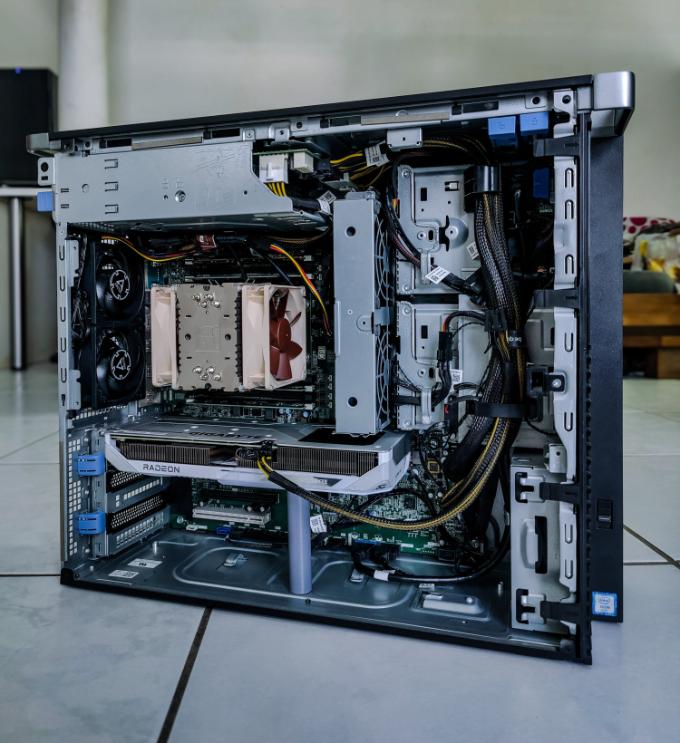
I'm a bit late to the party here. I recently saved a Dell Precision 5820 with a W-2145 and 32GB of DDR 4 ECC Memory from being thrown away. So naturally the first thing I did was to mod the thing. :)
I can confirm that the NOCTUA NH-U9DX i4 works on this socket. All you need to do is change the little mounting brackets, so the cooler mounts horizontaly. Also you'll need a 4-pin to 5-pin Dell Adapter. You can find them over on Amazon or AliExpress.

Also I designed a fan adapter for two 80mm Fans. You can buy any 80mm fans as long you can daisy chain them together. In my case i got the Arctic P8 PWM. You simply screw the fans on the adapter using the included screws. After that you mount the whole thing to the case using zip ties. You can download my file here: https://www.thingiverse.com/thing:7391153
You will also need a 4-Pin to 5-Pin Dell adapter to power the fans.


Also I made a GPU sag bracket, you can find here: https://www.thingiverse.com/thing:7391157
You will also need three 10x3mm magnets. This specific sag bracket is for the RX 6600 i had laying around from a different project, however I've included the .f3d file so you can simply import the file into Fusion360 and change the height to your needs. It's a bit overkill for a two fan 6600 but as we all know: A saggy GPU is a sad GPU... :)

The Last mod I made was the CD cover, as my Precision 5820 didn't come with one.
You can download it here: https://www.thingiverse.com/thing:7391152

I hope this helps the community and happy modding. :D
(edited)
0
1
Posted August 5th, 2026 12:43
Here's a picture from a bit farther away. I also Changed the GPU to a 9060 XT. It's a two slot card with three fans. Now the GPU sag bracket actually makes sense... ;)
It plays WoW in 1440p at 144fps out in the open and 40-80fps in crowded cities and Raids. The CPU-Temps never go above 70°C.
(edited)
0
0
Posted August 6th, 2026 13:19
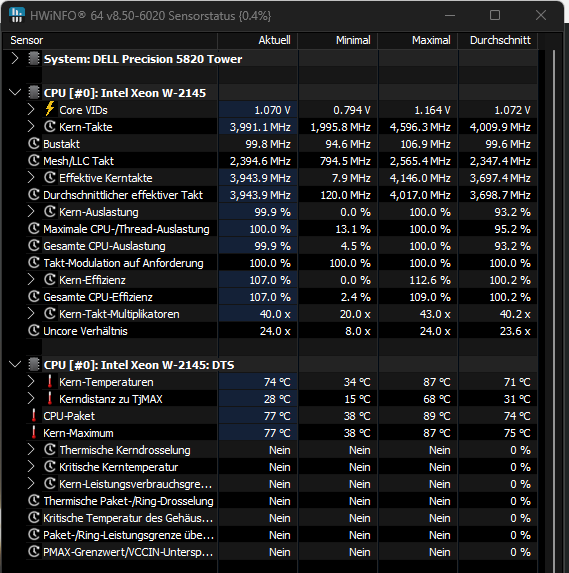
Little Update:
I've been doing some Stresstesting. Here are the Temps while running Cinebench. The Xeon W-2145 (140W TDP) never wen't over 87°C. So the NOCTUA NH-U9DX i4 can handle this 8C 16T CPU with a bit of thermal headroom. Which means even under full load it won't thermally throttle.
1093
0
Posted June 3rd, 2022 09:00
Before buying the cooler, it is best to check whether the back plate and screws of the main-board are suitable for installation.
My old Dell computer just had to modify the interface screws to install the NOCTUA cooler.504
0
Posted February 12th, 2023 23:00
I'm thinking about the same uprade on my 5820. What adapter cable to use from Dell 5 pin CPU fan header to Noctua fan 4 pin? Any modification needed on Noctua heatsink mounting bracket? Thanks
0
0
Posted March 5th, 2024 15:04
@SEAINC The 5-pin to 4-pin adapter listed with "other people that bought this also bought this" on Amazon works great. It'll specifically mention that it's for Dell.
Also, apparently you have to turn off RMT (Reliable Memory Technology) to prevent BIOS errors for fan speed.
0
0
Posted May 12th, 2025 09:53
bonjour est il possible de savoir si toutes les banques de RAM peuvent être utilisées avec ce dispositif ?

B-Michael
1 Rookie
•
6 Posts
1112
1
Posted June 2nd, 2022 08:00
The NOCTUA NH-U9DX i4 fits straight out of the box.
Below is also a photo where it is compared to the stock heatsink. The heat dissipation area of the original Dell cooling is small, to say the least (especially in the case of very efficient processors).