
UNSOLVED
Area 51m R2, repasting gone wrong
Hi, I've tried repasting my Alienware 51m R2 five times now with it overheating within minutes every time, and am looking for more ideas.
Last week, I noticed my laptop was thermal throttling the CPU hard - reaching 80C while idle and throttling at 100C when playing games or loading a single core. My apt's ambient temperature is ~20C. I ordered some "Phobya NanoGrease Extreme" from Amazon and tried repasting yesterday. However, after reassembling and rebooting, the temperatures immediately hit 100C after a few minutes (see screenshot below). A few minutes later, the system freezes.
CPU and GPU temperatures and load after repasting and rebooting
Since then, I repasted 3 more times:
- The initial repaste, I followed the guides online, and applied a rather modest X on the CPU and GPU
- I thought it might've be an uneven distribution while screwing down the tensioned heatsink screws, so I repasted and rescrewed a little by a little in order
- After reading an Amazon Review that the thermal paste I got was rather thick, I tried the full spread method instead of the X
- After reading another post about having too much thermal paste, I tried the full spread again with less paste
No luck every time, the CPU would go straight to 100C a few minutes after startup.
I've made sure:
- The fans are actually running
- The laptop has space underneath for air intake
- The battery was removed while testing (in case charging was creating heat)
Spread application after #3 (right before #4)(Spread application after #3, right before #4)
I'm out of ideas, and the heatsink screw heads are starting to strip . Did I just receive some bad thermal paste? Why is too much paste bad? If I'm out of warrany, is there any third-party service that can help me here?
371
0
Posted February 25th, 2023 20:00
Thank you for the tips!
I've done the following now:
- I purchased some Corsair thermal paste (it was all they had in-store)
- Checked that the CPU retainer is lower than the CPU itself
- I also adjusted the heatsink screws to balance the contact with the heat sink (see photo, please ignore the GPU job :P)
- Re: stripping screws, I'm still able to turn the screws fully, just need to be more careful about it.
After these changes, it still reaches 100C within the first few minutes. I'm still confused why this would happen - I'd imagine poor thermal paste application to lead to high temps, but not 100C during idle. Could the heatsink and heat pipes themselves be damaged?
365
0
Posted February 25th, 2023 20:00
Either the heat sink or more likely very poor fan operation and/or the vents are plugged with dust or restricted in some way.
Also have a look at this Dell support page. And this long read from a user with a number of suggestions that may help.

I am not a Dell employee...I am forum volunteer
Serious work on an E5430 and constantly building and working on an i5-6500 Desktop
344
1
Posted February 26th, 2023 10:00
Hi @scwu welcome to this free user-to-user Alienware laptop discussion forum.
Please consider partspeople repair
(edited)
[This user does not work for Dell and volunteers their free time. Please remember to say thank you by clicking on my thumb up icon.]0
0
Posted June 12th, 2024 12:48
@scwu the Intel version just runs hot. My AMD 7945HX runs about 90°C all the time while gaming. I believe it's hot spot, not package temp.
I think the Intel version, not sure on mine, has a paste/liquid metal mix version.
I would generally repaste on day one, but given it seems to be below temp threshold, I'm leaving mine as is.
Maybe try PTM7950. Most have good luck with it.
0
0
Posted May 19th, 2025 00:16
Hi. Have same issues with sam r2. Before, my laptop could heatup the room, now it blows cool air, while cpu is 100.
We gotta find if heatsinks degrade or something.
0
0
Posted May 19th, 2025 00:30
It is also notable, that the fan on gpu side blows warmer air, at gpu temperature of 43c, while cpu side (left fan) blows cold. The heatsink has cross pathways with one from cpu going to gpu fan area.
So, something is wrong with cpu area heatsink contents.
I also noticed that on my cpu heatsink side copper there are bubles (right, bublled copper, a little on the side farther away from the pathways that lead towards the fan)
Is tgere liquid inside? What kind of? Can it harden overtime and stop flowing?
Seems we need a new heatsink.
0
0
Posted August 11th, 2025 17:54
@dzmitrypatuk i had same issue.
Repaste my laptop 3 time. Use mx4. Then Termalgizz.
Fans are clean. Same isue. GPU blows hot air and when im gaming its reach max 65c but CPU blows cold air. But from cpu heatsink on top of CPU is hott.so that mean CPU side heatsink not transfer heat end of radiator .
Absolutely nightmare. Good laptop but cpu issue has need to fix.
I consider downgrade CPU from i9 10900k to i7 to get better termal solution.
Please Dell do something about it. You invest a lot to new laptops but forgot those who had Alienware 2 or 3 years old.
0
0
Posted August 29th, 2025 19:51
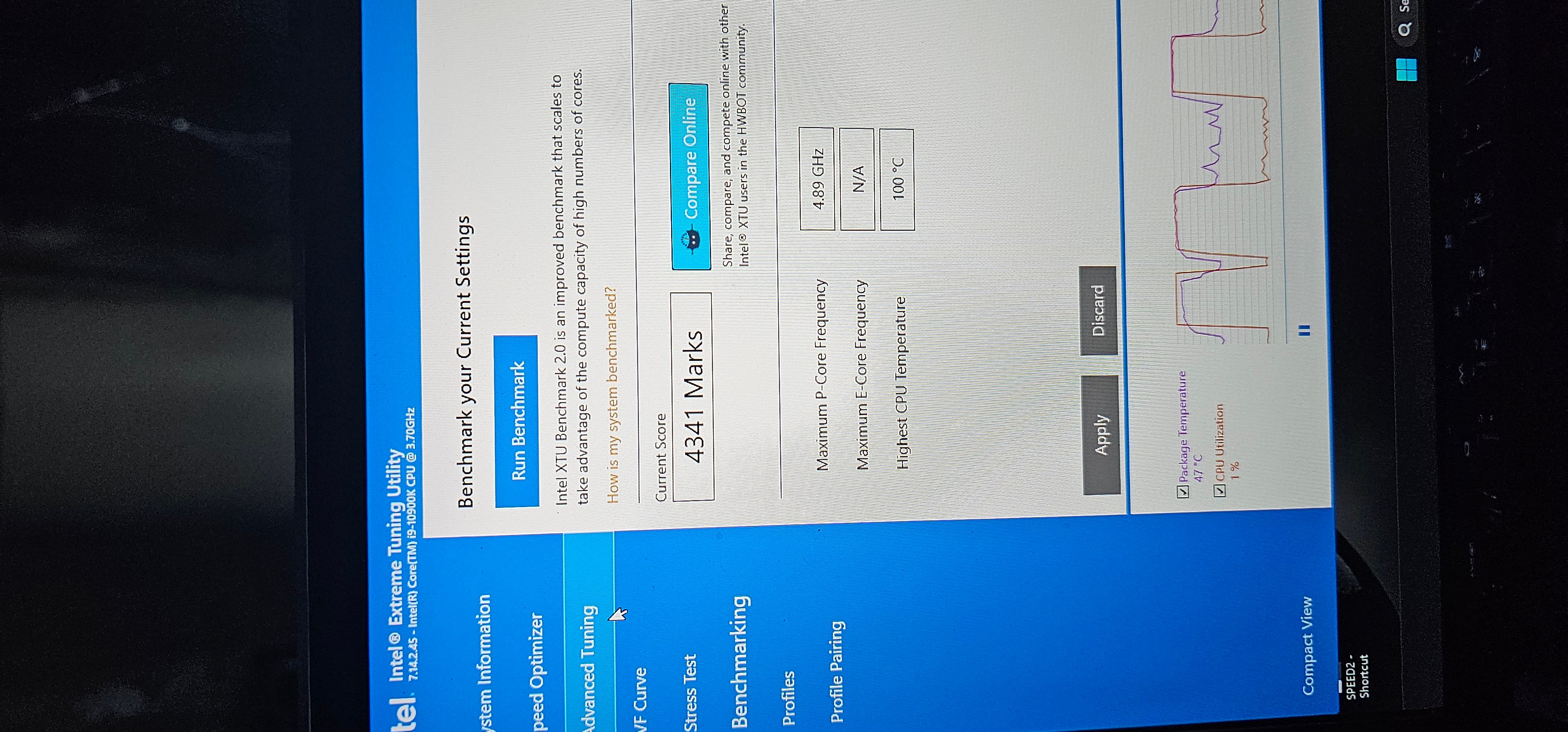
Done some upgrades. Got new cooling radiators from Aliexpres. Also delid and change liquid metal to CPU .
Now i can run this i9 10900k to 4.7 GhZ with no issues. And there is score what i got in Intel Benchmark.
0
0
Posted July 4th, 2026 17:57
@Janis1991 can you explain what u did to fix it? I have same issue....cpu at 100c and theres cold air coming out from the vents

JOcean
11 Legend
•
12621 Posts
•
69453 Points
378
1
Posted February 25th, 2023 18:00
Personally I prefer Arctic MX-4 though the newer MX-5 and MX-6 is fine as well. That sure looks like too much on the CPU and way too much on the GPU. Also looking at the picture I am not sure the heat sink contacts the CPU well on the left hand side. The retainer may be hitting the heat sink but that may just be the angle of the picture. This web page at Drivereasy has some suggestions as well.
Also if the screws are starting to strip then how can you be sure the heatsink assy. is making firm and solid contact on the CPU and maintaining that contact.
I am not a Dell employee...I am forum volunteer
Serious work on an E5430 and constantly building and working on an i5-6500 Desktop