
UNSOLVED
Wireless not working, wired working
Hi,
I am using Inspiron 15R N5010 windows 7. I am able to connect through wired network but not through wireless. Can anyone suggest reason for it. On my wireless card it says Intel centrino wireless N1000.
Thanks in advance.
Pratik
918
0
Posted December 14th, 2012 10:00
It couldnt start windows in network mode. I had connect wired at that time. It asked to start system repair but that also didnt work then it ask for system restore. That also isnt working. It asked me to send the analysis to microsoft. Have sent it. Dont know the reason yet.
918
0
Posted December 18th, 2012 03:00
Hi pratiknk,
I would like to know if any error occurs when you try to connect your computer to wireless network. Also, is the computer connected via Ethernet cable to the same router to which you are trying to connect wirelessly?Please refer to the following article to troubleshoot the issue: http://dell.to/TmrIF9
Please reply with the results.
918
0
Posted December 19th, 2012 13:00
Hi Nikhil,
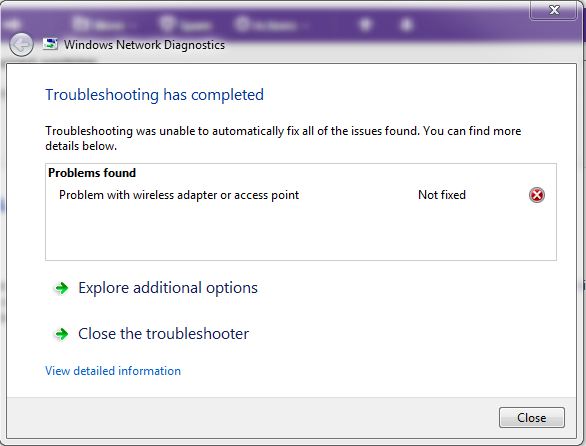
I have attached the file with the errors in it. I connect computer via Ethernet cable to the same router for wireless connectivity. It shows the wireless network in the range as well.
918
0
Posted December 19th, 2012 14:00
Attchment
918
0
Posted December 19th, 2012 19:00
Hi pratiknk,
I recommend wireless drivers update for the computer.
- Visit the following website: http://dell.to/Mbe3zg
- Enter the Service tag of the computer in the box provided and click “Submit”.
- In the next page, click drop down arrow to select the Operating System which is installed in the computer.
- Under category Network, select the wireless network drivers accordingly and click “Download File” and save the file on desktop.
- Run the file and install the drivers.
- Disconnect the Ethernet cable and try configuring wireless internet connection.
Please let me know if you have any other queries.
918
0
Posted December 21st, 2012 10:00
Hi NIkhil,
it is still not working. The wireless network card is Intel Centrino 1000. but when I scan for system analysis, it show my network adapter is microsoft teredo tunneling adapter. How should I install the driver for that network adapter.
918
0
Posted December 22nd, 2012 02:00
Hi pratiknk,
Check in Device Manager if there are any alerts on the Network Adapters.
Procedure to navigate to device manager:
- Click “start”.
- Type “Device Manager” in the search box.
- Select “Device Manager “in the list.
- Double click the “Network Adapters”.
If there are any alerts on Network adapters, please send me the service tag of the system, I will send you the right network card drivers for the system.
To private message me, click my user name, click Add as friend, and click start conversation and send the service tag of the system.
Awaiting your response.
918
0
Posted December 23rd, 2012 11:00
Hi Nikhil,
There is problem in Network controller. The network adapter installed is Realtek RTL8102E/RTL8103E Family PCI-E Fast Ethernet NIC (NDIS 6.20). But on system analysis it shows network adapter is microsoft teredo tunneling adapter. Can you send me the sequence/order in which I should install my drivers. My Laptop model no is inspiron 15R, N5010-2850
90
0
Posted December 24th, 2012 23:00
Hi pratiknk,
I would like to know if operating system was reinstalled in the computer.
If the operating system was reinstalled in the computer, drivers should be installed in correct order. Please use this link which shows the right order: http://tinyurl.com/8xvx6xy
If you have the resource disk, install the drivers in the correct order or use this link to install the drivers for the computer: http://tinyurl.com/cgcakw3
Click the link above, enter the service tag and select the operating system from the dropdown and follow the order in installing the drivers.
Check and reply for further help.

DELL-Nikhil D1
6 Operator
•
2580 Posts
918
0
Posted December 12th, 2012 21:00
Hi pratiknk,
Please check in safe mode with networking if you are able to go online.
To check in safe mode with networking follow the below steps:
Check if the computer is able to go online wirelessly in safe mode with networking.
If you are able to go online using the wireless network in safe mode with networking reboot the computer normally and run MS fixit. Use the below link
Link: http://support.microsoft.com/mats/Malware_Prevention/
Click the link above and select Run now.
Please post the results.