
Solved!
Go to SolutionAlert! Error initializing PCI Express Slot 4
Greetings Everyone: When I booted up yesterday, I was stopped on the way by this message: "Alert! Error initializing PCI Express Slot 4". I was/am able to boot into Windows (Windows 10 Professional) now by hitting the F1 key, but the error persists every time I restart or reboot.
I read about a similar situation (on another thread here at Dell Forums .. ) that the problem was a couple of burned-out capacitors on the PCIe SAS Controller Card, so I'm wondering 1. if this is also my problem and that, therefore, the fix for the problem is still a valid one (Alert ! Error initializing PCI express slot 4 - Dell Community) and then 2. where to get the replacement parts (either the two capacitors, or a new SAS card instead, if that will work) as my computer was made by Dell in 2010.
My last question concerns the card itself, why do I need it/why do I need an SAS Controller Card? (I have a single, 1TB SSD and therefore, have no use for RAID, that I know of anyway). Can I safely remove the Card altogether, or does it have other necessary functions (other than RAID) that would make that impossible?
Thank you for your help
Kindest Regards,
David
THANK YOU FOR YOUR HELP @redxps630!! Removing the SAS Card fixed the boot problem that I was having I am happy to report.
Kindest Regards,
David

redxps630
11 Legend
•
16316 Posts
•
82844 Points
940
1
Posted July 11th, 2022 20:00
I had an old PC that had an add-in RAID controller card. when there were no RAID drives detected on startup (I had only one hdd), it gave an initialization error. once I took out the RAID controller card, no more error on boot.
Re: Can I safely remove the SAS controller card altogether
yes. you do not need it.
Optiplex 980 slots:
PCI (white SLOT 2 & 3, 5V 64bit & 32bit)
PCI Express x16 connector (blue SLOT1)
PCI Express x16 (wired as x4) connector (black Slot 4)
it has only two PCIe slots in addition to two PCI slots.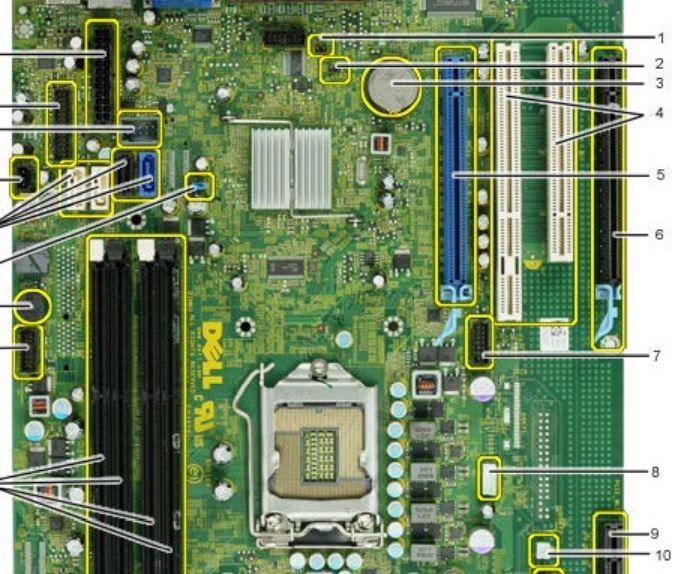 980
980