
Solved!
Go to SolutionOptiplex 7050 SFF - Will these drives work?
Hi everyone, I am trying to find out if I can use an M2 drive as the boot drive and a 3.5" HDD for storage in one of these machines. I will be using the boot drive for the OS and some software and the 3.5" HDD will be used as a storage drive for my security camera software. The 3.5" HDD will be a surveillance drive used just for storage. The PC will be mainly used for my security video software and footage storage.
I was hoping to be able to use the 2.5" SSD it comes with and add the extra 3.5" drive for the video storage but I did some looking around and it seems like I can't fit both those types of drives in this form factor.
Any useful information and input will be greatly appreciated.
Thanks in advance.
1911
0
Posted July 1st, 2022 22:00
7050sff motherboard m.2 supports both nvme and sata 2280 ssd. these are some of the Dell validated ssd for 7050
Storage Solid state drive (SSD), 1TB, P34, M.2 2280 slot, made by SK Hynix, PC401
M.2 1TB NVMe PCIe Class 40 Solid State Drive
Made by: SK HynixDell X10G4
Storage Solid state drive (SSD), 128, SATA 6Gb/s, M.2 2280 slot, LITEON, CV8
M.2 128GB SATA Class 20 Solid State Drive
Made by: Lite-OnDell 59X3V1908
0
Posted July 1st, 2022 22:00
the hdd cage of 7050 sff can be fit with two types of Dell blue caddy, one for single 3.5”, the other type for up to two 2.5”. If your 7050 originally came with 3.5”, you do not have the other type of blue caddy for 2.5”. You can buy it online. DP/N 9M3YR
1910
0
Posted July 1st, 2022 22:00
@redxps630 , Thanks so much for the very helpful information and the super fast reply. This really helps me out. I appreciate the extra detail that you went into as well.
You are awesome!!!
Thanks so much.
1877
0
Posted July 2nd, 2022 11:00
my pleasure. it came to my notice today that it is possible to install a thin 20 mm 3.5 hdd and a 7 mm 2.5 ssd in the 7050 SFF hard drive cage. the two drives stacked (20mm+7mm) appear to be comparable to the height of a single standard 26 mm 3.5 hdd installed in blue caddy. You may or may not need to remove the 3.5 blue caddy. this piggybank installation may need double sticky tape.
0
0
Posted October 11th, 2023 05:27
I've a question, as I'm not sure where else to ask. Can this system have three (3) physical SATA drives operational at the same time?
Are there three SATA power cables to power up three (3) physical drives?
Or, with an M.2 installed, say to host the OS, are only two (2) SATA drives?
I've reviewed this manual: https://dl.dell.com/content/manual42076770-optiplex-7050-small-form-factor-owner-s-manual.pdf?language=en-us
But it is not clear as to the interoperability of the M.2 -and- three (3) SATA drives.
Interestingly, this same manual, on page 51 indicates there could be five (5) SATA drives?
Is that really possible?
Are there sufficient SATA power cables out of the powersupply to support five (5) SATA drives?
How about SATA data ports... the motherboard only seems to have three (3)---what then?
I've not been able to find sufficient specs on the powersupply to figure that out for myself.
Additionally, can the M.2 support a 512GB add-on, or even up to 1TB?
Thank you in advance for whatever help you can give me.
Thank you.
R,
-Joe Wulf
(edited)
0
0
Posted October 12th, 2023 00:42
Workaround for the limitation of SATA ports on the motherboard is a SATA port PCIe card. Likely not worth it though if the PC can only fit an m.2 drive, 2 SATA drives, and a DVD drive. Or 3rd SATA drive would go where the slim DVD drive is with an adapter as redxps indicated.
If two 2.5" SATA drives are installed where one 3.5" drive would normally fit, you'd likely need a SATA power splitter cable.
In the case of SATA drive installed where DVD normally goes, just reuse the same DATA cable. Use it for storage though so it can be plugged into the white SATA port.
Each item does need it's own DATA cable with the exception of m.2 drive.
There's also adapters to fit more m.2 drives, but I'm not familiar enough with those to know how well one would fit in an SFF or if it would work.
Much easier to fit more drives into a tower. There's also the option of external SSD/HDD enclosures and docks.
(edited)
0
0
Posted October 12th, 2023 00:53
What you said is in the owner's manual can definitely be confusing, that it looks like the 7050 SFF can hold 5 SATA drives, that there's 5 SATA ports. I think in an unspecified way, they're referring to BIOS, that ports can be turned on and off there. The 7050 SFF can't hold 5 drives due to it's physical limitations.
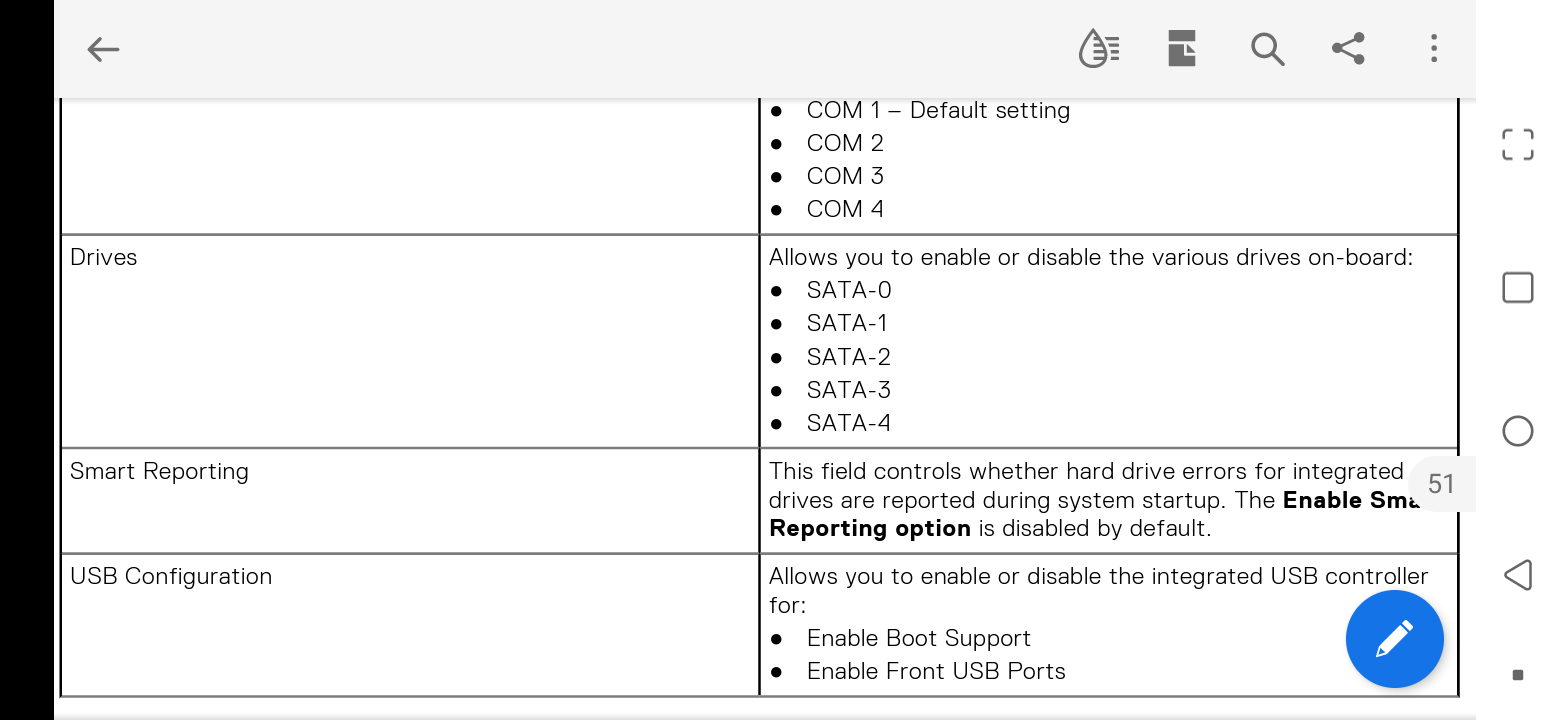 I don't know that 5 SATA ports would even show up in BIOS in the SFF.
0
0
Posted February 14th, 2024 21:20
@redxps630 Is it possible for you to provide a link to the 3.5in adapter from Dell? I am struggling to find it. I currently have the 2.5 in bay and want to move to a bigger more reliable drive that I have sitting around.
Thank you0
0
Posted February 15th, 2024 02:06
this one may look like what you are looking for in 7050 SFF. strange that Dell SFF manual does not mention it at all.
ASSY,BRKT,HD,3.5,CADDY,SFF,D7. $9.99 
(edited)


redxps630
11 Legend
•
16308 Posts
•
82821 Points
1913
0
Posted July 1st, 2022 21:00
Yes, you can install an M.2 ssd in 7050 SFF and install OS on it to make it a boot drive, and also use a 3.5” HDD as secondary drive for storage.
the hard drive space in SFF has room for either one 3.5 hdd or two 2,5” ssd/hdd. You are correct that the drive cage has no space for one 3.5+one 2.5 sata ssd.
there is a way to get around this space limit, but you would need to remove the dvd drive and install a 2.5” caddy adapter in the dvd slot. You can install os on the 2.5 ssd and make it a boot drive. remember to connect sata to black or blue sata port on motherboard which are faster than the white sata port reserved for mechanical dvd.