
UNSOLVED
R
rmalasquez
1 Rookie
•
11 Posts
1
439
May 10th, 2024 19:46
R640 Bios Update a iDrac error
Hi comunity,
I have a PowerEdge R640 server with windows server 2016. After an windows update IDrac have problems to start.
I try to Bios Update and error ocurrs, the message says Debug Error Ocurr restart the system and try again. The system restart but don´t fix de error. I trapped in this case, please your help with this issue.
0
0
Posted May 11th, 2024 15:04
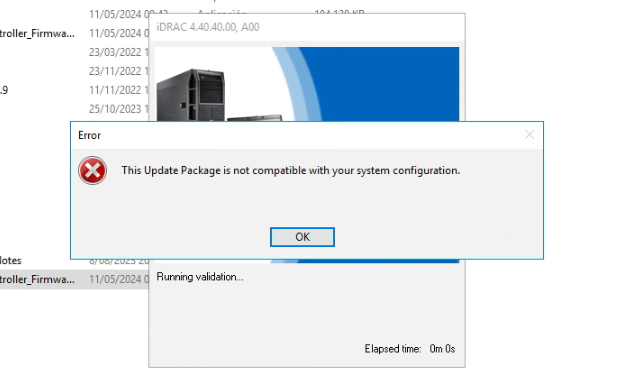
one detail more... in the support page the last iDrac update for dell poweredge R640 is the 7version, but in the server bios say 4version
0
0
Posted May 11th, 2024 15:08
0
0
Posted May 13th, 2024 08:25
Hello,
At first please check the .exe format (x86 or x64) is correct. If possible you take a downtime then you can do a cold boot. Because previously ran an upgrade firmware installer places a RAM drive onto OS. It may related with power cycles. If the BIOS update fails on the first attempt, it could be due to the Intel Management Engine (ME) not entering recovery mode. This is known to happen if the server has been powered on for more than 24 days since the last AC power cycle. To resolve this, perform a complete AC power cycle before attempting the BIOS update again. This involves gracefully shutting down the OS, removing all power cables, waiting a few seconds, and then reconnecting the power cables. After the power cycle, attempt the BIOS update again using the iDRAC web interface or the Lifecycle Controller.
Dell PowerEdge 14G: BIOS update fails on the first attempt, second attempt works | Dell US
You can use firmimg.d9 file after extracting the .exe file. ".d9 — Contains both iDRAC and Lifecycle Controller firmware" to updating iDRAC FW you can use either Update Package for MS Windows 64-Bit or firmimg image format file. Sometimes .exe files do not run properly on the iDRAC GUI. In such cases, as a workaround option is to download the file iDRAC and extract it. Once you extract you will get firmimg.d9 file and that file can be used in iDRAC GUI for update.
Other than you can use LCC to update. PowerEdge Server: LifeCycle Controller Update | Dell US
Hope that helps!
DELL-Erman O
Social Media and Communities Professional
Dell Technologies | Enterprise Support Services
#IWork4Dell
Did I answer your query? Please click on ‘Mark as Accepted Answer’. ‘Thumbs up’ the posts you like!0
0
Posted November 1st, 2024 11:12
@rmalasquez Did you get this resolved? I am following. Thanks
0
0
Posted November 1st, 2024 12:21
Hi,
Did you try my post in the topic? If it didn't work, can you give some more details? What server are you using and what is your current version and which version are you trying to upgrade to? (Major jumps between versions are not recommended)
DELL-Erman O
Social Media and Communities Professional
Dell Technologies | Enterprise Support Services
#IWork4Dell
Did I answer your query? Please click on ‘Mark as Accepted Answer’. ‘Thumbs up’ the posts you like!

shuff12
1 Rookie
•
7 Posts
0
0
Posted May 10th, 2024 21:05
Dell recommends updating both BIOS and iDRAC firmware, so maybe try both? https://www.dell.com/support/kbdoc/en-us/000215873/update-poweredge-bios-and-idrac-for?lang=en