
Solved!
Go to SolutionLatitude E5500 Wireless Switch turned off?
Hello all,
I've used the internal wireless (1397 mini-card) for a couple of years now...All of a sudden the WIFI LED is not lit up above my keyboard....Win 7 reports no problem with the card and the driver appears to be ok...Others have told me to try the FN + F2 key to turn the wireless switch back on, but this combo doesn't change anything...In fact, on my laptop that combo controls whether the AC adapter charges the battery or not while plugged in.
I booted into my XP dual boot real quick...ON this OS the wireless is controlled by the dell application and the dell software says the wireless radio switch is disabled? Everything is enabled in the BIOS under the wireless section...It must be a different key combo to turn my wireless on/off?
I plugged in my wireless dongle from another machine and everything works great...
Any ideas?
Ron, Thanks so much for posting this. I was having the same problem, I knew that I had used the turn off turn on function several times when the machine was new but had not done it in several years and had forgotten. Got your post on my first search "Problem solved, how wonderful, Thanks"
dochs
clydestamos
1 Message
117087
0
Posted March 11th, 2011 14:00
Great post! Thanks.
Ron,
You saved a life today....mine:) I was on the phone with my internet provider blaming them...hee...hee. Dell really needs to move this button to somewhere more visible. This is a company laptop so it's not like they give me a manual on it.
Thanks!!!!
Bob Pescinski
1 Message
116946
0
Posted December 4th, 2012 07:00
Thanks, Ron. Good very useful post.
helpless56
30 Posts
116946
0
Posted August 19th, 2013 10:00
Thank you for the picture and the specific location ! Been searching for this feature for a while now.
Hello Ron,
This info was quite useful, as I was trying for last one hour to fix this issue. Then,I came across this post and solved the problem in just one minute.
I recommend Dell to have some sign of wireless switch just above the switch indicated by 7 in picture in your post so that users can easily identify where the switch is.
Your post is highly appreciated.
Thanks,
Makarand

Eagle70ss
1 Rookie
•
4 Posts
117222
12
Posted February 7th, 2011 01:00
Okay everyone,
I just solved my own problem....I can't believe I did not know where this switch was and what it does....As soon as I posted I found a site that has the right information for this laptop....On the E5500 the FN key has nothing to do with the wireless switch on/off.I literally burned through 50 sites with everyone saying "just hold down FN and press F2"...I don't know why everybody has the wrong info about this laptop.
There is a toggle switch on the front of the laptop(just on the underside of the keyboard plane)...It's about where your left wrist sits when you are typing on the keypad...It has a wireless Access point symbol on the switch...It looks similar to this:::::
Here is a picture from the site:::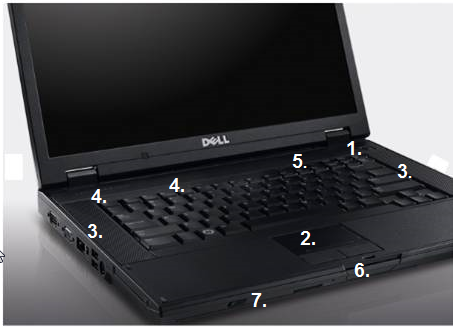
In this diagram, the number 7 is exactly where the toggle switch is to turn wireless radio on/off. Maybe this post was a little overkill, but I was about to tear my hair out trying to figure out why my darn wireless wasn't working. I hope this helps anyone who reads it.
Thanks,
Ron