
Solved!
Go to SolutionB
bruno_savalli
1 Rookie
•
6 Posts
•
2 Points
0
173
December 10th, 2025 18:03
Storage Center not Found - Dell SCV2020
I have a Dell SCV2020 storage array and I can't initialize it.
I'm using Dell Storage Manager Client 20.1.22.28, and although I can detect the array, it fails after I add the configuration I want to use.


I'm surprised that the MAC addresses it's getting are repeated.
After adding this information, this window appears.
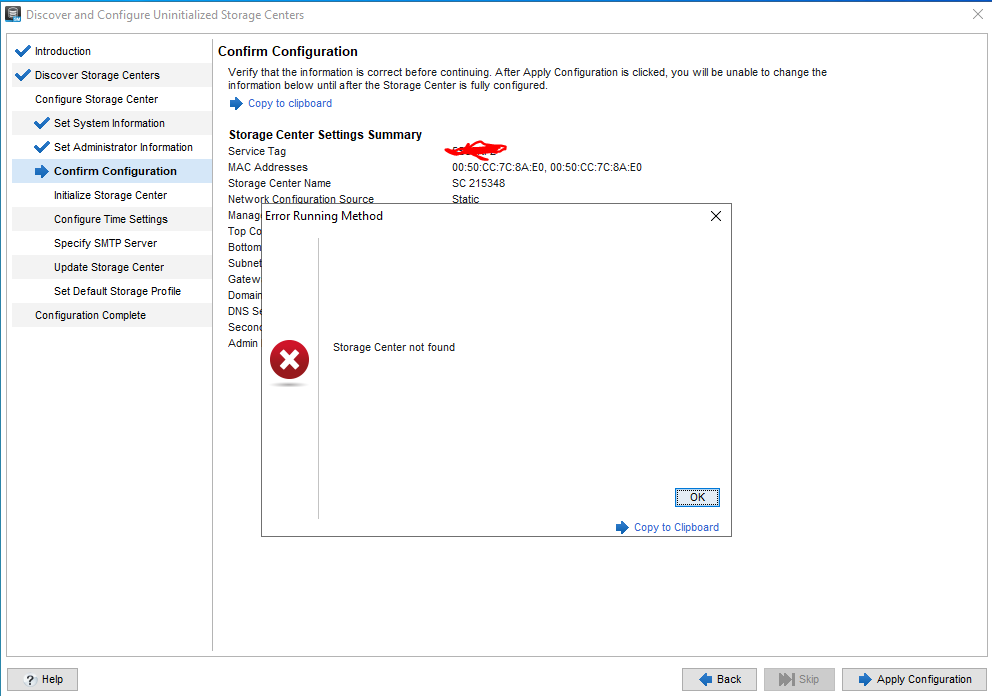
If I close it and reapply the settings, this is what happens.

What can I do? I have the serial cable to access the canisters if needed.
Thanks in advance.
0
0
Posted December 11th, 2025 07:45
Hi,
Can you confirm if the IP settings of the storage and the management PC are on the same subnet? Wait a few minutes after applying configuration; controllers may restart.
The MAC address which you are seeing is normal. Can you see if you can try manual discovery?DELL-Joey C
Social Media and Communities Professional
Dell Technologies | Enterprise Support Services
#IWork4Dell
Did I answer your query? Please click on ‘Mark as Accepted Answer’ if I did.
0
0
Posted December 11th, 2025 08:28
Hello.
Yes, they are on the same subnet. And I can confirm that the management IPs are the ones shown in the image.
ve tried doing it manually with the MAC addresses, and sometimes it works, sometimes it doesn't. Similarly, when automatically discovering the Storage Center, sometimes it detects it, sometimes it doesn't. But it always fails when applying the configuration.
If I wanted to restart the canisters, how could I do it via serial (Putty)?
Thank you very much for your response.
0
0
Posted December 11th, 2025 10:03
Hi,
if config consistently fails after detection, it could indicate an issue with controller initialization or network communication during setup.
- Connect your serial cable to the controller canister and open PuTTY (or similar) using the correct COM port.
- Set the baud rate to 115200, data bits 8, parity None, stop bits 1, and flow control None.
- Once connected, press Enter to get a prompt.
- Use the command:
orrestart
(depending on the firmware version). This will restart the controller safely.reboot
Hope that helps!
DELL-Erman O
Social Media and Communities Professional
Dell Technologies | Enterprise Support Services
#IWork4Dell
Did I answer your query? Please click on ‘Mark as Accepted Answer’. ‘Thumbs up’ the posts you like!0
0
Posted December 11th, 2025 10:19
This is the output I get
Current management interface addresses:
192.168.18.55
fe80::250:ccff:fe7c:8ae0Storage Center (sn215348) (ttyu0)
login: Admin
Password:
Last login: Wed Dec 10 11:29:50 on ttyu0Welcome to Dell Compellent Storage Center
sn215348> reboot
sn215348>
Cannot find command: reboot
-cpu -cpuset -dimmscan -pcilinkscan -pciscan -qpiscan -sm -threads
? AC DR abnormal alert async au bpManager
ca cache cat cdelete cdir cha chassis chelsio
cipc cms conman controller copy cp cs cycletime
daemon dcopy ddelete ddir delete device dfile dir
disk dma dmaengine dpm drename ds dump emulex
enables fctran fm fru gather heap help hypervolume
iocommon iorpmodifier iosub iotest ipc isdriver isns istran
jbod kmcs kmcscryptsoft lldp log ls lsi2sas lsisas
map mc md5 mem memdump memstore memstore2 mount
msgcat multi net nvIO pagepool phonehome ping ping6
pitc platform plxdma pmc3sas ppm qla24xx qla40xxcm qle10xxx
qrqcm question rack raid rdcopy readahead rename repl
replacement reqorder reservation rs rsrc sample sastran scsi
scupdate select sg sgpr sgprstats simtran smc smp
snapshot ss st stcon sts sub sysmon system
t420 tcg time tplib trace traceroute traceroute6 traceroute_iscs
tran umount usb utility varmem volume watchdog wwn
restart
sn215348>
Cannot find command: restart
-cpu -cpuset -dimmscan -pcilinkscan -pciscan -qpiscan -sm -threads
? AC DR abnormal alert async au bpManager
ca cache cat cdelete cdir cha chassis chelsio
cipc cms conman controller copy cp cs cycletime
daemon dcopy ddelete ddir delete device dfile dir
disk dma dmaengine dpm drename ds dump emulex
enables fctran fm fru gather heap help hypervolume
iocommon iorpmodifier iosub iotest ipc isdriver isns istran
jbod kmcs kmcscryptsoft lldp log ls lsi2sas lsisas
map mc md5 mem memdump memstore memstore2 mount
msgcat multi net nvIO pagepool phonehome ping ping6
pitc platform plxdma pmc3sas ppm qla24xx qla40xxcm qle10xxx
qrqcm question rack raid rdcopy readahead rename repl
replacement reqorder reservation rs rsrc sample sastran scsi
scupdate select sg sgpr sgprstats simtran smc smp
snapshot ss st stcon sts sub sysmon system
t420 tcg time tplib trace traceroute traceroute6 traceroute_iscs
tran umount usb utility varmem volume watchdog wwnLooks like I don't have that option (tried on both canisters)
Thank you for answer so quickly0
0
Posted December 11th, 2025 15:44
It worked!!! After the powercycle, it works perfectly. Thank you so much.


DELL-Erman O
Moderator
•
2984 Posts
•
14874 Points
0
0
Posted December 11th, 2025 10:44
Hi,
If DSM can see the array (even intermittently), the easiest and safest way to restart the controllers is through DSM:
Graceful Restart via DSM (Preferred):
System → Controllers → Restart
If DSM isn’t an option, you’ll need to do a manual power cycle:
Physical Power Cycle:
Hope that helps!
DELL-Erman O
Social Media and Communities Professional
Dell Technologies | Enterprise Support Services
#IWork4Dell
Did I answer your query? Please click on ‘Mark as Accepted Answer’. ‘Thumbs up’ the posts you like!