
Solved!
Go to SolutionNetwork traffic priority best practices at switch level
What is usually the best way to prioritize specific traffic from a specific VLAN?
I am working with Differentiated Services to match traffic from a specific VLAN and assign a switch queue of 6 to give this traffic a higher priority than normal traffic. But I am not sure with this configuration. I've red much about switch traffic priority but I didn't understand it all i think.
The policy is definitely working. In the web interface I see that are packets offered for this DiffServ, I think I am missing something...Config:
policy-map {policy name} in
class {class name}
assign-queue 6
exit
interface port-channel 1
service-policy in {policy name}
The match criteria was configured, but it has to be configured somewhat different than you have explained.
This is also part of my configuration:
class-map match-all WGF ipv4 match vlan 30 exitI think the assign queue command isn't appropriate for giving some traffic a higher priority over standard traffic. I was looking for someone to confirm of denial my thoughts of how to prioritize network traffic...
If I take a look in switch queuing in a general way, I would need to give my high priority network traffic a ToS byte value of '1000' to minimize delay. But now I have to configure it with DIFFSERV, I don't really understand what I am doing. I think I'll to use DSCP values instead of the queue command.
Do you agree?
Here's my source: http://www.cisco.com/en/US/technologies/tk543/tk766/technologies_white_paper09186a00800a3e2f_ps6610_Products_White_Paper.html
Maybe I've to configure 'mark ip-dscp ??' instead of 'assign-queue 6'? My next question will be: what dscp value I'll need to minimize delay, maximize reliability with a normal bandwidth? I've got this source which should make things clear, but I don't know how to read the table: http://bogpeople.com/networking/dscp.shtml. There are 6 binary values in the table, and the RFC791/RFC1349 is giving me 8 values...
Thanks for confirming my thoughts. So my configuration seems to be okay. Now I would like to verify if DiffServ is working... The traffic is coming from interface 1/g19 on the core switch of the datacenter. The packets meets to the policy-map I've created (VLAN 30), please take a look in the 'In Offered Packets': CoreSwitchDataCenter#show policy-map interface 1/g19 inAssigning queue 6 is perfectly fine and usually done when handling voice traffic. It may help to know what traffic you are wanting to give extra priority to. The priority goes from 0-6,lowest-highest priority.
Interface...................................... 1/g19
Direction...................................... In
Operational Status............................. Up
Policy Name.................................... WGF
Interface Summary:
Class Name..................................... WGF
In Offered Packets............................. 8971
In Discarded Packets........................... 0
After this the VLAN is tagged over port-channel 1 to our Campus core switch, I am unable to verify if the policy-map is working on the port-channel, because there is no command to show the policy map on a port-channel:
If I try to view the offered packets on the interfaces them selves, there is nothing to see because everything is configured on the port-channels:LANStack2#show policy-map interface ?
unit/port-type/port/ Enter interface in interface format.
So no option to query a port-channel...
Although it's definitly configured to match packets of this vlan:CoreSwitchCampus#show policy-map interface 1/g21 in
Interface...................................... 1/g21
Direction...................................... In
Operational Status............................. Down
Policy Name.................................... WGF
Interface Summary:
Class Name..................................... WGF
In Offered Packets............................. 0
In Discarded Packets........................... 0
CoreSwitchCampus#show policy-map interface 2/g21 in
Interface...................................... 2/g21
Direction...................................... In
Operational Status............................. Down
Policy Name.................................... WGF
Interface Summary:
Class Name..................................... WGF
In Offered Packets............................. 0
In Discarded Packets........................... 0interface ethernet 1/g21
channel-group 1 mode auto
service-policy in WGF
exit
!
interface ethernet 2/g21
channel-group 1 mode auto
service-policy in WGF
exit
!
interface port-channel 1
service-policy in WGF
switchport mode general
switchport general allowed vlan add 20,30,99-100 tagged
switchport general allowed vlan add 1 tagged
exit
Thanks for the information, but I think I understand how coq works. I just need some practical examples of how it will work on PowerConnect switches. Like you did on the assign-queue command :) Any idea's of how to verify if DeffServ is working?This document is about VOIP, but it also goes into QoS. The commands wont be the same, but the general info is good.
http://www.dell.com/downloads/global/products/pwcnt/en/app_note_11.pdf
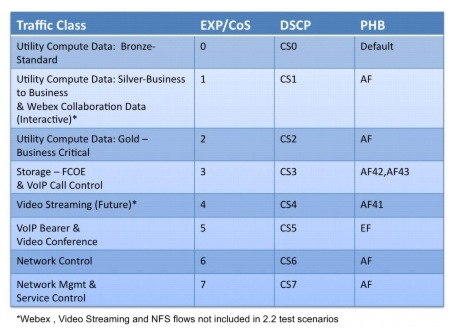
When it comes to priority each network can have different needs and goals. Because of this I don’t have a chart or list that shows which CoS we recommend placing certain traffic. I found an example chart on Cisco's site of priority levels that could be given out. But again these could change for each network you run into.
Wikipedia also has a similar example chart.
"The way traffic is treated when assigned to any particular class is undefined and left to the implementation. The IEEE however has made some broad recommendations:"
http://en.wikipedia.org/wiki/IEEE_P802.1p
What traffic are you wanting to prioritize and maybe we can give some recommendations of priority levels to give.

vwijhe
1 Rookie
•
35 Posts
8989
0
Posted November 21st, 2013 00:00
Just an short update: I think my configuration is working fine. I figured out that the ping reply delay has more to do with the end device then with the switch configuration :)