
UNSOLVED
Laptop network controller
Message came up saying 'found new hardware' and is asking for a CD that came with my network controller and ive tried every CD that came with my laptop and it cannot find what it wants, and it wont let me connect to the internet even though it was working fine before.
What could i do?
Thanks :)
1165
0
Posted February 4th, 2011 21:00
elysiat,
In addition to what Telson stated, what is the operating system on the computer? 32-bit or 64-bit?
Rick
1165
0
Posted February 5th, 2011 12:00
And its 32-bit.
Thankyouu
1165
0
Posted February 5th, 2011 12:00
Ive attached one.
And thats what confuses me because there is nothing external plugged into my laptop.
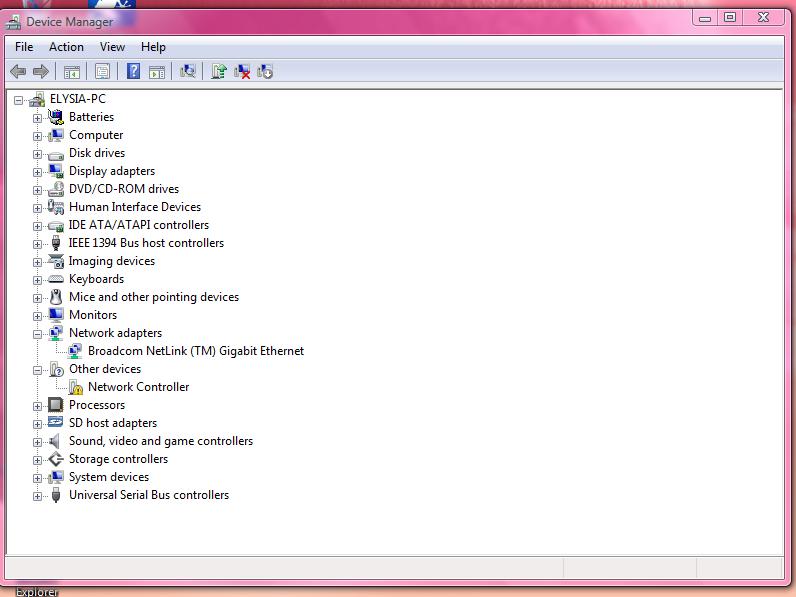
1165
0
Posted February 5th, 2011 14:00
ElysiaT,
You don't knopw which wireless adapter you had installed, do you? I had a 5100 agn adapter installed in my Studio 1737.
Try running Finding System Information and remove your product ID and post it back here. At the bottom it will show what network adapters are in the computer.
Rick
1165
0
Posted February 6th, 2011 23:00
Ive attached one.
And thats what confuses me because there is nothing external plugged into my laptop.
According to the device manager, you do have another network adapter, probably an internal wireless card.
If it was working fine before the best option here is a 'System Restore'
Click on the start button and type 'system restore'
Follow onscreen instructions and select a date when your wireless was working fine.
once system restore is complete it would restart and it should give you the message stating system restore was successful.
no check your device manager and post the screen shot.
1165
0
Posted May 1st, 2011 13:00
musbaulekan,
When you installed Windows 7 (32-bit or 64-bit) did you install the desktop/notebook utility and the chipset drivers first? If not the rest of the drivers will fail to install. How to Download and Install Drivers in the Correct Order If you cannot find Windows 7 drivers, then try using the Vista (or XP) 32-bit drivers, for Windows 7 32-bit of the Vista (or XP) 64-bit drivers for Windows 7 64-bit and install the drivers in the Compatibility mode
Rick
1165
0
Posted May 1st, 2011 13:00
I bought an inspiron n5030 and had to change the OS to window 7 ultimate fom home basic. but after the intallation of the new OS, my network controller is yellow marked, device manager states 'The drivers for this device are not installed. (Code 28)'
AND I cant detect any wireless network even if I am within ragnge of a network which I have been using with other PC till date. pls help me out.
142
0
Posted May 1st, 2011 14:00
musbaulekan,
Start downloading, in your browser, using Internet Explorer or use the drivers disk that was provided.
Install the desktop/notebook system software and the chipset drivers first.
Then follow the order and everything should start working.
The desktop/notebook system utility and the chipset drivers have all the drivers for the devices attached to your computer, like the usb ports, webcam, wireless adapters, just to name a few.
Rick
1165
0
Posted May 1st, 2011 14:00
maybe that is the cause of the problem. pls how can I rectify it without reloading my OS from scratch again


Telson A
4 Apprentice
•
904 Posts
1165
0
Posted February 4th, 2011 20:00
Hi
It would be helpful if you could put up a screen shot of your device manager with the network devices expanded.
What do u mean when you say 'CD that came with my network controller ' do u have an external network device plugged in ?