
UNSOLVED
Problem deleting folder / files
Problem deleting a Folder / Files
Hi and Happy Easter to all
I seem to be having a problem deleting a folder along with it files , every time I try , it says access denied , I have checked all the permissions etc that I can think of to be able to do it .
I have attached a couple of screen shots that may shed some light on the problem .
Running Windows 7 Ultimate 32 bit .
spike
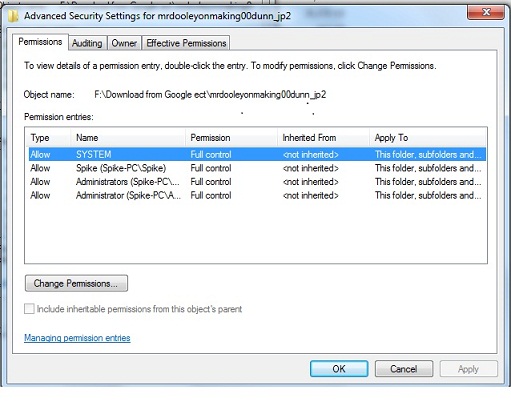
I seem to be having a problem deleting a folder along with it files , every time I try , it says access denied , I have checked all the permissions etc that I can think of to be able to do it .
I have attached a couple of screen shots that may shed some light on the problem .
Running Windows 7 Ultimate 32 bit .
spike


455
0
Posted April 27th, 2014 04:00
Hi
I could not do it hat way , probably not doing it correct , anyway I have sorted it , took me awhile , what I did was change all the files ( 210 ) to a .doc extension , then they changed to a word file and then I could delete them .
thanks again for all your feed back , probably would of been a lot quicker your solution , but I just did not want to mess about with system files or whatever .
again thanks
spike

Philip_Yip
11 Legend
•
16052 Posts
•
65915 Points
455
1
Posted April 20th, 2014 06:00
Use the unlocked program, follow the instructions in the second half here (using your folder opposed to the Windows.old folder):
http://dellwindowsreinstallationguide.com/a-clean-install-of-windows/the-windows-old-folder/
Windows 11 Installation Guide
Windows 7 Installation Guide