
UNSOLVED
D
dave321984
1 Rookie
•
4 Posts
0
751
September 24th, 2023 12:24
m15 R5, adding a second SSD
Hi there,
I recently purchased a second SSD to double up the storage on my system from the current 512GB. I bought a generic SSD (512GB M.2 PCIe NVMe SSD 2230), the same as came with the system, albeit a different brand.
However, when I installed the second drive, without any issues, the system became slow, buggy and games that previously work at 50/60 fps were running at 4fps. The only fix I could find was to completely remove the second SSD.
Any help/advice on a fix would be greatly appreciated.
Thanks
David
(edited)
0
0
Posted September 24th, 2023 12:49
The two M.2 slots are different speeds, are the two SSD in the right order?
Alienware m15 Ryzen Edition R5 Setup and Specifications | Dell UK
0
0
Posted September 24th, 2023 13:26
@Kennabytes The second one was added to the second slot, and when in disk management was set up an additional drive, all start-up and windows files were on the original drive.
https://www.amazon.co.uk/dp/B0C5T5V81H?ref=ppx_yo2ov_dt_b_product_details&th=1
This is the second SSD I added. Seems to fit all the requirements.
(edited)
0
0
Posted September 24th, 2023 16:56
I couldn't find any specifications for the BAITITON drive, what was the other drive you used?
A simple test would be to remove the "good" system drive for safe keeping, and temporarily install a clean copy of Windows on the new drive. If any speed issues still occur in either slot, you will know whether it is the drive and/or the slot.
0
0
Posted September 24th, 2023 19:08
The other drive is the original one that came with the system. Looking via Disk management this appears to be the current SSD installed in slot 1.
https://www.amazon.com/SKHynix-BC711-512GB-Solid-State/dp/B0B8Q9HJKQ
0
0
Posted September 24th, 2023 23:57
Hi dave321984 welcome to this free user-to-user Alienware laptop discussion forum.
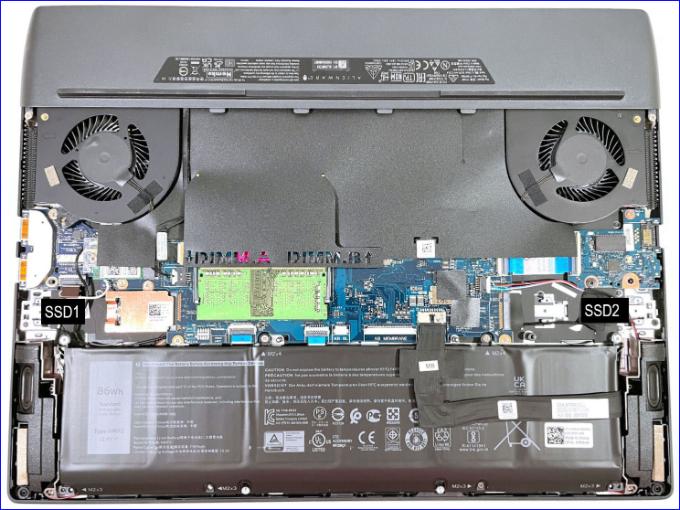
The Alienware m15 R5 (5/4/2021) will accept two internal M.2 2230/2280 SSD similar to the original. Amazon.com: SKHynix BC711 512GB NVMe PCIe Gen 3.0 x4 M.2 2230 30mm Solid State Drive - HFM512GD3GX013N BA- OEM Packaging : Electronics.
m15 R5/R6, second SSD, parts needed | DELL Technologies.
(edited)
[This user does not work for Dell and volunteers their free time. Please remember to say thank you by clicking on my thumb up icon.]

JOcean
11 Legend
•
12621 Posts
•
69453 Points
0
0
Posted September 24th, 2023 12:47
Is the BIOS set for RAID or AHCI? Default is AHCI but a RAID setting could possibly slow down the system.
I am not a Dell employee...I am forum volunteer
Serious work on an E5430 and constantly building and working on an i5-6500 Desktop