
UNSOLVED
M
MarvinDorn
1 Rookie
•
12 Posts
•
2 Points
0
182
June 12th, 2025 07:27
Share Baselines between all Users
Hello,
today we connected LDAP to our OME and added the users to the groups Admins and Device Manager. Now the Device Manager cant see the Baselines for Driver and Firmware Compliance. How can i share the Baselines for all to see?
0
0
Posted June 12th, 2025 12:44
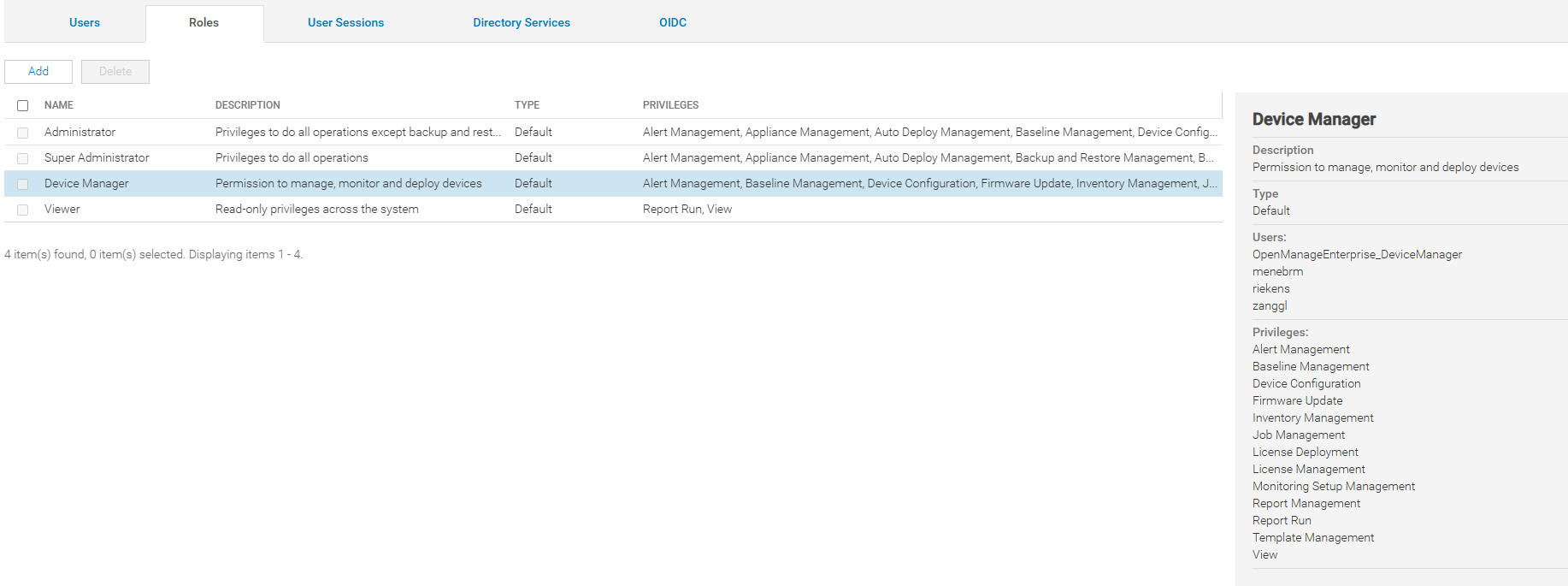
I cant edit the Device Manager role. Im logged in as the superadmin.0
0
Posted June 12th, 2025 12:46
Also when creating Baselines i cant select a User Group that should be able to see the Baseline.
The Baselines are configured to "Select Groups" and then i just clicked an "ALL"0
0
Posted June 12th, 2025 13:22
I think default roles cannot be edited. You can try to create a new custom role Then assign users or LDAP groups to this new custom role.
Bence varsayılan roller düzenlenemez. Yeni bir özel rol oluşturmayı ve ardından bu yeni özel role kullanıcılar veya LDAP grupları atamayı deneyebilirsiniz.DELL-Erman O
Social Media and Communities Professional
Dell Technologies | Enterprise Support Services
#IWork4Dell
Did I answer your query? Please click on ‘Mark as Accepted Answer’. ‘Thumbs up’ the posts you like!0
0
Posted June 12th, 2025 13:37
I created a custom role and assigned it. First i assigned all the permissions as the device manager. Now what do i have to add so they can see the baseline?

0
0
Posted June 12th, 2025 13:38
Here the permissions of the role

0
0
Posted June 12th, 2025 14:05
I would check a few things. head over to Device Groups. Look at which groups the baseline is applied to often it's something like ALL.
Then, make sure your custom role has both visibility and access to those specific device groups.
If it doesn’t, I would check:
- Assign the role to all device groups, or
- Create a new device group that includes the relevant devices and assign that group to the role.
DELL-Erman O
Social Media and Communities Professional
Dell Technologies | Enterprise Support Services
#IWork4Dell
Did I answer your query? Please click on ‘Mark as Accepted Answer’. ‘Thumbs up’ the posts you like!0
0
Posted June 13th, 2025 06:13
Hi as is shown in the screenshot the Group has access to All Devices. Also the Baseline is applied to the Groups "All Devices".
We are just using the default System groups and a few query groups. The role can see all the groups but not the baselines.0
0
Posted June 17th, 2025 12:34
Does anyone has an other idea. I still didnt find a solution.
0
0
Posted July 18th, 2025 07:46
Any updates to this? We have the same problem. Only Admin users can create and use baselines with each other but every user can't be admin in our system. Custom roles does not allow to make baselines that would be shared with other users, except admins.

DELL-Erman O
Moderator
•
2984 Posts
•
14874 Points
0
0
Posted June 12th, 2025 12:24
Hello,
Make sure the baseline is either global, or assigned to a device group.
In OpenManage Enterprise, baselines are scoped based on user roles and permissions. If someone (like a Device Manager) can’t see a baseline, it’s usually because of RBAC (Role-Based Access Control) settings.
By default:
To fix this and let Device Managers see the shared baselines, try the following:
Once those permissions are in place, the baselines should show up for users in that role.
Hope that helps!
DELL-Erman O
Social Media and Communities Professional
Dell Technologies | Enterprise Support Services
#IWork4Dell
Did I answer your query? Please click on ‘Mark as Accepted Answer’. ‘Thumbs up’ the posts you like!