
UNSOLVED
0
0
Posted December 6th, 2023 20:28
Hi. What am I missing? The question is, "how do I recover my administrator PWD?"
The answer is, "Login with an administrator account. . . ."
How do I log in my administrator account if I don't have the administrator PWD.The analogy is when you lose your SAVED Google passwords, by whatever circumstance, and the verification is another Google account, the PWD for which is also missing.
Murphy's digital tech law: "If it can go wrong, it will in a way a rocket scientist couldn't resolve." Or some such. DrD
0
0
Posted December 6th, 2023 22:48
@DrNick31522 - Do you have this same problem or are you just commenting on prior posts in this thread?
And always include exact PC model and version of Windows in your posts.
On the sign-in screen, type your Microsoft account name if it's not already displayed. If there are multiple accounts on the computer, choose the one you want to reset. select I forgot my password link located below the password text box. Follow the steps to reset your password.
And read: 3 Ways to Reset a Forgotten Windows Administrator Password
0
0
Posted December 11th, 2023 18:49
@RoHe Hi. I have the same problem and was sharing my confusion, which happens since I'm a computer legacy innovator, a fanyc term for someone who's been using computers since the Univac 1050-2. I'm dating myself but it's ok. I was a fun date before I was married.
That's a long-winded explanation about why a little problem like this is aggravating -- I hate it when the computer wins because it reminds me I know just enough to be dangerous and but enough to find a work-around or a posted solution.
[Where's the attach files link?]
Inspiron Specifications
I have the SYSTEM and the HDD PWDs to get me into the BIOS utility.
<Private data removed from public view. DELL Admin>
Set-up utility . . .
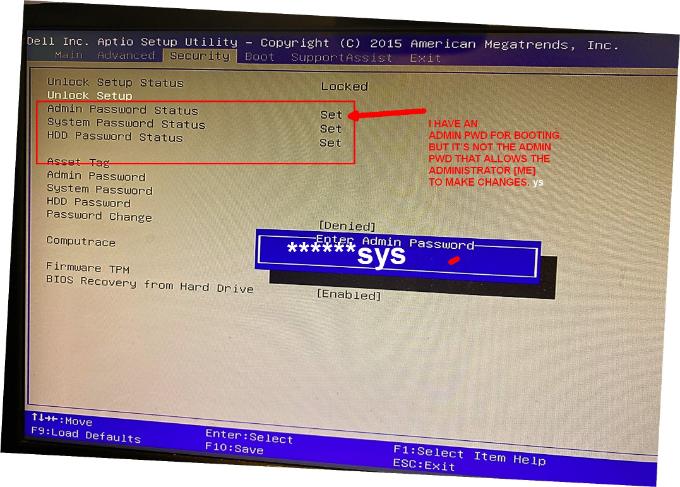 Does this help? Or am I a dog in the wrong hunt?? DrD
<Post edited to remove image with personal info>(edited)
0
0
Posted December 12th, 2023 01:38
You could try resetting BIOS on your Inspiron 3650...
- Power off, unplug power cord from rear of PC
- Press/hold power button for ~15 sec
- Open case and remove motherboard battery (check Service Manual for details)
- Press/hold power button for ~30 sec
- Reinstall battery (Probably time for a fresh CR2032 3-volt coin cell battery, ~$3)
- Close up and connect mouse, monitor and keyboard
- Reconnect power cord to rear of PC
- See if you can boot to desktop now and make whatever changes you want/need in BIOS setup. You may have to set passwords again, assuming they got cleared by the BIOS reset.
(NOTE: I will attempt to delete your first image (above) because it shows personal info that should never be posted in a public forum.)
(edited)
0
0
Posted February 2nd, 2024 02:00
Same problem, sir . . . TY for the response. I've been living the John Lennon mantra -- Life is what happens when you're making / have made other plans.
0
0
Posted February 2nd, 2024 20:03
@DrNick31522 I don't know what PC model you have, so please just post the type, eg Inspiron, and its 4-digit model number...
Have you tried using the password reset jumper on the motherboard to clear the (BIOS) password?
0
0
Posted October 14th, 2024 18:49
my Dell Latitude E7270 laptop when powering on just displays Dell Security Manager.
Please type administrator password, which dont have. Please Help
0
0
Posted January 14th, 2025 06:54
i forgotten my screen lock password how i rest it

AdrianG001
6 Operator
•
3958 Posts
149
0
Posted February 13th, 2023 00:00
Login with an administrator account, click on Start menu >> All Programs >> Accessories >> right-click on Command Prompt >> select Run as administrator. 3. And then press Enter to reset the Administrator account password on your Dell Inspiron laptop.