I would first record on paper the current "working" BIOS settings. Then try to make the changes and see what happens. I don't think making that BIOS change will make the SSD perform faster, but test it.
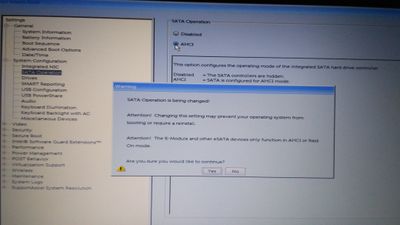
If your only options are Disabled and AHCI, and everything currently works while set to Disabled, then it won't work any differently if you enable AHCI. It definitely won't improve your performance. It's explained right there in the description of the setting that's visible behind and under the popup dialog in your photo. It says that it only affects the SATA controller, and that Disabled hides the SATA controller, while AHCI enables it in AHCI mode. If your M.2 SSD is working while the system has the SATA controller completely disabled, then you have an M.2 NVMe SSD rather than an M.2 SATA SSD. NVMe SSDs do not use a SATA interface, so enabling the SATA controller on your system won't change anything at all. If you ever wanted to use an M.2 SATA SSD, you'd probably have to enable that setting, but going from NVMe to SATA would be a significant performance downgrade.
So you can certainly change it without breaking anything, but with your current hardware it won't make any difference whatsoever. On many Dell systems, the SATA Operation setting has options for AHCI and RAID, and despite the legacy name "SATA Operation", the setting affects both the SATA and NVMe interfaces. If you had SATA and RAID options, that would introduce other considerations -- but you don't, and apparently on your system it's a SATA-only setting. And if you don't see an AHCI vs. RAID option for your NVMe interface somewhere else in the BIOS, then that suggests that the NVMe controller is permanently set to AHCI mode (and possibly permanently enabled).
Since you don't say which model of M.2 drive you have, I would have to say the AHCI option would be in case you decided to add a second drive to the SATA port. Otherwise, it probably has no effect on the M.2 port.
@RicoWirz glad you liked my explanation, but that basically already answers the question you asked. If you disable it and everything still works, then it’s fine to disable it. If it doesn’t work afterward, then turn it back on. But even if the system works with SATA disabled, it won’t perform any better as a result, so I’m not sure why you’d want to.
I am writing to check if you tried the suggested steps. Do get back to us so that we can look into this. Also, share the configuration of the SSD you installed.
DELL-Chris M
Community Manager
•
56891 Posts
•
232143 Points
19475
0
Posted April 12th, 2019 06:00
If the laptop is currently functioning, why change anything in the BIOS?
DELL-Chris M (old account)
#IWork4Dell