mooreted

updated

13 years ago

M

mooreted

10 Posts

0

54669

November 5th, 2013 11:00

Optiplex 780 Black Screen

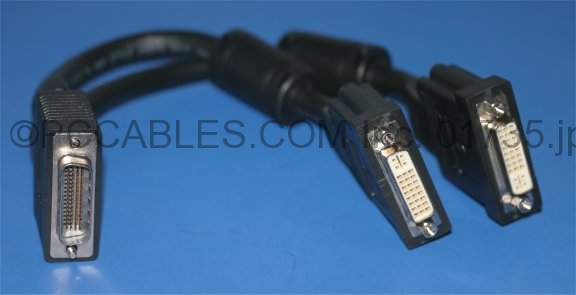
I have an Optiplex 780 slimline. The video cable is a proprietary Dell DVI splitter. I have tried both ports 1 and 2. When the system boots, the screen remains black until Windows starts. After Windows boots the video system works fine. The problem is, I can't get into setup or the boot menu because I can't see anything during POST.

  • mooreted

    10 Posts

    5287

    0

    Posted November 6th, 2013 12:00

    New video card fixed it. Strange problem to have, but at least it's working now.

  • mooreted

    10 Posts

    5287

    0

    Posted November 6th, 2013 17:00

    New video card fixed it. Not sure what the deal was. Strange problem, but at least it's working now.

  • Mary G

    6 Operator

    20095 Posts

    5287

    0

    Posted November 5th, 2013 14:00

    Remove the splitter and directly connect it to access the bios. The splitter is not recognized pre boot. Why do you need a splitter? What's on the other side of the splitter--another monitor? It helps us to know what operating system you have.

  • mooreted

    10 Posts

    5287

    0

    Posted November 5th, 2013 16:00

    Because the port on the video card is not DVI. It's a proprietary port that requires the Dell video cable which has two ports on the end of the cable. I believe it is a DMS-59 cable.

    Like this:

    http://www.pccables.com/images/LFH59_CABLE_DMS59_DY599A_NVIDIAPNYHP_DVI.jpg

  • mooreted

    10 Posts

    5287

    0

    Posted November 6th, 2013 08:00

    Ok, I guess I will have to try a different video card.

  • placy

    15 Posts

    5287

    0

    Posted November 6th, 2013 08:00

    Or you might try using the other leg of your splitter.   

  • mooreted

    10 Posts

    5287

    0

    Posted November 6th, 2013 09:00

    Tried that.

  • mooreted

    10 Posts

    5287

    0

    Posted November 6th, 2013 11:00

    Tried a new cable: No change. I'll try resetting CMOS. If that doesn't work, I'll pull a video card.

    I have about 10 of these, and this is the only one having this issue.