
Solved!
Go to SolutionR
raulakh2010
1 Rookie
•
7 Posts
1
347
March 20th, 2024 20:54
Foreign Configuration/Raid0
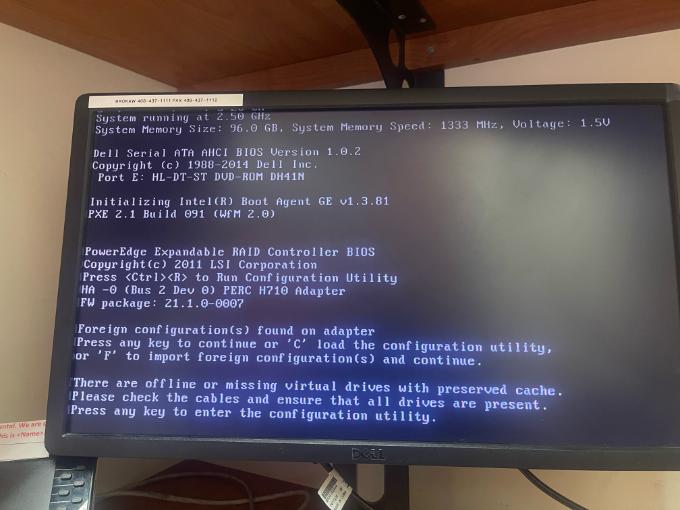
Hello: I have 3 drives in this t^30 and it appears one of them has gone bad. I get the error
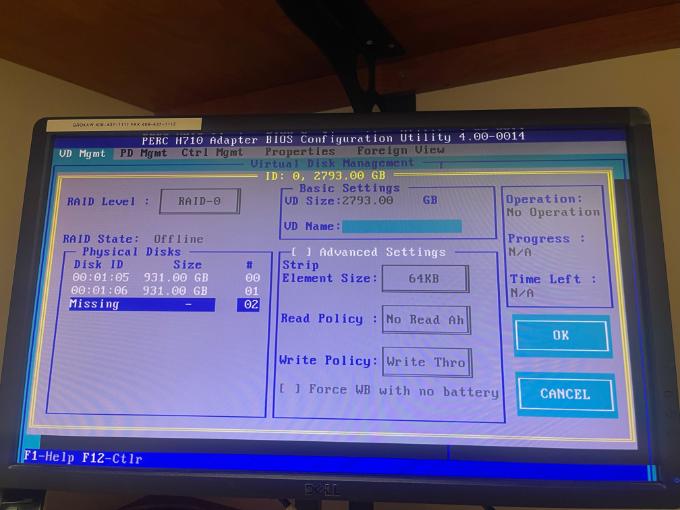
"Foreign Configuration found on adapter" (screen shot attached) . When I press C I get the BIOS screen but not sure what to do next (screenshot attached). I do not want to lose the data
0
1
Posted March 21st, 2024 04:40
@DELL-Joey C Thank you for your prompt response. I have 3 disks but one of them seems to be missing (or bad). So 2 questions:
1. Can I just configure Raid 0 with 2 existing good HDD and save the data?
OR
2. Can I add a new HDD to replace the "missing" or bad HDD and reconfigure the ND
Either way the data save is paramount
0
0
Posted March 21st, 2024 04:44
@raulakh2010 Sorry I meant VD, not ND
0
0
Posted March 21st, 2024 07:48
@raulakh2010 you can reinsert the missing Drive and then delete the raid array and again recreate new raid.
if data is not important.
0
0
Posted March 21st, 2024 07:54
Hi,
1. Can I just configure Raid 0 with 2 existing good HDD and save the data?
No you can't. Your RAID0 need the 3rd drive to make a complete array
2. Can I add a new HDD to replace the "missing" or bad HDD and reconfigure the ND
RAID0 has no redundancy, hence you can't replace missing or failed drive.
My point of view is, we do not know if the drive is having a symptom of failing or has failed, hence you are facing the issue of foreign config, so try the import foreign configuration to try to revive the RAID array. If this does not work, you can try Praveen's suggestion, Re-tagging RAID configuration. But if you are not comfortable doing steps like these, I strongly suggest contacting reseller to restore data from the disks you have.
DELL-Joey C
Social Media and Communities Professional
Dell Technologies | Enterprise Support Services
#IWork4Dell
Did I answer your query? Please click on ‘Mark as Accepted Answer’ if I did.
0
0
Posted March 21st, 2024 14:27
@DELL-Joey C Thank you! On another note, I think the array was RAID-1. It seems to have defaulted to RAID-0 after the "bad" drive. Should I try change it to RAID-1?
0
0
Posted March 21st, 2024 14:46
It shouldnt have just changed the Raid levels due to the disk, unless the drives config was imported to the controller and it wasnt correct. If that is the case then I would be curious if you are able to boot to the OS. if not then you may need to retag the Virtual Disk depending on the controller. Another thing is you stated that it was a Raid 1, but you had 3 disks, which wouldn't work, as you have to have an even amount of drives for a raid 1, now you can have a 3 drive raid 5. So would you confirm if the OS is bootable, the controller installed, if this may have been a raid 5, and if you have a backup? The reason I ask is you may want to consider taking the drives to a data recovery company, as anything we do could risk the data.
DELL-Chris H
Social Media and Communities Professional
Dell Technologies | Enterprise Support Services
#IWork4Dell
Did I answer your query? Please click on ‘Mark as Accepted Answer’. ‘Thumbs up’ the posts you like!0
0
Posted March 21st, 2024 15:12
@DELL-Chris H Thank you! Do you know of any data recovery companies? The data is VERY important
0
0
Posted March 21st, 2024 15:34
I do not, I am sorry that is out of my wheelhouse.DELL-Chris H
Social Media and Communities Professional
Dell Technologies | Enterprise Support Services
#IWork4Dell
Did I answer your query? Please click on ‘Mark as Accepted Answer’. ‘Thumbs up’ the posts you like!0
0
Posted March 21st, 2024 15:45
@DELL-Chris H Thank you!

DELL-Joey C
Moderator
•
4170 Posts
•
20965 Points
0
1
Posted March 21st, 2024 03:33
Hi,
First thing that I need to set expectation that if data is important for you, I might suggest stop any process and contact the nearest IT vendor for data recovery on your drives. The step that I'm providing, may or may not bring back the RAID configuration that you have configured.
From the pictures, I can see there is foreign view. Go to the foreign view tab and check if the configuration is what you have set. Next is to go back to VD management and press F2 on Controller 0, then Foreign Config to Import foreign configuration.
There are times, where the disk is bad, hence the communication with the RAID controller and the disk may result to foreign configuration. Hopefully the disk has not failed, and you are able to obtain your data. I strongly suggest if you manage to access your data, do a full data backup.
DELL-Joey C
Social Media and Communities Professional
Dell Technologies | Enterprise Support Services
#IWork4Dell
Did I answer your query? Please click on ‘Mark as Accepted Answer’ if I did.