
UNSOLVED
Firefox settings
Had to wipe and reinstall Firefox today (don't ask!).
When it was done, Firefox Data Collection and Use options were all enabled on the Privacy & Security screen:
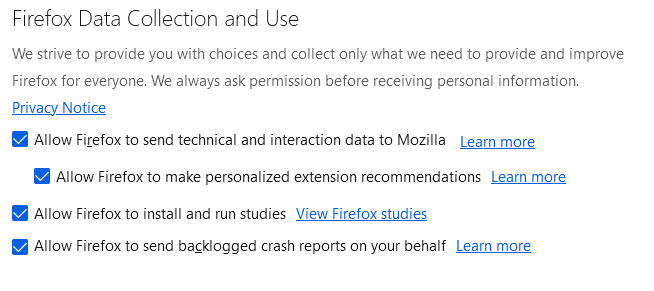
IMO, these default settings don't mesh with an organization that claims to value our privacy/security.
Even if you haven't reinstalled FF lately, you may want to check these settings and decide for yourself what you're willing to allow...
0
0
Posted January 3rd, 2024 19:38
Why would you let them run "studies" that use your hardware resources, collect who-knows-what data, what they do with that data, etc behind the scenes? Could you have using a beta test version?
I always want those boxes unchecked and surprised when the clean install checked them again. I also disable all Firefox Suggest options, all Firefox Search options, all Firefox Home page options (aside from selecting preferred home page), etc. IMO, all that stuff is the opposite of user privacy...
0
0
Posted January 4th, 2024 00:08
I don't remember the specifics... it was a long time ago. All I recall now is that I needed to do something (perhaps it was related to fixing a problem I had encountered with Firefox???)... and the solution I found involved running one of their "studies"... and to my recollection, it got the job done.
Perhaps, it might be prudent to disable that option, until such time as I find reason to use it again...

ky331
5 Journeyman
•
15622 Posts
•
45048 Points
0
0
Posted January 3rd, 2024 11:38
At one point, I found that I actually needed to Allow Firefox to install and run studies ; I don't recall now why, but I did. So that one is still checked for me. The others are UNchecked.