Find your Service Tag or Serial Number
For a personalized experience on the Dell Support website, identify your Dell or Dell EMC product using the Service Tag, Serial Number, Express Service Code, or PSNT.

Locate Your Laptop's Service Tag
Access your laptop's Service Tag (ST) or Express Service Code (EX) on the bottom cover or via BIOS/UEFI, Command Prompt, PowerShell, or SupportAssist.

Locate Your Desktop's Service Tag
Access your desktop's Service Tag (ST) or Express Service Code (EX) on the back panel or via BIOS/UEFI, Command Prompt, PowerShell, or SupportAssist.
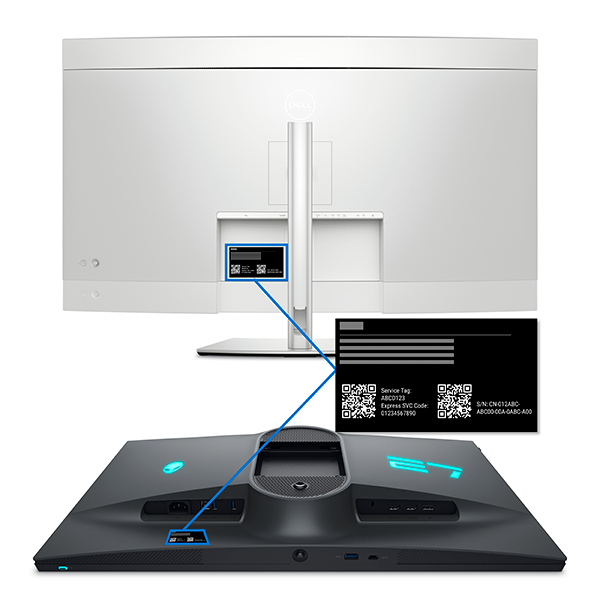
Locate Your Monitor's Service Tag
Access your monitor's Service Tag or Express Service Code on the back panel. No Service Tag? Use the model number on Dell Support.

Identify Devices Without Service Tag
Dell keyboards, mice, headsets, external drives don't have a Service Tag or Express Service Code. Use the model to identify your device on Dell Support.

Locate Your Server's Service Tag
Find your Dell PowerEdge Service Tag on rack, tower, modular & cloud servers - front panels, pull-tabs, iDRAC, or command line methods.

Locate Your Storage Device's Tag
Find your Dell Storage device Service Tag or Serial Number for support - PowerStore, Unity, PowerMax systems via labels or CLI methods.

Locate Your Networking Device's Tag
Find your Dell Networking device Service Tags easily - check front tabs, use web GUI, or CLI commands for MX-Series chassis and rackmount switches.

Locate Your Converged or Hyper-Converged Infrastructure System's Tag
Find Service Tags on Dell Converged/HCI systems - VxBlock, VxRail, PowerFlex via pull-tabs, chassis stickers, or component lookup.
Locate Your Data Protection Device's Service Tag
Find Service Tags on Dell Data Protection devices - Avamar, Data Domain, IDPA via pull-tabs, CLI commands, or management interfaces.Locate Your Dock's Service Tag
Access your docking station's Service (SVC) Tag or Express Service Code on the bottom panel. No Service Tag? Use the model number on Dell Support.Locate Your Tablet's Service Tag
Find the Service Tag or Express Service Code on the back or bottom of your tablet, in the BIOS/UEFI interface, or via the SupportAssist app.Locate Your Thin Client's Service Tag
Find your Dell Thin Client Service Tag and Express Service Code quickly. Get drivers, warranty information and faster support for OptiPlex, Wyse devices.Video Resources

This video will demonstrate the how to identify Dell Products not having a service tag.