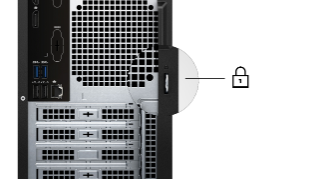
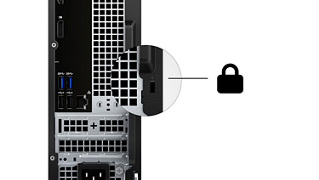
How to Physically Secure Your Dell Computer, Monitor or Docking Station
Summary: You can secure your Dell desktop, laptop, docking stations or monitors with a cable, using the security slot.
Instructions
What Is a Kensington or Noble Security Slot?
Dell desktops, some laptops, docking stations, and monitors include a security slot that lets you secure the device with a cable lock.
Not all Dell devices use the same type of lock, the correct option depends on the model, generation, and physical design of the device.
Before purchasing a security cable, it is necessary to identify which lock type your Dell device supports.
Use the information below to determine the correct lock type for your device.
| Lock Type | Most Common Use | Location |
|---|---|---|
| Noble Wedge | Thin, modern Dell laptops
(Starting around 2016–2018) |
Left or right side of the chassis |
| Kensington (K‐slot)
(May also be known as T‑bar slot) |
Standard Dell laptops, monitors, Docking Stations |
Standard Dell laptops ‐ Left or right side of the chassis Monitor ‐ Rear of the monitor, normally on the right side as you face the monitor Docking Station ‐ Right side of the chassis, next to the Undock button. |
| No Slot | Some ultra‑thin or tablet devices |
Table 1: Primary Security Lock Types Used on Dell Computers
Noble Wedge Lock Slot
- Shape: Almost square Figure 1.
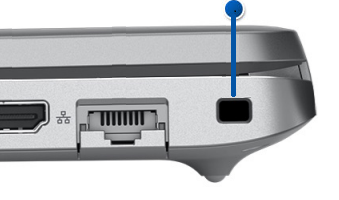
Figure 1: Wedge-Shaped Security Lock SlotNOTE: The dimensions are 3/16"x1/8." - Where it is used:
- Newer, thin modern Dell laptops
(Starting around 2016–2018)
- Newer, thin modern Dell laptops
- Lock compatibility: Noble Wedge‑style locks only (not Kensington)
Kensington Security Slot (K‑Slot)
- Shape: Rectangular slot Figure 2.
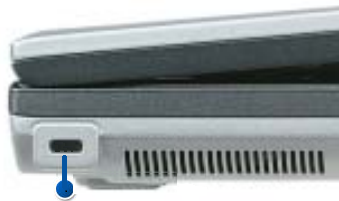
Figure 2: Kensington Standard K-Slot or T-Bar lockNOTE: The dimensions are 1/4"x1/8." The slot may also be installed vertically. - Where it is used:
- Older Dell laptops
- Dell desktops
- Dell monitors and docking stations
- Lock compatibility: Kensington‑compatible cable locks
How to Confirm the Lock Type Needed for Your Dell Device
See the User Manual or Owner's Manual for your Dell Device. For information about obtaining the User Manual or Owner's Manual, see Dell Knowledge Base article Manuals and Documentation for your Dell Product
Once you have the User Manual or Owner's Manual:
Check:
- System Views
- Ports and Connectors
- Security Features
What Is a Padlock Ring?
Dell desktops are equipped with a padlock ring on the rear of the chassis to prevent unauthorized entry to the inside of the case. Newer Dell desktop computers are equipped with security slots as well.