Avamar: Backup Fails with Avtar ERROR 5737 Due to Insufficient Privileges
Summary: This article discusses backup failures caused by insufficient permissions. This results in errors such as an inability to create files during backup, and provides potential solutions to resolve the issue. ...
Symptoms
Windows backup fails with errors similar to the following below:
ERROR: avtar Error <5737>: I/O error: Unable to create file during backup
The file cannot be restored to the target directory. In other scenarios, the file is restored with no size (zero bytes) and no content.
Cause
Avtar does not have the correct privileges to restore files in the directory.
Resolution
- Select a user with the correct privileges to write in the target directory.
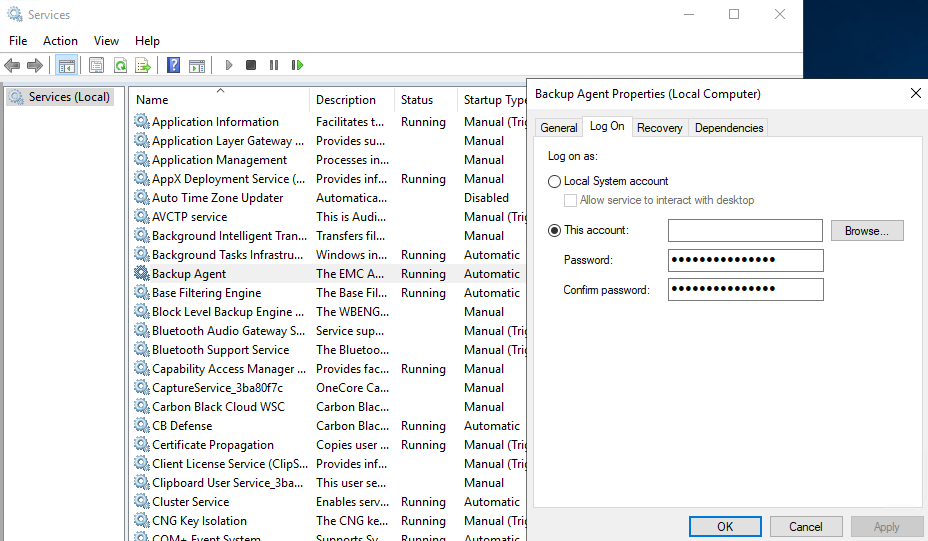
- Set this user for the Avamar Backup Agent (
avagent) service. - On the Windows client, type Services in the search bar and click the Services application.
- Double-click the Backup Agent service and select the Log On tab.
- Check what user account the Backup Agent service is running as and change it to a domain account that has at least read and write access.
Example:
Alternatively, create an avtar.cmd file in the C:\Programe Files\avs\var directory using a text editor such as Notepad. Then add the following flag and save the file:
--ignorewinperms
Use this flag sparingly. It does not restore the access control lists (ACL) assigned to files or directories. Once the file is restored, it inherits the properties from the target system settings instead.
If the restored data is corrupt, move the data to another directory. Then restore the data from a different good Avamar backup.