NVP-vProxy: FLR of GPO is showing files from the current date instead of the backup date
Summary: Unable to restore Group Policy Objects (GPO) using NetWorker VMware Protection (NVP) vProxy File Level Restore (FLR). The data presented for recovery matches the data already present on the system. ...
Symptoms
The NetWorker VMware Protection integration is configured with the vProxy Appliance. A file level restore (FLR) is being performed of a Group Policy Object (GPO) on a domain controller (DC) virtual machine. The FLR mounts the correct save set, but the restore data matches the current server data. For example, selecting a March 2018 save set shows files dated June 2018.
Cause
By default, the GPOs reside under the SYSVOL directory, e.g: C:\Windows\SYSVOL\domain\Policies

There is a second sysvol directory that contains a shortcut to the original policies directory, for example: C:\Windows\SYSVOL\sysvol\domain.name\Policies
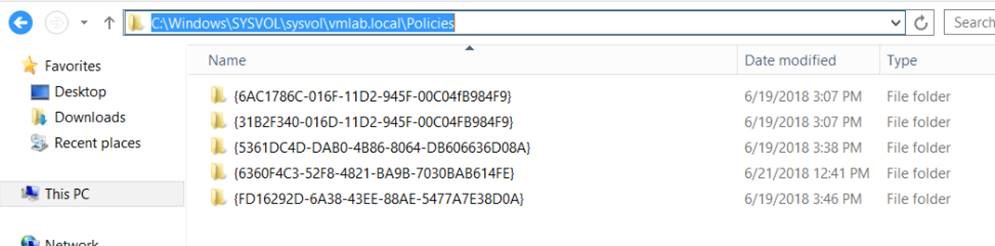
If the second path in the above example is used during the FLR, the browse function exits the FLR mountpoint and follows the shortcut path. The current data on the server is presented, not the data from the selected backup SSID for recovery.
Resolution
The default GPO directory should be used to browse over FLR instead of the shortcut. The following procedure can be followed to restore GPOs.
1. Confirm the path for GPO recovery. The default path is C:\Windows\SYSVOL\domain\Policies, used when default options are selected during GPO feature installation on the DC. GPOs can be installed under a different path or volume.
2. The "Policies" directory contains GPO Unique Identity (UID) folders, confirm which is needed for recovery.
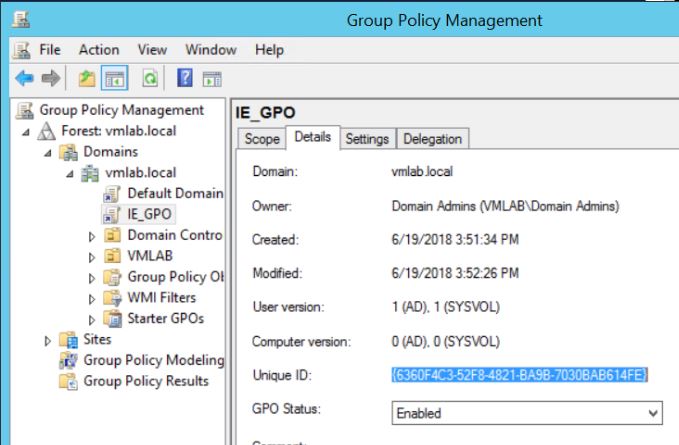
3. Perform the FLR recovery:
B. Select Recover then New Recovery.
C. Select Virtual Machine Recovery, click Next.
D. Select the Virtual Machine needed for recovery, click Next.
E. Select the backup date required for the recovery, click Next.
F. Select File Level Recovery, click Next.
G. Select a recovery source device, click Next.
H. Select a target destination, click Next.
I. Enter the Mount Credentials,
- If a different host is used as a target, the LOCAL admin credentials for that host must be used.
- If the source domain controller as a target, a DOMAIN Admin account must be used.
K. When selecting the files/folders to recover, browse to the \SYSVOL\domain\Policies path, DO NOT select the \SYSVOL\sysvol\domain.name\Policies shortcut path.
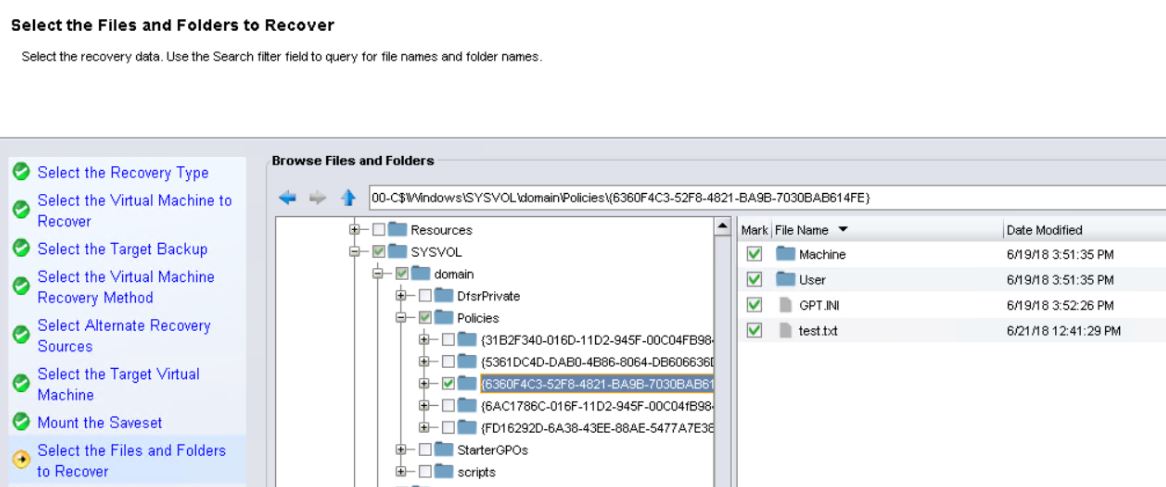
L. Select a restore location. To restore to the same location, move or remove existing files from the GPO to avoid skipping them during the restore. Alternatively, restore to a different location and manually copy the files to the original location using Windows File Explorer. A successful recovery shows:
159373:nsrvproxy_flr_recover: vProxy Log: YYYY/MM/DD HH:MM:SS INFO:   [NWBUILD] -------------------------------------------------------------------------------
159373:nsrvproxy_flr_recover: vProxy Log: YYYY/MM/DD HH:MM:SS INFO:   [NWBUILD]    ROBOCOPY     ::     Robust File Copy for Windows
159373:nsrvproxy_flr_recover: vProxy Log: YYYY/MM/DD HH:MM:SS INFO:   [NWBUILD] -------------------------------------------------------------------------------
159373:nsrvproxy_flr_recover: vProxy Log: YYYY/MM/DD HH:MM:SS INFO:   [NWBUILD]    Source : C:\Program Files (x86)\EMC\Vproxy FLR Agent\flr\mountpoints\FLR171964675\00-C$\Windows\SYSVOL\domain\Policies\{6360F4C3-52F8-4821-BA9B-7030BAB614FE}\
159373:nsrvproxy_flr_recover: vProxy Log: YYYY/MM/DD HH:MM:SS INFO:   [NWBUILD]      Dest : C:\Windows\SYSVOL\domain\Policies\{6360F4C3-52F8-4821-BA9B-7030BAB614FE}\
159373:nsrvproxy_flr_recover: vProxy Log: YYYY/MM/DD HH:MM:SS INFO:   [NWBUILD]     Files : *.*
...
159373:nsrvproxy_flr_recover: vProxy Log: YYYY/MM/DD HH:MM:SS INFO:   [NWBUILD] ------------------------------------------------------------------------------
159373:nsrvproxy_flr_recover: vProxy Log: YYYY/MM/DD HH:MM:SS INFO:   [NWBUILD]                Total    Copied   Skipped  Mismatch    FAILED    Extras
159373:nsrvproxy_flr_recover: vProxy Log: YYYY/MM/DD HH:MM:SS INFO:   [NWBUILD]     Dirs :         3         2         0         0         0         0
159373:nsrvproxy_flr_recover: vProxy Log: YYYY/MM/DD HH:MM:SS INFO:   [NWBUILD]    Files :         4         4         0         0         0         0
159373:nsrvproxy_flr_recover: vProxy Log: YYYY/MM/DD HH:MM:SS INFO:   [NWBUILD]    Bytes :       982       982         0         0         0         0
159373:nsrvproxy_flr_recover: vProxy Log: YYYY/MM/DD HH:MM:SS INFO:   [NWBUILD]    Times :   0:00:00   0:00:00                       0:00:00   0:00:00
...
162217:nsrvproxy_flr_recover: FLR recover job completed successfully.
4. On the domain controller, open the Microsoft Group Policy Management Console and select "Refresh." The restored GPO should be visible.
5. To apply the GPO, run the following command from an Administrative command prompt.
gpupdate /force