VxRail: Cluster Shutdown Shows Wrong Non-admin VM Count after Performing vCenter Convert with Log Insight Manager
Summary: After converting an internal vCenter (VC) to external, the Log Insight virtual machine (VM) should be considered as a non-service VM, but it is not checked by shutdown validation.
This article applies to
This article does not apply to
This article is not tied to any specific product.
Not all product versions are identified in this article.
Symptoms
This issue happens when we convert internal vCenter Service Appliance (VCSA) and Platform Service Controller (PSC) to external, and Log Insight VM is also present.
After converting internal VCSA and PSC, cluster shutdown precheck indicating that VCSA and PSC are a non-service VM, and if Log Insight is also deployed, it is still counted as service VM.
Check and Ensure that all customer virtual machines have been shut down.
Error: Two non-VxRail virtual machines are running within the current vSAN cluster. Shut down the virtual machines manually first.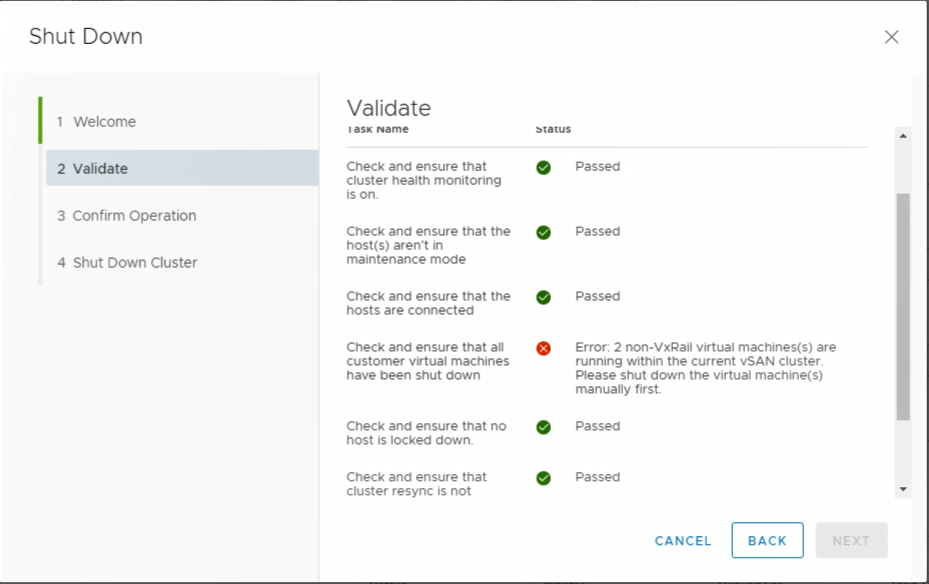
Cause
This is a known issue. Whatever VM on the VxRail cluster with the name "VMware vRealize Log Insight" is considered as a service VM, no matter what the VM is.
Resolution
For cluster shutdown, manually power off Log Insight VM with other customer VMs
To avoid confusion, rename Log Insight VM to a different name.
If the VCSA and PSC are still on the VxRail cluster, the shutdown still fails.
Also, avoid using the name of "VMware vRealize Log Insight" for other VMs.
To avoid confusion, rename Log Insight VM to a different name.
If the VCSA and PSC are still on the VxRail cluster, the shutdown still fails.
Also, avoid using the name of "VMware vRealize Log Insight" for other VMs.
Additional Information
The Log Insight license is bundled with internal vCenter, so after conversion, Log Insight is no longer a service VM, and a separate license should be provided.
Affected Products
VxRail, VxRail SoftwareArticle Properties
Article Number: 000043806
Article Type: Solution
Last Modified: 12 Jun 2025
Version: 4
Find answers to your questions from other Dell users
Support Services
Check if your device is covered by Support Services.