VNX: Unable to create RAID group/Storage Pool
Summary: Unable to create RAID group/Storage Pool.
Symptoms
Unable to create Storage pool/RAID group even though there are unbound drives.
While creating a new RAID group:
Error: There are no more disks available to create a RAID.
While creating a new storage pool:
Error: There are no more disks available to create pool. Note that the system disk are not eligible for use in a pool.
Cause
The drives used to create a RAID group/storage pool were showing unbound in the disk list [Unisphere > System > Storage Hardware > Disk]. However these unbound drives were showing as part of a raid group [In Unisphere > Storage > Storage Pool > RAID Group]. And this raid group, RAID type was showing as Unbound. See the screenshot:
In the screenshot, disk Bus 0 Enclosure 0 Disk 15 drives are shown as unbound. It also shows that this drive is part of raid group "RAID Group 2" and the RAID Type shows as unbound.
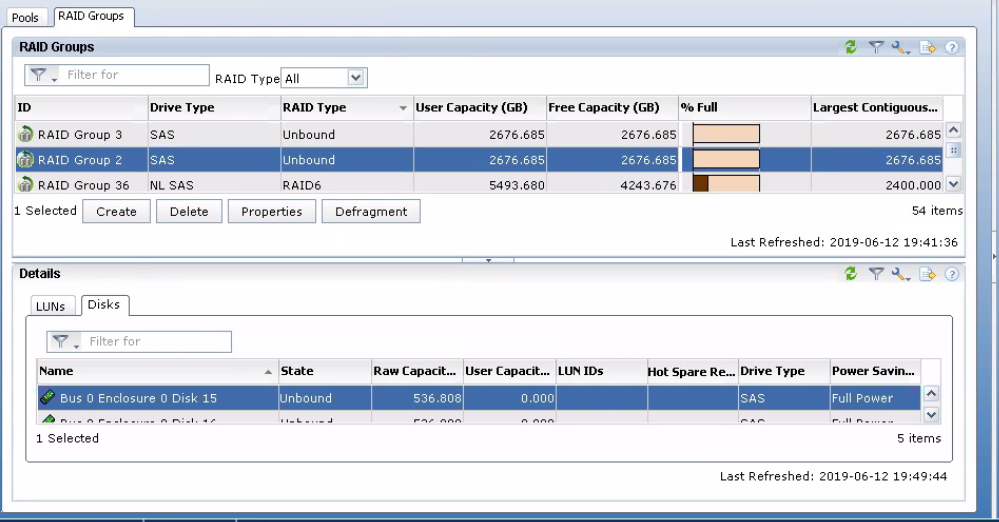
In the below logs, the drives 0.0.15 to 0.0.19 are shown as unbound but also part of RAID Group 2.
0.0.15      2    600GB SAS           HITACHI    Cobra-D        PPGJR17B         118032767    005049250PWR  C260       Unbound     --            6     6
0.0.16      2    600GB SAS           HITACHI    Cobra-D        PPGK24ZB         118032767    005049250PWR  C260       Unbound     --            6     6
0.0.17      2    600GB SAS           HITACHI    Cobra-D        PPGHLMRB         118032767    005049250PWR  C260       Unbound     --            6     6
0.0.18      2    600GB SAS           HITACHI    Cobra-D        PZKD8URD         118032767    005049250PWR  C3B2       Unbound     --            6     6
0.0.19      2    600GB SAS           HITACHI    Cobra-D        PPGET75B         118032767    005049250PWR  C260       Unbound     --            6     6
SPA/B_arrayconfig.txt file:
RAIDGroup[2]:                                                 <<<<<< Raid group 2
        Capacity: 5613414400
        FreeSpace: 5613414400
        LargestUnboundSegmentSize: 5613414400
        RGRaidType: 0
        Type: 0
        OperationPriority: 1
        WillBeRemoved: false
        IsPrivate: false
        State: 3
        MaxLuns: 256
        RawCapacityBlocks: 5613414400
        PercentDefragmented: 100
        PercentExpanded: 4294967295
        LunExpansionEnabled: false
        LegalRaidTypes: 153
        RGUserDefinedPowerSaving: false
        RGUserDefinedLatencyTolerance: 0
        IsRGHardwarePowerSavingEligible: true
        IsRGPowerSavingEligible: true
        IsRGInStandByState: false
        ElementSize: 128
        Disks:
          Disk[0.0.19]:
            Name: Bus 0 Enclosure 0 Disk 19
            Bank: -1
            BankAsInteger: 4294967295
          Disk[0.0.18]:
            Name: Bus 0 Enclosure 0 Disk 18
            Bank: -1
            BankAsInteger: 4294967295
          Disk[0.0.17]:
            Name: Bus 0 Enclosure 0 Disk 17
            Bank: -1
            BankAsInteger: 4294967295
          Disk[0.0.16]:
            Name: Bus 0 Enclosure 0 Disk 16
            Bank: -1
            BankAsInteger: 4294967295
          Disk[0.0.15]:
            Name: Bus 0 Enclosure 0 Disk 15
            Bank: -1
            BankAsInteger: 4294967295
Resolution
Destroy the RAID Group in which the RAID Type shows as "unbound" and the disks in the raid group shows as unbound. Then these drives can be used to create new pool or raid group. Destroying the raid group deletes all the LUNs. Ideally such RAID Group does not have any LUNs in them. In case if there are any LUNs in such a type of RAID group, the RAID group can be destroyed after deleting the LUN. If the LUNs are required, then do not delete the LUN or RAID Group.