NetWorker: gstd 서비스로 NMC를 시작할 수 없음 "http: 웹 서버 pid 파일을 찾을 수 없습니다. "
요약: 이 문서에서는 gstd 충돌 문제를 식별하고 해결하는 데 도움이 됩니다.
이 문서는 다음에 적용됩니다.
이 문서는 다음에 적용되지 않습니다.
이 문서는 특정 제품과 관련이 없습니다.
모든 제품 버전이 이 문서에 나와 있는 것은 아닙니다.
증상
타사 애플리케이션을 설치하고 서버를 재부팅했습니다.
NMC를 시작할 수 없습니다. gstd 서비스가 지속적으로 중단되고 있습니다.
다음은 NMC의 로그입니다.
authc_mgmt 실행하면 다음 출력이 표시됩니다.
NMC 로그 위치:
NMC를 시작할 수 없습니다. gstd 서비스가 지속적으로 중단되고 있습니다.
다음은 NMC의 로그입니다.
31581 7/10/2019 8:02:24 AM 2 0 0 3944 5600 0 <NetWorker_Server_Hostname> gstd NSR warning *** gstd starting at Wed Jul 10 08:02:24 2019
129343 7/10/2019 8:02:44 AM 2 0 0 3944 5600 0 <NetWorker_Server_Hostname> gstd NSR warning Using authentication service on '<NetWorker_Server_Hostname>' host and '9090' port.
139071 7/10/2019 8:02:44 AM 0 0 0 3944 5600 0 <NetWorker_Server_Hostname> gstd NSR info Updating External roles attributes to include Administrators group of authentication service.
0 7/10/2019 8:02:46 AM 2 0 0 3944 5600 0 <NetWorker_Server_Hostname> gstd NSR warning Unable to get token for service account of NMC server from authentication service. Authentication service account name or password not specified
0 7/10/2019 8:02:53 AM 2 0 0 3944 5600 0 <NetWorker_Server_Hostname> gstd NSR warning http: Web server pid file not found.
31582 7/10/2019 8:02:55 AM 2 0 0 3944 5600 0 <NetWorker_Server_Hostname> gstd NSR warning *** gstd stopping at Wed Jul 10 08:02:55 2019
authc_mgmt 실행하면 다음 출력이 표시됩니다.
C:\Program Files\EMC NetWorker\Management\GST\logs>authc_mgmt -u administrator -e find-all-users
Enter password:
The query returns 2 records.
User Id User Name
1000 administrator
1001 svc_nmc_nw-srv
NMC 로그 위치:
Linux: /opt/lgtonmc/logs/gstd.raw
Windows: .. \Program Files\EMC NetWorker\Management\GST\logs\gstd.raw
NetWorker: nsr_render_log 사용 방법
Windows: .. \Program Files\EMC NetWorker\Management\GST\logs\gstd.raw
NetWorker: nsr_render_log 사용 방법
원인
다른 애플리케이션은 포트 9000을 사용하고 있습니다.
해결
이 KB의 단계는 포트 9000을 사용하는 애플리케이션이 NMC임을 보여줍니다. 그러나 다른 애플리케이션이 포트 9000을 사용하고 있는지 확인하는 데에도 동일한 단계가 적용됩니다.
1. NMC 서버에서 gstd 서비스가 중지되었는지 확인합니다.
a. gstd 서비스가 실행 중인 경우 중지합니다
. Linux: systemctl stop gst
Windows: net stop gstd
2. NMC 서비스가 중지된 경우 포트 9000에서 프로세스가 수신 대기 중인지 확인합니다.
1. NMC 서버에서 gstd 서비스가 중지되었는지 확인합니다.
Linux: ps -ef | grep gstd
Windows: taslklist | findstr gstd
Windows: taslklist | findstr gstd
a. gstd 서비스가 실행 중인 경우 중지합니다
. Linux: systemctl stop gst
Windows: net stop gstd
2. NMC 서비스가 중지된 경우 포트 9000에서 프로세스가 수신 대기 중인지 확인합니다.
Linux: netstat -apno | grep 9000
예:
[root@lnx-nwserv]:~#netstat -apno | grep 9000
tcp6       0      0 :::9000                 :::*                    LISTEN      2583321/httpd        off (0.00/0/0)
Windows: netstat -ano | findstr "9000"
의 예:
PS C:\Windows\system32> netstat -ano | findstr "9000"
  TCP    0.0.0.0:9000           0.0.0.0:0              LISTENING       6924
  TCP    [::]:9000              [::]:0                 LISTENING       6924
참고: 두 시스템 모두 프로세스가 포트 9000에서 수신 대기 중임을 나타내고 프로세스와 연결된 PID(Process ID)도 표시됩니다. 이 포트는 NMC에서 사용하는 기본 포트입니다. 다른 포트도 이 포트를 사용하는 경우 NMC 연결이 실패할 수 있습니다.
3. 포트 9000을 사용하는 애플리케이션 식별:
Linux: ps -ef | grep <PID from netstat output>
Example:
[root@lnx-nwserv]:~# ps -ef | grep 2583321
nsrnmc   2583321       1  0 Sep11 ?        00:00:29 /opt/lgtonmc/apache/bin/httpd -f /opt/lgtonmc/apache/conf/httpd.conf
nsrnmc   2583322 2583321  0 Sep11 ?        00:00:00 /opt/lgtonmc/apache/bin/httpd -f /opt/lgtonmc/apache/conf/httpd.conf
root     3582983 3581647  0 11:24 pts/12   00:00:00 grep --color=auto 2583321
Windows: 작업 관리자를 열고 Details 탭으로 이동하여 PID 열을 정렬한 다음 netstat 명령 출력에서 PID를 찾을 때까지 목록을 검토합니다.
예제:
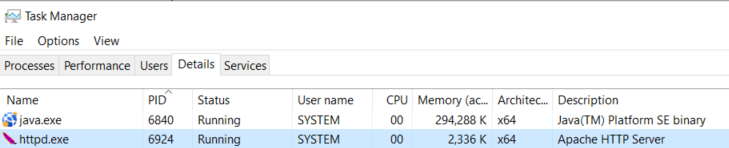
참고: 표시된 애플리케이션은 다를 수 있습니다. 위의 단계는 포트 9000을 사용하는 프로세스 또는 애플리케이션을 식별하는 데 도움이 됩니다.
4. 포트 9000을 사용하여 애플리케이션을 중지하고 NMC를 시작합니다.
Linux: systemctl start gst
Windows: net start gstd
a. gstd 서비스가 시작되는지 확인합니다.
Linux: ps -ef | grep gstd
Windows: taslklist | findstr gstd
5. NMC에 액세스하고 로그인할 수 있는지 확인합니다.
다른 애플리케이션이 중지되면 NMC에 액세스할 수 있는 경우 다음 옵션 중 하나를 사용할 수 있습니다.
- NMC 포트와 충돌하는 애플리케이션을 제거합니다.
- 애플리케이션을 제거할 수 없는 경우 애플리케이션 포트를 변경할 수 있는지 확인합니다.
- 애플리케이션을 제거할 수 없고 사용하는 포트를 변경할 수 없는 경우 NMC에서 사용하는 포트를 변경합니다.
NMC에서 사용하는 포트를 변경하려면 NMC 서버에서 gstd.conf 파일을 수정합니다.
Linux: /opt/lgtonmc/etc/gstd.conf
Windows: .. \Program Files\EMC NetWorker\Management\GST\etc\gstd.conf
gstd.conf 파일에서 다음 줄을 변경하여 사용 가능한 포트를 가리킵니다.
int http_svc_port = <포트 번호>
NetWorker 프로세스 및 포트: 다른 NetWorker 서비스에서 아직 사용하지 않은 포트를 지정합니다. 포트를 설정하기 전에 서버의 다른 어떤 것도 포트에서 수신 대기 중인지 확인합니다.
GSTD 서비스를 다시 시작합니다.
Linux: systemctl restart gst
Windows: net stop gstd && net start gstd
추가 정보
해당 제품
NetWorker제품
NetWorker, NetWorker Management Console문서 속성
문서 번호: 000060646
문서 유형: Solution
마지막 수정 시간: 27 9월 2023
버전: 3
다른 Dell 사용자에게 질문에 대한 답변 찾기
지원 서비스
디바이스에 지원 서비스가 적용되는지 확인하십시오.