Dell EMC Unity: Is it possible to reset the counter of Total Link Errors on a Fibre Channel (FC) port
Summary: Is it possible to reset the counter of Total Link Errors on a Fibre Channel (FC) port? (User Correctable)
This article applies to
This article does not apply to
This article is not tied to any specific product.
Not all product versions are identified in this article.
Symptoms
Is it possible to reset the counter of Total Link Errors on FC ports to 0?
For example: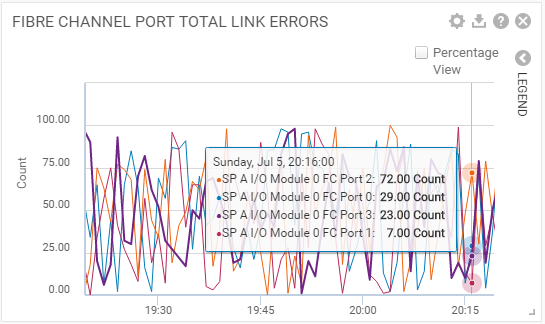
The values displayed are the Total Number of Link Errors, in I/O per second, for the selected Storage Processors, and associated Fibre Channel (FC) ports.
Cause
None
Resolution
Total Link errors on FC port are only visible or can be added in the "Historical Chats".
Currently, there is no way in the Dell EMC Unity to clear or reset the counters of Total Link Errors on an FC port.
For detailed information about Total Link Errors on FC port:
Affected Products
Dell EMC Unity FamilyProducts
Dell EMC Unity Family |Dell EMC Unity All Flash, Dell EMC Unity Family, Dell EMC Unity HybridArticle Properties
Article Number: 000069639
Article Type: Solution
Last Modified: 11 Jul 2025
Version: 4
Find answers to your questions from other Dell users
Support Services
Check if your device is covered by Support Services.