VPLEX: When using HTML-5 GUI in 6.2 through 6.2 P3 the Remove Initiators feature, it is removing more initiators than the user selected.
Summary: This article talks to the issue in GeoSynchrony 6.2 through 6.2 Patch 3 when using the HTML-5 GUI and using the ‘ADD/REMOVE INITIATORS’ option under Storage View, if the filter option (funnel icon) in this feature is used for initiators to be removed, and the shift+select function is used, more initiators than those selected are also removed. This may lead to Data Unavailable (DU) situations. ...
This article applies to
This article does not apply to
This article is not tied to any specific product.
Not all product versions are identified in this article.
Symptoms
In the HTML-5 GUI interface, in the ‘Storage Views’ screen the user can view those initiators in a Storage View and if they plan to remove some of those initiators for a retiring Host(s) or for other reasons and renames those initiators to be removed for easier finding.
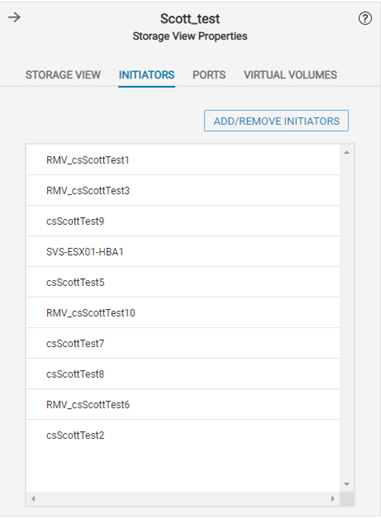
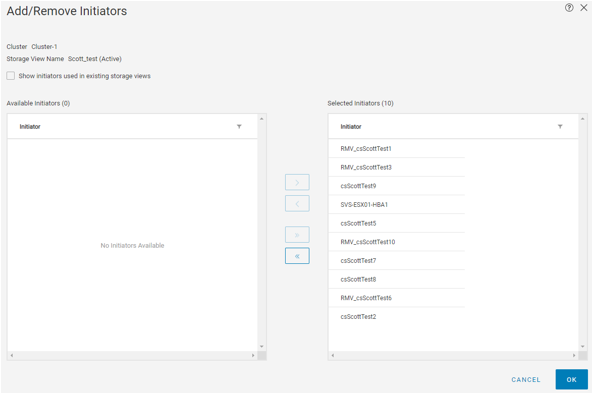
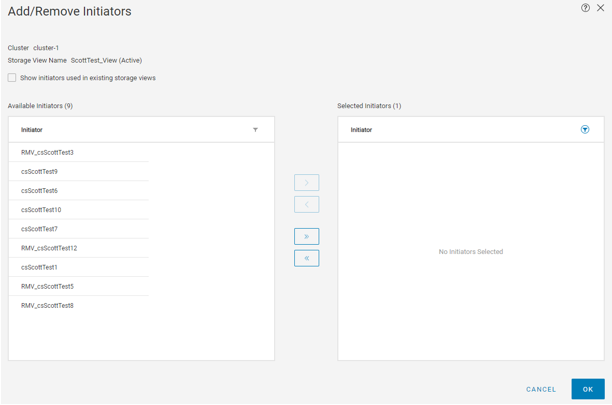
The user clicks on ‘Add/Remove Initiators’ and sees the list of initiators with those renamed for easy finding for removal.
In the screenshot example below those initiators to be removed were renamed with "RMV_" at the beginning of the initiator name.
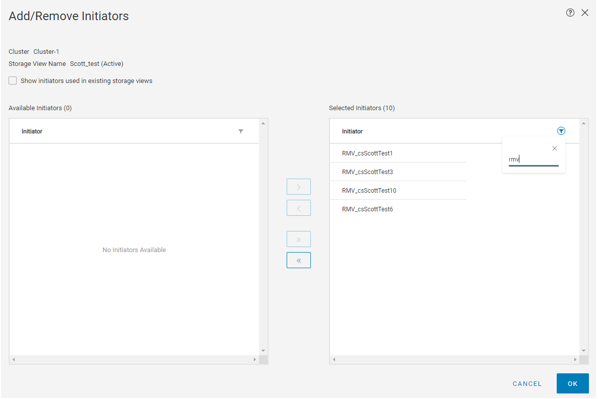
Then in the upper right corner is the filter icon, the funnel, and the user selects the filter feature to filter on those initiators they wish to remove, renamed with "RMV_" for example purposes.
From the filtered list of initiators listed the user clicks on the top initiator, scrolls down to find the last initiator they want to remove and they use the shift+select method by holding down the shift key and clicking on the last initiator to be removed,
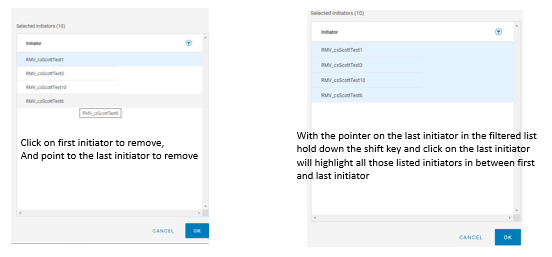
what the user is not aware of is in background all of the initiators between those initiators they "Shift+selected" to be removed are also selected.
The issue is that all the other initiators seen in the initial remove initiator list not showing in the filtered list that were not selected will also be selected, unbeknownst to the user and they won’t know this until after they click the remove single arrow. So clicking on the remove single arrow (left pointing) to remove the selected initiators will show a Warning message, alerting the user that removing initiators from an active storage view may cause data to become unavailable in this Storage View, and asks if they are sure of this operation.
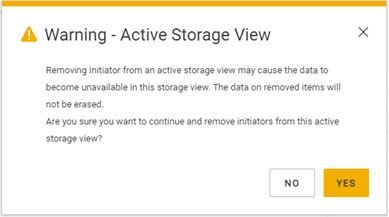
If the user proceeds to confirm the changes, they will not be aware of other non-selected initiators that were added to the list and by removing those initiators not intended for removal may lead to Data Unavailable (DU) for the hosts where the initiators that were not intended to be removed are.
The user clicks YES in the warning message which will take the user back to the Add/Remove Initiator screen, where on the left are those initiators that will be removed if the action is OK'd. In that list the user will see those initiators they had selected using the filter and shift+select method and possibly other initiators that were not in the filtered listing, yet in the unfiltered list were in-between those renamed, as "RMV_" that were to be removed. If the user just clicks OK without first checking the list of initiators to be removed then those they were not aware were also selected and added to the remove list will be removed when they click OK.
The user clicks on ‘Add/Remove Initiators’ and sees the list of initiators with those renamed for easy finding for removal.
In the screenshot example below those initiators to be removed were renamed with "RMV_" at the beginning of the initiator name.
Then in the upper right corner is the filter icon, the funnel, and the user selects the filter feature to filter on those initiators they wish to remove, renamed with "RMV_" for example purposes.
From the filtered list of initiators listed the user clicks on the top initiator, scrolls down to find the last initiator they want to remove and they use the shift+select method by holding down the shift key and clicking on the last initiator to be removed,
what the user is not aware of is in background all of the initiators between those initiators they "Shift+selected" to be removed are also selected.
The issue is that all the other initiators seen in the initial remove initiator list not showing in the filtered list that were not selected will also be selected, unbeknownst to the user and they won’t know this until after they click the remove single arrow. So clicking on the remove single arrow (left pointing) to remove the selected initiators will show a Warning message, alerting the user that removing initiators from an active storage view may cause data to become unavailable in this Storage View, and asks if they are sure of this operation.
If the user proceeds to confirm the changes, they will not be aware of other non-selected initiators that were added to the list and by removing those initiators not intended for removal may lead to Data Unavailable (DU) for the hosts where the initiators that were not intended to be removed are.
The user clicks YES in the warning message which will take the user back to the Add/Remove Initiator screen, where on the left are those initiators that will be removed if the action is OK'd. In that list the user will see those initiators they had selected using the filter and shift+select method and possibly other initiators that were not in the filtered listing, yet in the unfiltered list were in-between those renamed, as "RMV_" that were to be removed. If the user just clicks OK without first checking the list of initiators to be removed then those they were not aware were also selected and added to the remove list will be removed when they click OK.
Cause
There is a known issue with the filtering option in the ‘Add/Remove Initiators’ screen in the HTML-5 GUI. Whenever using ‘shift+select’ on a filtered list, it is selecting all the initiators in-between the first and the last initiator selected from the unfiltered list, thus selecting more initiators than intended.
This issue exists in the ‘Add/Remove Initiators’ from Storage Views’ screen and the “Ports” screen "Add/Remove Ports" function as well. It is not seen in other areas of the HTML-5 GUI like the ‘Add" or "Remove’ function of the Virtual Volumes tab of the Storage Views screen.
This issue exists in the ‘Add/Remove Initiators’ from Storage Views’ screen and the “Ports” screen "Add/Remove Ports" function as well. It is not seen in other areas of the HTML-5 GUI like the ‘Add" or "Remove’ function of the Virtual Volumes tab of the Storage Views screen.
Resolution
Resolution:
The 'Shift + select' feature in the HTML5 GUI has been disabled in GeoSynchrony 6.2 Patch 4 while Dell EMC VPLEX Engineering investigate this problem. Once a complete fix is available this article will be updated.
This issue has been fixed in GeoSynchrony 6.2 Patch 5 and later
Workaround:
The workaround for 6.2 through Patch 3 is to not use the ‘shift+select’ functionality on a filtered list as it would select all the items in-between from the un-filtered list as well. Rather, select each initiator the user intends to remove individually from the filtered list on the right side of Add/Remove Initiators screen.
How to fix the issue when unselected initiators have been added to the remove list, as talked to in the Issue section.
If you look at the last screen shot in the Issue section, the way to fix that issue of the Remove Initiators process is the user needs to STOP, not click any more buttons, and review the list of initiators showing in the left pane, as these are the initiators that will be removed when OK, in the lower right, is clicked if no action is taken. From the view shown below, the user should review those initiators listed in the left pane and select, individually, all those initiators that are not to be removed, then click the "add" single arrow (right pointing) to move those selected initiators not intended to be removed back to the right hand pane as initiators in the right pane will not be removed.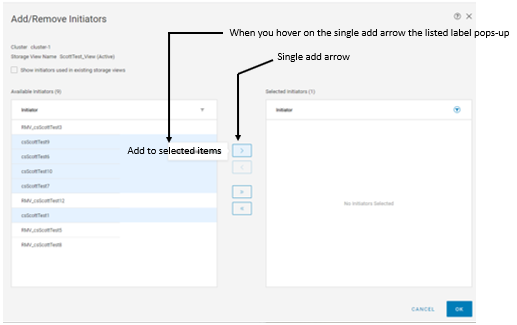
This will move all those selected initiators the user did not want removed to the right side and leave only those the user had intended to be removed. Also, you will not see any initiators you moved to the right side as the filter is still setup to filter on the name of the initiators to be removed, e.g. RMV.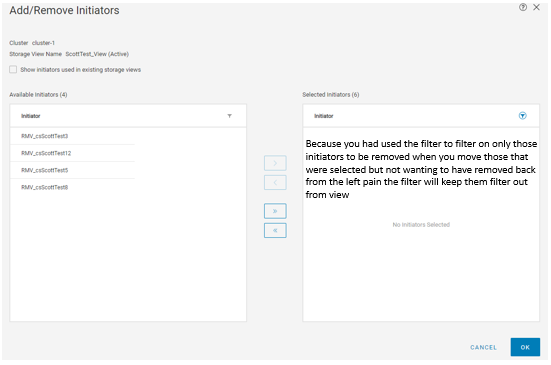
Now once only the initiators the user wanted to remove are now listed in the left pane you can click on OK in the lower right. This will carry out the removal action and a pop-up window will appear reporting the results of the removal, listing all the initiators that were removed from the Storage View.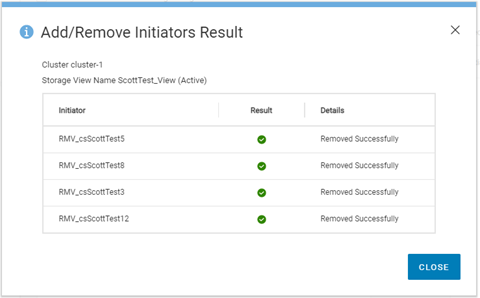
Again, review the results data to ensure only those initiators that were to be removed are listed. If all is correct you can click on CLOSE to close the results pop-up window. This will take you back to the Storage-view window and on the right is the Storage-view you had been working in. Click on the INITIATORS selection at the top and you should see the remaining initiators and those you had renamed for easy finding before will be gone.
This issue does not exist in the FLASH* GUI, which can also be used as an alternative.
*Note: Users should be aware that as of 31 December 2020 Adobe ended support for their Flash application and browser vendors have depreciated support of Flash as well. Refer to DTA 180686 for more information on this.
Affected Products
VPLEX Series, VPLEX VS2, VPLEX VS6Article Properties
Article Number: 000181186
Article Type: Solution
Last Modified: 04 Jun 2025
Version: 5
Find answers to your questions from other Dell users
Support Services
Check if your device is covered by Support Services.