IDPA: Cannot Access ACM Upgrade UI Due to Upgrade Validation with Message 'redirection failed'
Summary: This article walks you through a scenario during the IDPA upgrade validation process where the ACM upgrade UI redirection fails. This may happen if port 9443 is blocked on the network firewall between the system accessing the ACM and ACM. ...
Symptoms
Verify that the extraction of upgrade binary on ACM was successful.
Log in to the ACM using PuTTY or SSH as root user and run the following command:
cat /data01/tmp/patch/logs/extract.log

05/01/21 06:43:33 ************ Executing extract.sh ************

05/01/21 06:43:34 Dataprotection upgrade rpm not found.

05/01/21 06:43:34 Deploying dataprotection-upgrade binary in tomcat.

05/01/21 06:44:08 Checking for the mandatory files in tar

05/01/21 06:44:08 Creating second instance of tomcat

05/01/21 06:44:41 Successfully created second tomcat instance
Verify that the second upgrade Tomcat process creation was successful:
tail -5 /data01/tmp/patch/logs/tomcat_creation.log

05/01/21 06:44:41 Upgrade war exists in old tomcat. Removing war

05/01/21 06:44:41 Successfully deleted dataprotection upgrade war from old tomcat

05/01/21 06:44:41 Dataprotection upgrade directory exists in old tomcat. Removing war

05/01/21 06:44:41 Successfully deleted dataprotection upgrade directory from old tomcat

05/01/21 06:44:41 Successfully created second tomcat instance
Verify that ACM is listening on port 9443 using the following command:
netstat -apn |grep 9443
Verify that the Upgrade service is up and running using the following command:
service dataprotection_webapp_upgrade status

dataprotection_webapp_upgrade.service - SYSV: Apache Tomcat init script

   Loaded: loaded (/etc/init.d/dataprotection_webapp_upgrade)

   Active: active (exited) since Sat 2021-05-01 06:44:12 PDT; 4 days ago

  Process: 17035 ExecStart=/etc/init.d/dataprotection_webapp_upgrade start (code=exited, status=0/SUCCESS)
In another use case, the following messages were noted on the ACM upgrade-utility.log:
grep -i "java.net.ConnectException" /data01/tmp/patch/logs/upgrade-utility.log

2020-10-16 10:59:41,576 ERROR [https-jsse-nio-8543-exec-8]-util.RestUtil: Error occured while executing REST request. due to java.net.ConnectException: Connection timed out (Connection timed out)
Verify if port 9443 is open on the network firewall between the system accessing the ACM and the ACM itself.
Cause
Resolution
goidpa tool can provide more information about this issue. Follow the below article to install the goidpa tool: PowerProtect Data Protection Appliance: GoIDPA tool
Run the following command on the ACM:
./goidpa system upgrade-port-check
This allows you to test if port 9443 is reachable from your system.
Fix:
Port 9443 must be opened on the network firewall between the system Accessing the ACM UI and the ACM VM.
Workaround:
It may be possible to create a tunnel on PuTTY to perform port forwarding as a workaround.
- Right-click PuTTY and go to Connection > SSH > Tunnels
- Enter the details in the following format:
Source Port 443

Destination IP: ACM Public IP Address

Destination Port: 443
- Click Add
- Add the second port tunnel for 9443 as per the details below and click Add.
Source Port 9443

Destination IP: ACM Public IP Address

Destination Port: 9443
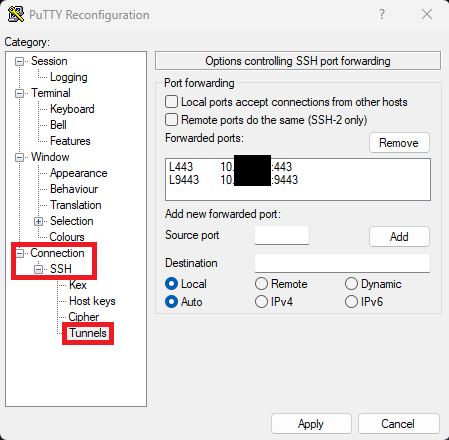
- Open the IDPA Upgrade UI on the following URL:
https://localhost:9443/dataprotection-upgrade