NVP vProxy: VM Backups Failing after Updating SSL Certificate on vCenter Server
Summary: After updating the SSL certificate on the vCenter server, NetWorker VMware Protection (NVP) backups of Virtual Machines (VM) fail.
This article applies to
This article does not apply to
This article is not tied to any specific product.
Not all product versions are identified in this article.
Symptoms
- vCenter SSL certificate was replaced or updated on the vCenter server.
- All vProxy image-based backup performed through the vCenter fail
- The VM session logs show the following error:
YYYY-MM-DD HH:MM:SS INFO:   [@(#) Build number: ###] There are 2 certificates available at VCENTER_HOSTNAME. First one will be used.
YYYY-MM-DD HH:MM:SS ERROR:  [@(#) Build number: ###] Failed to disable storage migration for virtual machine "vm-###": VDDK Error: 1: Unknown error.
YYYY-MM-DD HH:MM:SS ERROR:  [@(#) Build number: ###] Error disabling storage migration for virtual machine "VM_NAME".
YYYY-MM-DD HH:MM:SS INFO:   [@(#) Build number: ###] Set custom attribute 'Dell EMC vProxy Session' value for object vm-### to ''.
YYYY-MM-DD HH:MM:SS INFO:   [@(#) Build number: ###] Unlocked virtual machine.
YYYY-MM-DD HH:MM:SS INFO:   [@(#) Build number: ###] vProxy locks reset successfully.
- The vProxy
/opt/emc/vproxy/runtime/logs/vbackupd/vbackupd-vddk.logmay show:
YYYY MM DDTHH:mm:SSZ NOTICE: VDDK INFO VixDiskLib : VixDiskLib_PrepareForAccess : Disable Storage VMotion failed.
Error 1 (Unknown error) (Other error encountered: SSL Exception: Verification parameters:
YYYY MM DDTHH:mm:SSZ NOTICE: VDDK INFO PeerThumbprint :
2D:5E:84:C7:C7:41:8A:19:9E:02:F9:BB:B1:BD:CD:0C:4E:B3:AB:30
YYYY MM DDTHH:mm:SSZ NOTICE: VDDK INFO ExpectedThumbprint :
4e:68:1d:93:99:36:53:6a:ec:cd:8f:ae:0b:08:16:ef:75:89:79:1c
YYYY MM DDTHH:mm:SSZ NOTICE: VDDK INFO ExpectedPeerName : vCenter_Name
YYYY MM DDTHH:mm:SSZ NOTICE: VDDK INFO The remote host certificate has these problems:
YYYY MM DDTHH:mm:SSZ NOTICE: VDDK INFO
YYYY MM DDTHH:mm:SSZ NOTICE: VDDK INFO * Host name does not match the subject name(s) in certificate.
YYYY MM DDTHH:mm:SSZ NOTICE: VDDK INFO
YYYY MM DDTHH:mm:SSZ NOTICE: VDDK INFO * unable to get local issuer certificate) at 5001.
- Reviewing the session logs:
- NetWorker Management Console (NMC): The session log can be reviewed by opening the backup action details from the Monitoring tab, selecting a failed VM backup, then clicking show messages, and then Get full Log.
- vProxy: The session logs can be reviewed from an SSH session on the vProxy, connect to the vProxy as admin and switch to root. Completed and failed session logs are found under
/opt/emc/vproxy/runtime/logs/recycle/vbackupd/
Cause
vProxy version 4.3.0-34 or earlier is used.
The vProxy sends the current vCenter certificate thumbprint to the Virtual Disk Development Kit (VDDK) library. When the vCenter certificate is renewed, the thumbprint is no longer valid and VDDK returns an error. The vProxy gets a new certificate from vCenter and generates a new thumbprint. However, the older VDDK library (7.0.0-15832853 or earlier) does not accept it.
The vProxy sends the current vCenter certificate thumbprint to the Virtual Disk Development Kit (VDDK) library. When the vCenter certificate is renewed, the thumbprint is no longer valid and VDDK returns an error. The vProxy gets a new certificate from vCenter and generates a new thumbprint. However, the older VDDK library (7.0.0-15832853 or earlier) does not accept it.
Resolution
Solution:
This issue was resolved with the VDDK version in vProxy 4.3.0-36 (November 2022). If the vProxy is 4.3.0-34 or earlier, upgrade it to the latest 4.3.x or 4.4.x vProxy version supported by the NetWorker server and vCenter. Compatibility requirements are detailed in the NETWORKER and ALL COMPONENTS compatibility guides.
To get updates for the vProxy operating system, VDDK libraries, VMware Tools, and DD Boost Library, replace the vProxy with a newer release. See E-Lab Navigator for NetWorker.
Note: VDDK versions are updated periodically on vProxy releases. Even if the vProxy version used is later than 4.3.0-36, consult the compatibility matrix and below vProxy version information article. If the current vProxy VDDK version is older than the vCenter version, upgrading the vProxy is advised.
Related articles:
- NVP vProxy: NetWorker vProxy Version Information
- NVP vProxy: How To Upgrade the NVP vProxy Appliance using nsrvproxy_mgmt
Workaround:
- Ensure that the following process is used for replacing the SSL certificate on the vCenter server, VMware article Using vSphere Certificate Manager to Replace SSL Certificates
- From the NetWorker Management Console Devices >VMware Proxies tab, write down the configuration settings of the vProxys from the vProxy properties. Delete the vProxys. Deleting the vProxy should unregister it from the NetWorker server.
- From the vSphere client, reboot the vProxys. If the vProxy is not rebooted, the issue may persist once added back.
- From the NetWorker Management Console, return to the VMware Proxies tab and add the vProxys back to the NetWorker server matching the configuration settings. Adding the vProxy back re-registers the vProxy.
- Run the backups which previously failed.

Additional Information
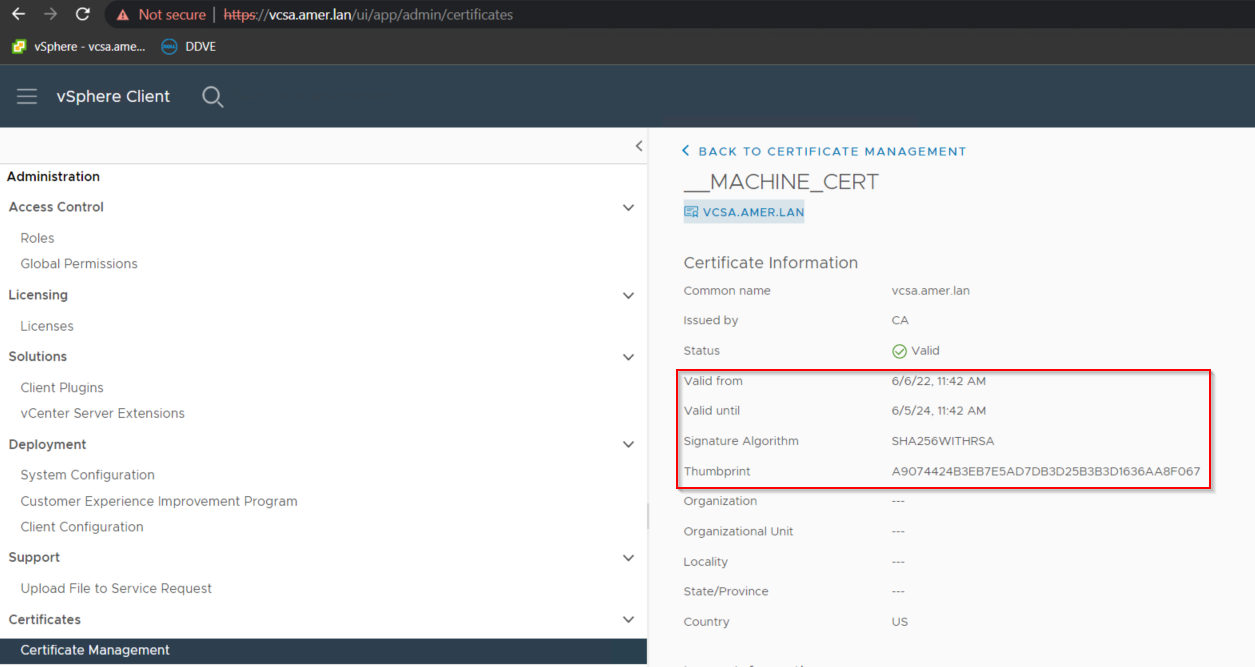
The current certificate thumbprint and validity period can be observed from the vSphere web client Administration > Certificates > Certificate Management >__MACHINE_CERT > View Details:
Affected Products
NetWorkerArticle Properties
Article Number: 000190514
Article Type: Solution
Last Modified: 03 Jul 2025
Version: 7
Find answers to your questions from other Dell users
Support Services
Check if your device is covered by Support Services.