PowerEdge: HTTP and HTTPS FQDN Connection Failures On iDRAC9 Firmware Version 5.10.00.00
Resumo: The Dell iDRAC9 firmware version 5.10.00.00 blocks HTTP and HTTPS access through the Fully Qualified Domain Name (FQDN) when the FQDN is not defined as the iDRAC Remote Access Controller (RAC) name. ...
Sintomas
The Dell Integrated Remote Access Controller 9 (iDRAC9) firmware version 5.10.00.00 introduced HTTP and HTTPS connection changes. These changes may impact user connections when specifying a Fully Qualified Domain Name (FQDN) address. Due to these changes, iDRAC9 users may encounter connection errors, redirection, or '400 - Bad Request' errors. These connection sightings occur when the specified FQDN does not match the iDRAC 'DNSRacName' or 'DNSDomainName' values.
Browser Error Example:
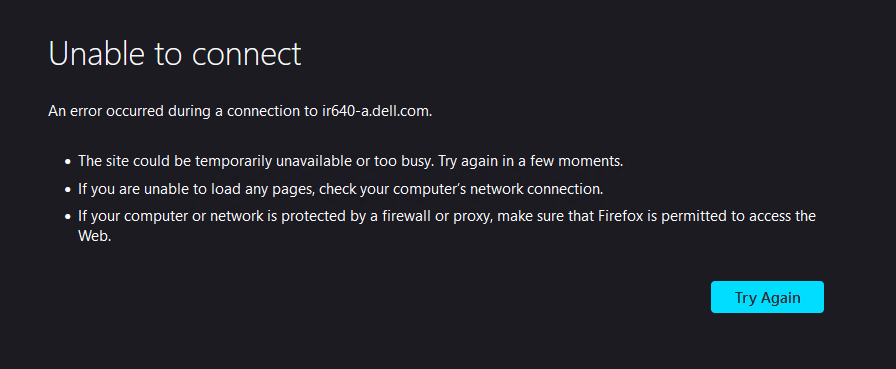
Figure 1: Mozilla HTTPS header error Curl Error Example:
	root@rhel7-vm:~$ curl -k https://iR640-A.dell.com/
	<!DOCTYPE html>
	<head>
	    <title>Bad Request</title>
	    <link rel="shortcut icon" href="data:image/x-icon;," type="image/x-icon">
	</head>
	<body>
	    <h2>Access Error: 400 -- Bad Request</h2>
	    <pre></pre>
	</body>
	</html>
Causa
The webserver in iDRAC9 firmware version 5.10.00.00 enforces an HTTP and HTTPS Host Header check by default.
Resolução
By default, the iDRAC9 checks the HTTP and HTTPS Host Header and compares to the defined 'DNSRacName' and 'DNSDomainName'. When the values do not match, the iDRAC refuses the HTTP and HTTPS connection. In iDRAC9 5.10.00.00, this Host Header enforcement can be disabled with the following RACADM command.
#Disable host header check

racadm set idrac.webserver.HostHeaderCheck 0
When HTTP and HTTPS Host Header check is enabled (more secure), the iDRAC can be accessed using the IPv4/IPv6 address, the RAC Name, and the defined iDRAC FQDN (DNSRacName, DNSDomainName). If the end-user is accessing with hostnames that the iDRAC may not be aware of (such as manual DNS entries added in DNS records), iDRAC9 5.10.00.00 firmware version introduced a new attribute 'ManualDNSEntry'. This new setting can be updated with up to four IP addresses and host names/FQDNs to provide an allow-list of Host Headers. This ensures that incoming requests are not dropped when the HTTP and HTTPS Host Header carries one of the entries in the 'ManualDNSEntry' setting.
# Add manual entry to allow list

racadm set idrac.webserver.ManualDNSEntry 192.168.20.30

racadm set idrac.webserver.ManualDNSentry 192.168.20.30,idrac.mydomain.com
This additional configuration is required in cases such as when:
- End user is using manual DNS configuration to access iDRAC (Manual DNS Host Record)
- Subject Alternative Name and Wild card certificate is used to access the iDRAC
- Accessing iDRAC using host IP address directly (usingISM)