PowerFlex HC template network validation error with newly uploaded ESX ISO VXFM00290
Summary: HC template is throwing a network validation error after selecting new ESXi OS image.
This article applies to
This article does not apply to
This article is not tied to any specific product.
Not all product versions are identified in this article.
Symptoms
- You create a template in PFxM before you upload an ESXi OS image.
- You then update the template to use this ESXi OS image.
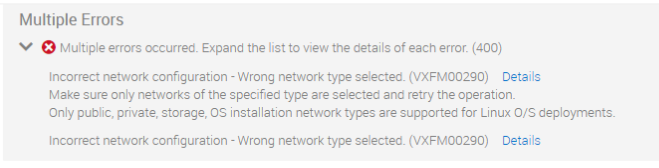
- You see the error stating Incorrect network configuration - Wrong network type selected (VXFM00290).
Cause
This occurs due to Template data not being able to fetch the new ESXi ISO details.
Resolution
There are two options to resolve this issue:
- Reboot the PFxM appliance
- Create a new template
Affected Products
PowerFlex rack, PowerFlex ApplianceArticle Properties
Article Number: 000195207
Article Type: Solution
Last Modified: 26 May 2025
Version: 5
Find answers to your questions from other Dell users
Support Services
Check if your device is covered by Support Services.