VxRail: Ensure vCLS VMs are deleted before VxRail cluster shutdown
Summary: Ensure vCLS VMs are deleted before VxRail cluster shutdown operation.
This article applies to
This article does not apply to
This article is not tied to any specific product.
Not all product versions are identified in this article.
Symptoms
Perform VxRail cluster shutdown from VxRail plug-in UI.
Due to a rare
Due to a rare
HostCommunication error from vCenter to ESXi, after cluster power on, some Virtual Machines (VM) may lose vSAN objects.
Check ESXi eam.log

// vCLS(1) = vm-3001 = agent-id 0052042f-8680-404e-9a14-46074251809d
// EAM successfully powered off the vCLS VM
2021-12-15T01:06:55.837Z |  INFO | vim-inv-update | VirtualMachinePropertyChangeHandler.java | 264 | VM: vm-3001 power state set to poweredOff
2021-12-15T01:06:56.375Z |  INFO | cluster-agent-2 | AuditedJob.java | 106 | JOB COMPLETED: [#172504658] PowerOffVmJob(ClusterAgent(ID: 'Agent:0052042f-8680-404e-9a14-46074251809d:null'))
// then EAM tried to delete the vCLS VM
2021-12-15T01:06:56.375Z |  INFO | cluster-agent-2 | ExecutorUtils.java | 36 | JOB SUBMITED: [#1300404265] DeleteVmJob(ClusterAgent(ID: 'Agent:0052042f-8680-404e-9a14-46074251809d:null'))
2021-12-15T01:06:56.375Z |  INFO | cluster-agent-2 | AuditedJob.java | 106 | JOB STARTED: [#1300404265] DeleteVmJob(ClusterAgent(ID: 'Agent:0052042f-8680-404e-9a14-46074251809d:null'))

// but due to HostCommunication error, EAM failed to delete the vCLS VM.
2021-12-15T01:07:50.530Z |  WARN | cluster-agent-2 | Retry.java | 103 | Failed to delete ClusterAgent(ID: 'Agent:0052042f-8680-404e-9a14-46074251809d:null') VM vm-3001.at attempt 1 out of 24 Reason: vmodl.fault.HostCommunication {
}

// then Cluster was shutdown
// After Cluster power up EAM tried to delete the VM again after vCenter boot up, but it deleted wrong VM
2021-12-15T06:25:56.336Z |  INFO | cluster-agent-3 | ExecutorUtils.java | 36 | JOB SUBMITED: [#1489285519] DeleteVmJob(ClusterAgent(ID: 'Agent:0052042f-8680-404e-9a14-46074251809d:null'))
2021-12-15T06:25:56.336Z |  INFO | cluster-agent-3 | AuditedJob.java | 106 | JOB STARTED: [#1489285519] DeleteVmJob(ClusterAgent(ID: 'Agent:0052042f-8680-404e-9a14-46074251809d:null'))
2021-12-15T06:25:58.389Z |  INFO | cluster-agent-3 | AuditedJob.java | 106 | JOB COMPLETED: [#1489285519] DeleteVmJob(ClusterAgent(ID: 'Agent:0052042f-8680-404e-9a14-46074251809d:null'))
2021-12-15T06:25:58.389Z |  INFO | cluster-agent-3 | AuditedJob.java | 106 | JOB COMPLETED: [#1090355414] UninstallClusterAgentJob(ClusterAgent(ID: 'Agent:0052042f-8680-404e-9a14-46074251809d:null'))
Cause
During the VxRail cluster shutdown process, VxRail initiates cluster retreat mode, which requests the vCenter ESXi Agent Manager (EAM) service to delete vCLS VMs. Due to a rare
VxRail manager is not able to detect vCLS VM status, so the shutdown process does not wait for the vCLS VM deletion complete. It may shut down vCenter and VxRail manager VMs before the EAM finishes the deletion operation.
As a result, the EAM tries to delete these VMs again during cluster powering on, but now the VM ID between VPXD and VPXA is not synced, which causes incorrect VMs getting deleted.
HostCommunication error from vCenter to ESXi, the EAM may fail to delete the vCLS VMs.
VxRail manager is not able to detect vCLS VM status, so the shutdown process does not wait for the vCLS VM deletion complete. It may shut down vCenter and VxRail manager VMs before the EAM finishes the deletion operation.
As a result, the EAM tries to delete these VMs again during cluster powering on, but now the VM ID between VPXD and VPXA is not synced, which causes incorrect VMs getting deleted.
Resolution
VxRail enhanced cluster shut down process in 7.0.370 and 8.0.000 releases, to monitor vCLS VMs status, and ensure they are deleted before proceeding the cluster shutdown process. If your cluster is on 7.0.370, 8.0.000 or newer versions, this issue is already fixed.
For clusters prior to 7.0.370 version, BEFORE performing VxRail cluster shut down operation, it is required to manually ensure all vCLS VMs have been removed from the cluster.
- Follow VMware KB 80472
"Retreat Mode steps" to enable Retreat Mode and ensure vCLS VMs are deleted successfully. This can be checked by selecting the vSAN Cluster > VMs tab, there should be no vCLS VM listed.
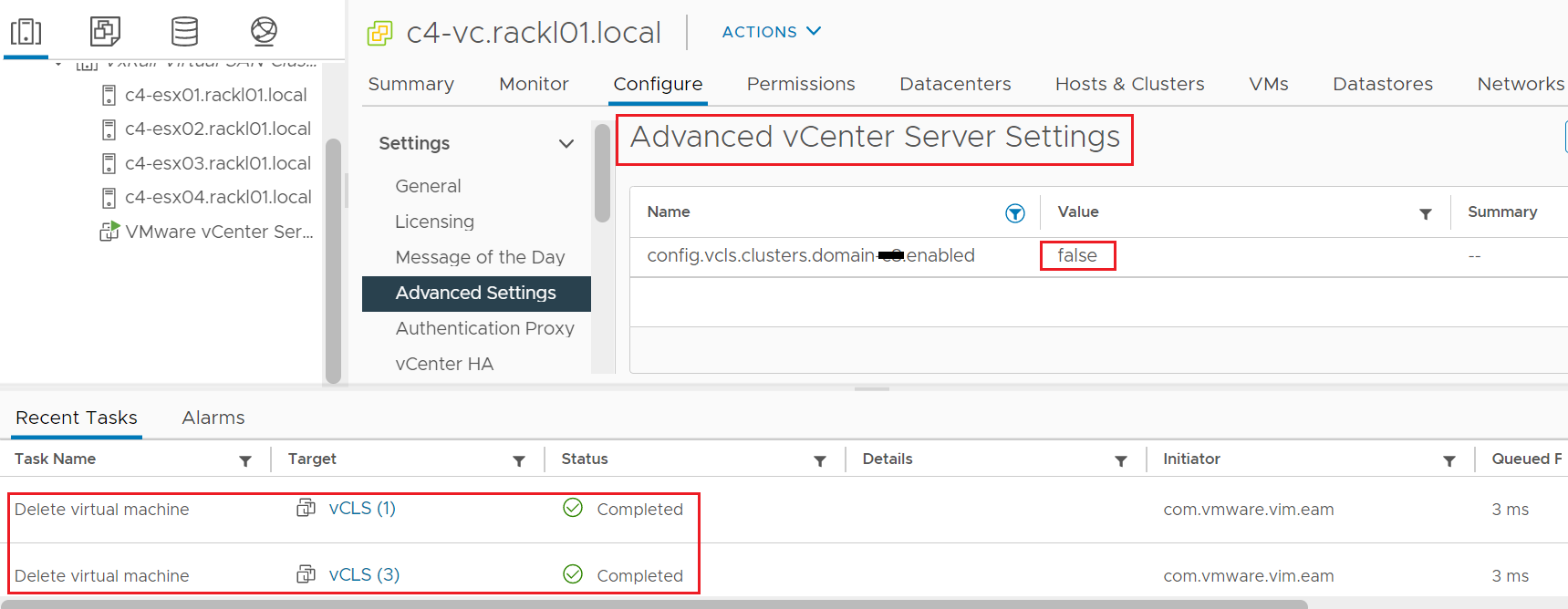
- Follow the VxRail plug-in UI to perform cluster shutdown.
Affected Products
VxRail SoftwareArticle Properties
Article Number: 000196884
Article Type: Solution
Last Modified: 13 May 2026
Version: 13
Find answers to your questions from other Dell users
Support Services
Check if your device is covered by Support Services.