AppSync: AppSync-käyttöliittymässä asiakas ei voinut määrittää lokiinkirjaustilaa virheenkorjaukseksi, koska Apply-painike pysyi poissa käytöstä virheenkorjausasetuksen valinnalla.
Yhteenveto: AppSync-käyttöliittymässä asiakas ei voinut määrittää lokiinkirjaustasoa virheenkorjaukseksi, koska Apply-painike pysyi poissa käytöstä virheenkorjausasetuksen valinnalla.
Tämä artikkeli koskee tuotetta
Tämä artikkeli ei koske tuotetta
Tämä artikkeli ei liity tiettyyn tuotteeseen.
Tässä artikkelissa ei yksilöidä kaikkia tuoteversioita.
Oireet
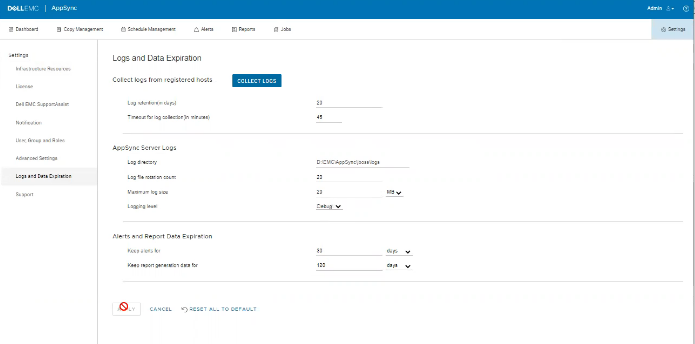
Lokeissa ei ole virheitä, mutta ongelma näkyy käyttöliittymässä seuraavan esimerkin mukaisesti.
Syy
Ongelma johtuu siitä, että samassa näytössä oleva asiakas on määrittänyt Timeout for log collection (in minutes) -asetuksen arvoksi 45, mikä on virheellistä.
Tarkkuus
Aseta Timeout for log collection (in minutes) -arvoksi kelvollinen arvo 90 ja 120.
Lisätietoja
AppSync 4.5 ei salli virheellistä timeout for log collection (in minutes)
-arvoa.Kelvolliset arvot voivat olla 90–120.
-arvoa.Kelvolliset arvot voivat olla 90–120.
Tuotteet, joihin vaikutus kohdistuu
Data Protection, Data Backup & Protection Software, AppSync, AppSyncArtikkelin ominaisuudet
Artikkelin numero: 000203604
Artikkelin tyyppi: Solution
Viimeksi muutettu: 15 toukok. 2026
Versio: 9
Etsi vastauksia kysymyksiisi muilta Dell-käyttäjiltä
Tukipalvelut
Tarkista, kuuluuko laitteesi tukipalveluiden piiriin.