NetWorker: Cómo habilitar respaldos de índice de archivos de cliente durante respaldos de datos
Resumen: En este artículo, se analiza la nueva funcionalidad agregada en NetWorker 19.8 para habilitar los respaldos de índices de archivos de cliente (CFI) en los mismos respaldos de datos de políticas que se realizan. ...
Este artículo se aplica a
Este artículo no se aplica a
Este artículo no está vinculado a ningún producto específico.
No se identifican todas las versiones del producto en este artículo.
Instrucciones
NetWorker 19.8 agregó funcionalidad para permitir que los administradores de respaldo configuren los respaldos del índice de archivos de cliente (CFI) para que se realicen inmediatamente después de que un cliente complete los respaldos de datos. Esto se puede hacer dentro de la acción de respaldo en la que el cliente está protegido. Anteriormente, esto solo era posible mediante la "Política de protección del servidor" de NetWorker.
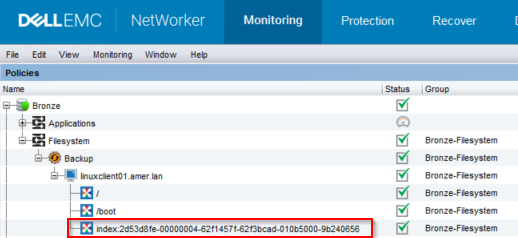
Figura 1: Monitoreo de respaldo de NetWorker
2. Para habilitar los respaldos de CFI, ejecute el siguiente comando nsrpolicy en la acción de respaldo:
Requisitos:
- El servidor de NetWorker debe estar en NetWorker 19.8.0.0 o superior: https://www.dell.com/support/home/product-support/product/networker/overview
- Esta funcionalidad está destinada a respaldos "tradicionales" (basados en clientes).
Figura 1: Monitoreo de respaldo de NetWorker
root@linux1:~# mminfo -avot -t today
 volume        type   client           date     time         size ssid      fl   lvl name
ClientBackupPool.001 Data Domain linux1.amer.lan 02/27/2023 12:38:30 PM 74 MB 4277998791 cr 9 index:linuxclient01.amer.lan
ClientBackupPool.001 Data Domain linuxclient01.amer.lan 02/27/2023 12:39:32 PM 13 MB 16585916 cb incr /
ClientBackupPool.001 Data Domain linuxclient01.amer.lan 02/27/2023 12:39:37 PM 4  B 4294776000 cb incr /boot
NOTA: La habilitación de esta funcionalidad no excluye a los clientes que ejecutan su respaldo de índice en una política de protección de datos de la política de protección de servidores. Cuando se ejecuta la política de protección del servidor, el respaldo del índice se realiza nuevamente.
Hay dos métodos para habilitar esta función.
CLI de Nsradmin:
- En el símbolo del sistema de administrador o raíz en el servidor de NetWorker, ejecute el comando:
nsradmin
- En el indicador nsradmin, utilice la siguiente sintaxis de comando para imprimir los detalles de la acción de respaldo:
nsradmin> show Enable Cfi
nsradmin> print type: nsr protection policy action; name: ACTION_NAME; policy name: POLICY_NAME; workflow name: WORKFLOW_NAME
Ejemplo:
nsradmin> show Enable Cfi
nsradmin> print type: nsr protection policy action; name: backup; policy name: Bronze; workflow name: Filesystem
Enable Cfi: No;
nsradmin>
- Para habilitar los respaldos de Cfi en la acción de respaldo, ingrese el siguiente comando en el indicador nsradmin:
nsradmin> update Enable Cfi: Yes
- Vuelva a ejecutar el comando de impresión para mostrar los cambios:
nsradmin> print type: nsr protection policy action; name: backup; policy name: Bronze; workflow name: Filesystem
                  Enable Cfi: Yes;
CLI de Nsrpolicy:
- Desde un símbolo del sistema raíz o administrador en el servidor de NetWorker, ejecute el siguiente comando nsrpolicy para mostrar los atributos de la acción de respaldo:
nsrpolicy action display -p POLICY_NAME -w WORKFLOW_NAME -A ACTION_NAME
O:
nsrpolicy action display --policy_name POLICY_NAME --workflow_name WORKFLOW_NAME --action_name ACTION_NAME
Ejemplo:
root@linux1:~# nsrpolicy action display -p Bronze -w Filesystem -A backup
{
    "actionName": "Backup",
    "actionSpecific": {
        "actions": {
            "actionType": "backup",
            "actionBackupSubtypeSpecific": {
                "backupSubtypes": {
                    "abBackupSubtype": "traditional",
                    "abtDestinationPool": "ClientBackupPool",
                    "abForceBackupLevel": "",
                    "abtBrowsePeriod": "1 Months",
                    "abtDDRetentionLockTime": "",
                    "abtEnableCfiBackup": false,
                    "abtEnableDDRetentionLock": false,
                    "abtEstimate": false,
                    "abtFileInactivityAlertThreshold": 0,
                    "abtFileInactivityThreshold": 0,
                    "abtRevertToFullWhenSyntheticFullFails": true,
                    "abtTimestampFormat": "none",
                    "abtVerifySyntheticFull": true
                }
...
...
nsrpolicy action update backup traditional -p POLICY_NAME -w WORKFLOW_NAME -A ACTION_NAME --enable_cfi yes
O:
nsrpolicy action update backup traditional --policy_name POLICY_NAME --workflow_name WORKFLOW_NAME --action_name ACTION_NAME --enable_cfi yes
Ejemplo:
root@linux1:~# nsrpolicy action update backup traditional -p Bronze -w Filesystem -A backup --enable_cfi yes
128947:nsrpolicy: Action 'backup' was successfully updated
- Para confirmar los cambios, vuelva a ejecutar el comando nsrpolicy display:
root@linux1:~# nsrpolicy action display -p Bronze -w Filesystem -A backup
{
    "actionName": "Backup",
    "actionSpecific": {
        "actions": {
            "actionType": "backup",
            "actionBackupSubtypeSpecific": {
                "backupSubtypes": {
                    "abBackupSubtype": "traditional",
                    "abtDestinationPool": "ClientBackupPool",
                    "abForceBackupLevel": "",
                    "abtBrowsePeriod": "1 Months",
                    "abtDDRetentionLockTime": "",
                    "abtEnableCfiBackup": true,
                    "abtEnableDDRetentionLock": false,
                    "abtEstimate": false,
                    "abtFileInactivityAlertThreshold": 0,
                    "abtFileInactivityThreshold": 0,
                    "abtRevertToFullWhenSyntheticFullFails": true,
                    "abtTimestampFormat": "none",
                    "abtVerifySyntheticFull": true
                }
...
...
Productos afectados
NetWorkerProductos
NetWorker Family, NetWorker, NetWorker SeriesPropiedades del artículo
Número del artículo: 000210224
Tipo de artículo: How To
Última modificación: 16 may 2026
Versión: 8
Encuentre respuestas a sus preguntas de otros usuarios de Dell
Servicios de soporte
Compruebe si el dispositivo está cubierto por los servicios de soporte.