NetWorker: Unable to Launch NetWorker Management Console UI, Verified that the NetWorker Authentication Service is Running
Summary: NetWorker Management Console login failure with message "Could not resolve host: NetWorker_ServerName."
This article applies to
This article does not apply to
This article is not tied to any specific product.
Not all product versions are identified in this article.
Symptoms
Error while launching NetWorker Management Console (NMC) user interface (UI):
An error occured while validating user credentials. Verify that the NetWorker Authentication service is running
[Could not resolve host  <NetWorker server>
Server message Make sure the server is running]
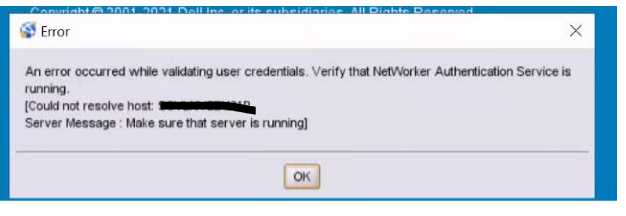
Figure 1: NMC UI Error Message
The NetWorker Authentication service is running on the AUTHC server that the NMC uses: NetWorker: How To Identify Which Server is the Authentication Server Used By NMC and NWUI
The NMC server can resolve the AUTHC server and communicate with port 9090: nsrports -t AUTHC_SERVER_NAME -p 9090
The NMC server package is installed on its own standalone system separate from the NetWorker server.
Cause
Failure to launch was due to an error in the NMC Launcher window. In the "Connect to NMC server, enter NMC server or IP address," the hostname of the NetWorker server was selected instead of the NMC server.
Resolution
Enter the NMC server hostname in the NetWorker Runtime Environment (NRE) launcher window.
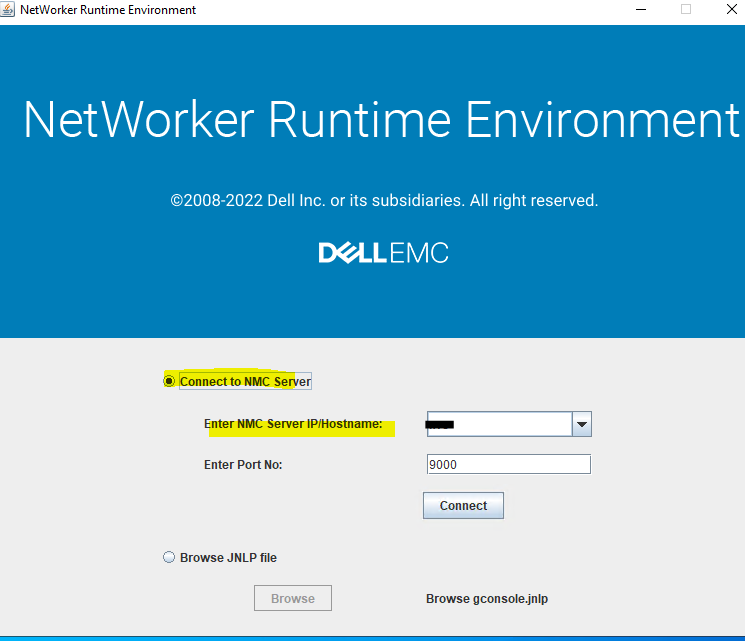
Figure 2: NRE Launcher Window
Entering a host in this field stores it in the NRE host lists file. This can be cleared by renaming or deleting the
C:\Program Files\NRE\config\hostlists file.
Additional Information
Affected Products
NetWorker, NetWorker Management ConsoleProducts
NetWorker Family, NetWorker SeriesArticle Properties
Article Number: 000211065
Article Type: Solution
Last Modified: 27 May 2026
Version: 7
Find answers to your questions from other Dell users
Support Services
Check if your device is covered by Support Services.