SE, Unisphere for PowerMax: Can the Time To Live of an Expired SnapVX Session be extended
Summary: Can the Time To Live (TTL) of an expired Linked Snapshot be extended?
Instructions
It is possible to extend the Time To Live (TTL) of an expired Linked snapshot.
| Can TTL be extended? | ||
| TTL expired | No TTL set | |
| Snapshot with link | Yes | Yes |
| Snapshot with no links | Not Applicable | Yes |
This can be done using Solutions Enable with the following commands: (can be done against a device group, device file, storage group, composite group, or individual devices):
symsnapvx -g <DgName> -snapshot_name <SnapshotName> [-generation <GenerationNumber>] set ttl <-delta <delta_time | NONE> | -absolute <date_time>>

symsnapvx -sid <SymmID> -file <DeviceFileName> -snapshot_name <SnapshotName> [-generation <GenerationNumber>] set ttl <-delta <delta_time | NONE> | -absolute <date_time>>

symsnapvx -sid <SymmID> -sg <SgName> -snapshot_name <SnapshotName> [-generation <GenerationNumber>] set ttl <-delta <delta_time | NONE> | -absolute <date_time>>

symsnapvx -cg <CgName> -snapshot_name <SnapshotName> [-generation <GenerationNumber>] set ttl <-delta <delta_time | NONE> | -absolute <date_time>>

symsnapvx -sid <SymmID> -devs <<<SymDevStart>:<SymDevEnd> | <SymDevName>> [,<<SymDevStart>:<SymDevEnd> | <SymDevName>>...] -snapshot_name <SnapshotName> [-generation <GenerationNumber>] set ttl <-delta <delta_time | NONE> | -absolute <date_time>>
-delta Specifies the time to live expiration time in the form DD:HH (days:hours). The specified days can be set to any value between 0 and 400. The specified hours can be set to any value between 0 and 23.-absolute Specifies a date and time for the snapshot time to live expiration time in the form MM/DD/YYYY[:hh] (month/date/year[:hour]) using the local host time. The specified date may be up to 400 days in the future. The specified hours can be set to any value between 0 and 23. It has to be at least one hour in the future from the current time. It is set as close to the specified hour as possible.
For example:
Setting the TTL for a snapshot named 600am to automatically terminate after 6 hours:
symsnapvx -sid xxx -dev 03b5 -snapshot_name 600am set ttl -delta 0:6
Setting the TTL for a snapshot named 600am to automatically terminate on October 10, 2025, at 6:00 PM:
symsnapvx -sid xxx -dev 03b5 -snapshot_name 600am set ttl -absolute 10/10/2025:18
In Unisphere for PowerMax:
- For a new snapshot, Storage > Storage Group > Data Protection > Create Snapshot has the option to set TTL.
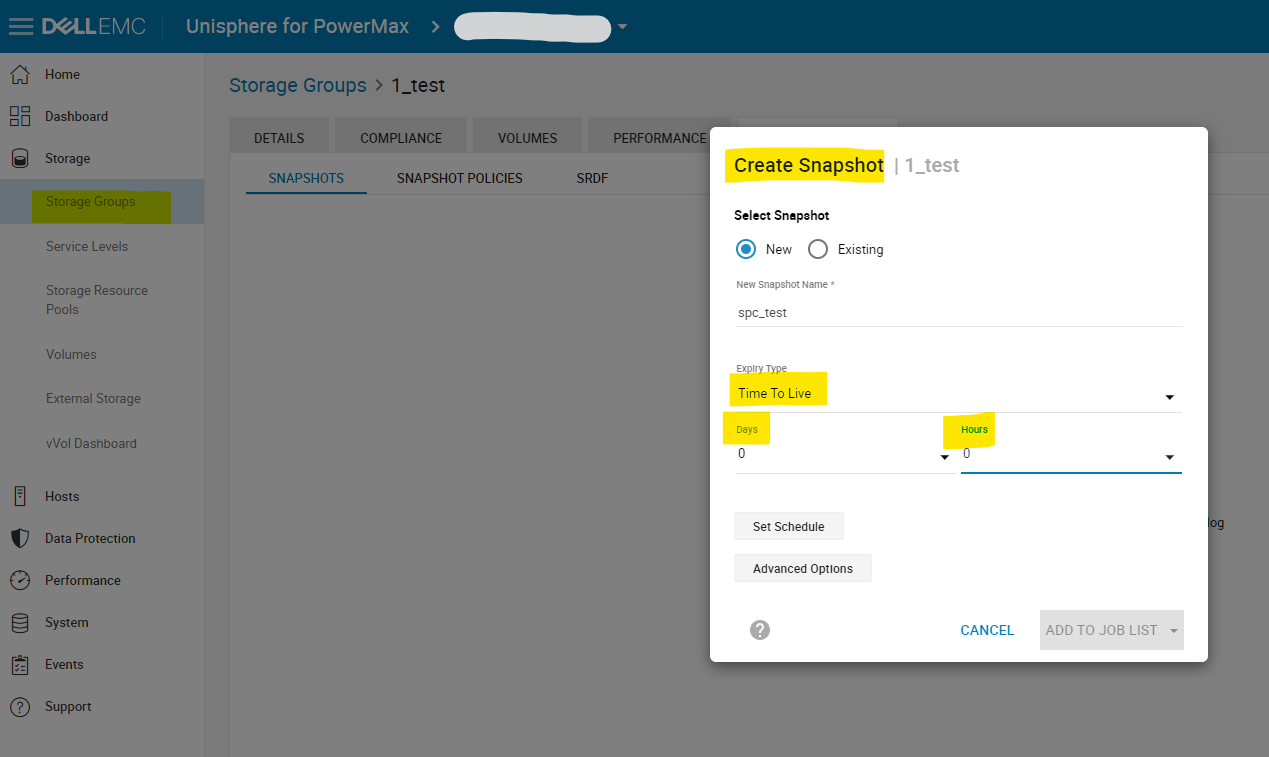
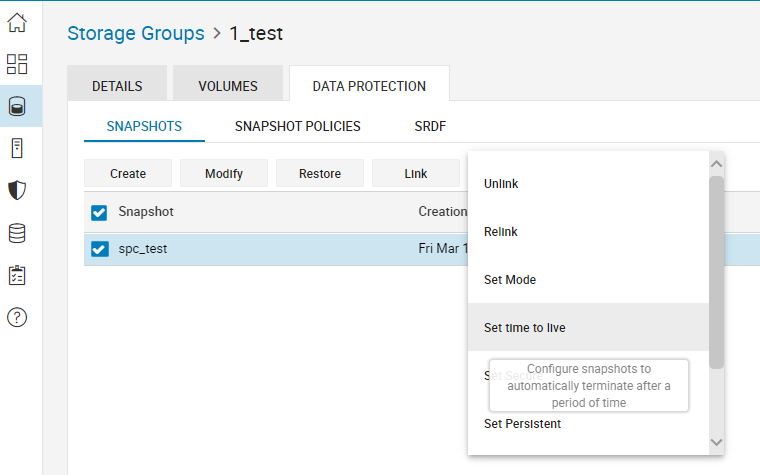
- For an existing snapshot, Storage > Storage Group > Data Protection > Select Snapshot >
 > Set time to live
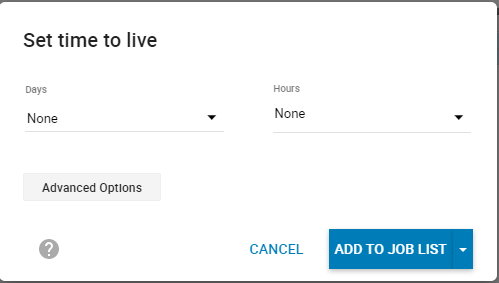
As per Dell Solutions Enabler TimeFinder SnapVX CLI User Guide,
"Only snapshots without links or restore sessions can be terminated. If the snapshot has links, it is terminated when the last link is unlinked."
- It is evident that the snapshots that have no linked targets will be terminated after the TTL expires. This concludes that it is not possible to extend the TTL of a snapshot (with no linked targets) after it has expired.
- However, it is worthwhile to notice that a snapshot that has at least one linked target will not get terminated even after the TTL expires. Therefore, the TTL of an expired Linked snapshot can be extended using the set TTL command.