NetWorker: VMware View Refresh Fails "Dispatcher Request Timed Out"
Summary: Error fetching vCenter information for ESXi vCenter hostname: Reason Dispatcher Request timed out NetWorker
Symptoms
The NetWorker Management Console's (NMC) VMware View times out with the following error.
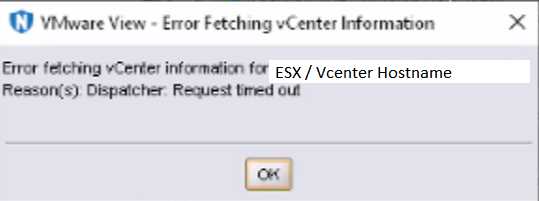
Figure 1: NetWorker Management Console Time Out Error Message
A similar error may be observed when performing NetWorker VMware Protection (NVP) Virtual Machine (VM) backups or restores.
The NetWorker server's daemon.raw reports:
Inventory session returned err: Inventory session status returned with a failure.
Error: 'Failed to load inventory from 'VMWARE-HYPERVISOR-FQDN'. Failed to load Category/Tagging metadata.
- Linux:
/nsr/logs/daemon.raw - Windows:
C:\Program Files\EMC NetWorker\nsr\logs\daemon.raw
Cause
- The vCenter inventory operation is exceeding the max Java heap size (default 2 GB) on the NMC client.
- Default timeout parameters used by NetWorker processes are exceeded.
Resolution
NetWorker Management Console Heap Size:
Increase the Java heap size of the NetWorker Management Console. This process is documented in the following article: NetWorker: How to change the java heap size for the NetWorker Management Console (NMC)
Environment Variables:
Add the following two system variables on the NetWorker server:
GST_VBA_TIMEOUT=7200
NSR_HYPERVISOR_QUERY_REQUEST_TIMEOUT=3600
NSRVIM_TIME_INTERVAL=60
For Windows:
Use one of the following methods to apply the recommended system variables.
Command-Line:
- Open an Administrator command prompt.
- Run the following commands:
setx /m GST_VBA_TIMEOUT 7200
setx /m NSR_HYPERVISOR_QUERY_REQUEST_TIMEOUT 3600
For NetWorker 19.10 (or later) add the following (optional):
setx /m NSRVIM_TIME_INTERVAL 60
This setting changes the frequency in which nsrvim runs (in minutes). The minimum (default setting) is 15. The maximum setting is 60. This change can help reduce load on the vCenter Server Daemon (VPXD).
- Reboot the host.
- When the host comes back up, validate the system variables using from a new Administrator command-prompt:
set
System Properties UI Method:
- From the dashboard, select Server Manager > Local Server.
- Click the hyperlink for the Computer Name.
- Select System Properties > Advanced > Environment Variables > New.
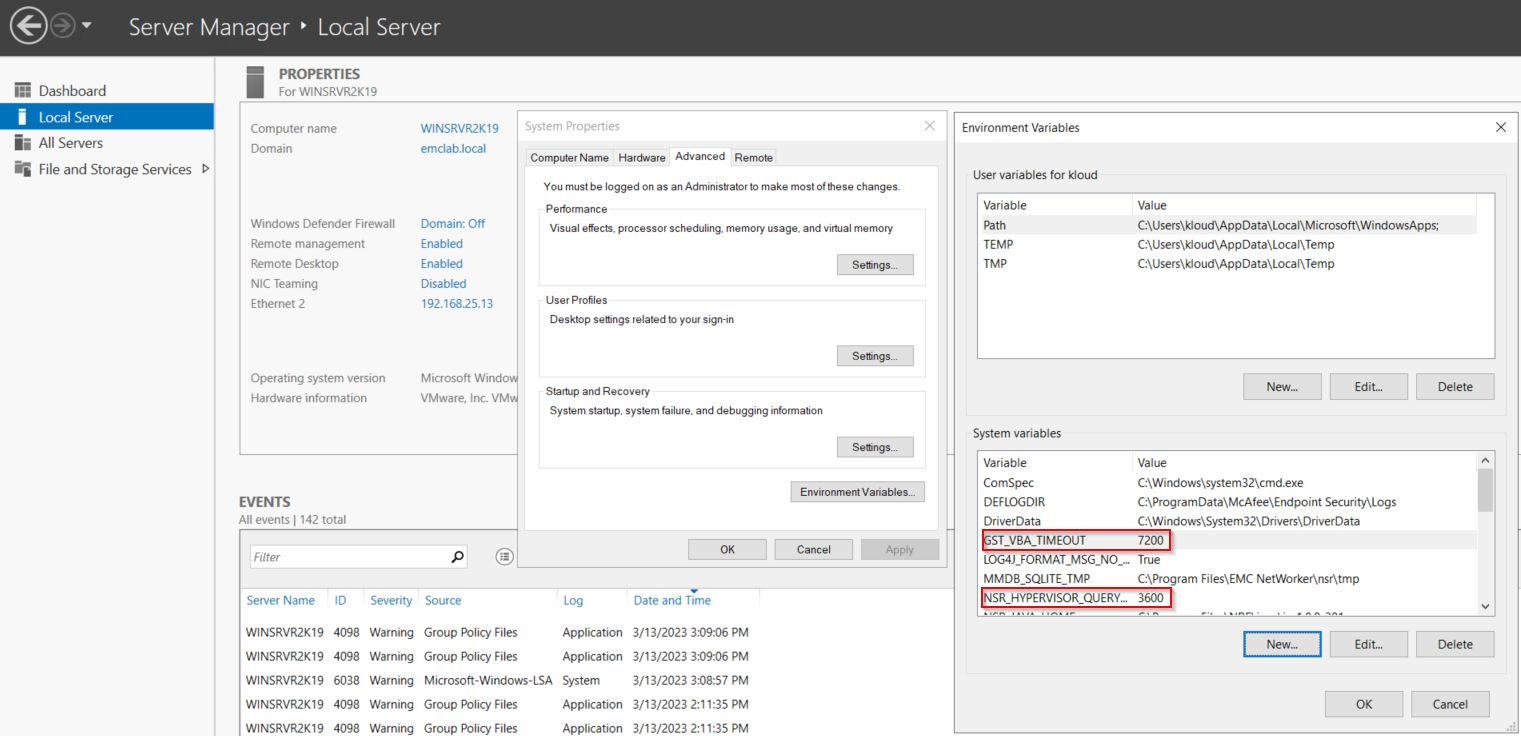
Figure 2: Server Manager Dashboard for Windows
- Reboot the NetWorker server operating system.
For Linux:
- Create or edit the
/nsr/nsrrcfile using a text editor:
vi /nsr/nsrrc
nsrrc file is a variable file used by NetWorker processes, the variables are applied during NetWorker daemon startup.
- Add the following lines:
GST_VBA_TIMEOUT=7200
export GST_VBA_TIMEOUT
NSR_HYPERVISOR_QUERY_REQUEST_TIMEOUT=3600
export NSR_HYPERVISOR_QUERY_REQUEST_TIMEOUT
NSRVIM_TIME_INTERVAL=60
export NSRVIM_TIME_INTERVAL
- The finished changes should look similar to:
[root@networker]:~# cat /nsr/nsrrc
JAVA_HOME=/opt/nre/java/latest/
export JAVA_HOME
GST_VBA_TIMEOUT=7200
export GST_VBA_TIMEOUT
NSR_HYPERVISOR_QUERY_REQUEST_TIMEOUT=3600
export NSR_HYPERVISOR_QUERY_REQUEST_TIMEOUT
# For NetWorker 19.10 and later add the following line (optional)
NSRVIM_TIME_INTERVAL=60
# This value changes the frequency in which scheduled nsrvim runs (in minutes). Minimum (default): 15, maximum:60. This setting can help reduce load on the vCenter server daemon.
export NSRVIM_TIME_INTERVAL
- Restart the NetWorker services:
systemctl restart networker
systemctl restart gst
Additional Information
If the issue persists after applying the environment variables defined in this KB, see: