Error de desinstalación de PowerPath para Windows: 0x80070091 - Error al eliminar el directorio y Error de instalación de PowerPath 0xe0000247...
Resumen: Error de desinstalación de PowerPath para Windows: 0x80070091 - Error al eliminar el directorio y Error de instalación de PowerPath 0xe0000247: Se encontró un problema al intentar agregar el controlador a la tienda. ...
Este artículo se aplica a
Este artículo no se aplica a
Este artículo no está vinculado a ningún producto específico.
No se identifican todas las versiones del producto en este artículo.
Síntomas
- Una vez que PowerPath se elimina correctamente de Control Programs and Features, la ejecución de la instalación de >PowerPath informa el siguiente error y no puede continuar con la instalación.
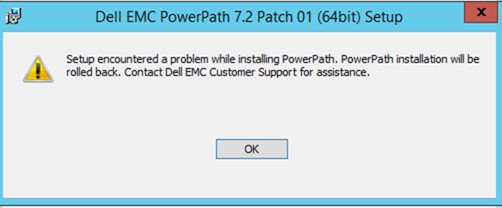
Figura 1: Mensaje de error de instalación de PowerPath 7.2
PowerPath 7.2 P02 installation Boot 2023-06-30 14:42:51.452 [UNK]:   LIB: Event=0, Error=e0000247 (A problem was encountered while attempting to add the driver to the store.) Failed to copy OEM INF for driver package "C:\Program Files\EMC\PowerPath\Drivers\emcpclass.inf"
2023-06-30 14:42:51.452 [VER]:   LIB: Event=3, In Limited retStatus= -1 reboot : 0
2023-06-30 14:42:51.453 [ERR]:   EmcpWinInstallSetupDriver failed (0xe0000247).
2023-06-30 14:42:51.453 [ERR]: Command failed: error 2 (Generic failure).
Mensaje de error observado en ### ppinstall_2023-06-30_XX-XX-XX_XXXXXX.log:
PowerPath 7.2 P02 installation Boot 2023-06-30 14:42:51.452 [UNK]:   LIB: Event=0, Error=e0000247 (A problem was encountered while attempting to add the driver to the store.) Failed to copy OEM INF for driver package "C:\Program Files\EMC\PowerPath\Drivers\emcpclass.inf"
2023-06-30 14:42:51.452 [VER]:   LIB: Event=3, In Limited retStatus= -1 reboot : 0
2023-06-30 14:42:51.453 [ERR]:   EmcpWinInstallSetupDriver failed (0xe0000247).
2023-06-30 14:42:51.453 [ERR]: Command failed: error 2 (Generic failure).
Mensaje de error observado en ### SetupApi.Dev.log:
>>>  [SetupCopyOEMInf - C:\Program Files\EMC\PowerPath\Drivers\emcpclass.inf]
>>>  Section start 2023/06/30 14:31:23.362
      cmd: "C:\Program Files\EMC\PowerPath\ppinstall.exe" install -inf "C:\Program Files\EMC\PowerPath\Drivers\emcpclass.inf" -rootdevice default -force -limited -verbose -logfile "C:\ProgramData\EMC\PowerPath\logs\ppinstall_2023-06-30_14-30-59_29151.log"
     sto: {Setup Import Driver Package: C:\Program Files\EMC\PowerPath\Drivers\emcpclass.inf} 14:31:23.362
     inf:      Provider: Dell Inc. or its subsidiaries.
     inf:      Class GUID: {4D36E967-E325-11CE-BFC1-08002BE10318}
     inf:      Driver Version: 08/11/2021,7.1.0.234
     inf:      Catalog File: EmcpClass.cat
     pol:      {Driver package policy check} 14:31:23.643
     pol:      {Driver package policy check - exit(0x00000000)} 14:31:23.643
     sto:      {Stage Driver Package: C:\Program Files\EMC\PowerPath\Drivers\emcpclass.inf} 14:31:23.643
     inf:           {Query Configurability: C:\Program Files\EMC\PowerPath\Drivers\emcpclass.inf} 14:31:23.659
     inf:                Driver package 'emcpclass.inf' is configurable.
     inf:           {Query Configurability: exit(0x00000000)} 14:31:23.659
     flq:           Copying 'C:\Program Files\EMC\PowerPath\Drivers\EmcpClass.cat' to 'C:\Windows\System32\DriverStore\Temp\{197cd00c-edd4-2c44-a211-61ae2c995147}\EmcpClass.cat'.
     flq:           Copying 'C:\Program Files\EMC\PowerPath\Drivers\emcpclass.inf' to 'C:\Windows\System32\DriverStore\Temp\{197cd00c-edd4-2c44-a211-61ae2c995147}\emcpclass.inf'.
     flq:           Copying 'C:\Program Files\EMC\PowerPath\Drivers\EmcpClass.sys' to 'C:\Windows\System32\DriverStore\Temp\{197cd00c-edd4-2c44-a211-61ae2c995147}\EmcpClass.sys'.
     sto:           {DRIVERSTORE IMPORT VALIDATE} 14:31:23.706
     sig:                {_VERIFY_FILE_SIGNATURE} 14:31:23.737
     sig:                     Key      = emcpclass.inf
     sig:                     FilePath = C:\Windows\System32\DriverStore\Temp\{197cd00c-edd4-2c44-a211-61ae2c995147}\emcpclass.inf
     sig:                     Catalog  = C:\Windows\System32\DriverStore\Temp\{197cd00c-edd4-2c44-a211-61ae2c995147}\EmcpClass.cat
!    sig:                     Verifying file against specific (valid) catalog failed! (0x800b0109)
!    sig:                     Error 0x800b0109: A certificate chain processed, but terminated in a root certificate which is not trusted by the trust provider.
     sig:                {_VERIFY_FILE_SIGNATURE exit(0x800b0109)} 14:31:23.878
     sig:                {_VERIFY_FILE_SIGNATURE} 14:31:23.878
     sig:                     Key      = emcpclass.inf
     sig:                     FilePath = C:\Windows\System32\DriverStore\Temp\{197cd00c-edd4-2c44-a211-61ae2c995147}\emcpclass.inf
     sig:                     Catalog  = C:\Windows\System32\DriverStore\Temp\{197cd00c-edd4-2c44-a211-61ae2c995147}\EmcpClass.cat
!    sig:                     Verifying file against specific Authenticode(tm) catalog failed! (0x800b0109)
!    sig:                     Error 0x800b0109: A certificate chain processed, but terminated in a root certificate which is not trusted by the trust provider.
     sig:                {_VERIFY_FILE_SIGNATURE exit(0x800b0109)} 14:31:23.956
!!!  sig:                Driver package catalog file certificate does not belong to Trusted Root Certificates, and Code Integrity is enforced.
!!!  sig:                Driver package failed signature validation. Error = 0xE0000247
     sto:           {DRIVERSTORE IMPORT VALIDATE: exit(0xe0000247)} 14:31:23.956
!!!  sig:           Driver package failed signature verification. Error = 0xE0000247
!!!  sto:           Failed to import driver package into Driver Store. Error = 0xE0000247
     sto:      {Stage Driver Package: exit(0xe0000247)} 14:31:23.972
     sto: {Setup Import Driver Package - exit (0xe0000247)} 14:31:23.972
!!!  inf: Failed to import driver package into driver store
!!!  inf: Error 0xe0000247: A problem was encountered while attempting to add the driver to the store.
<<<  Section end 2023/06/30 14:31:24.268
<<<  [Exit status: FAILURE(0xe0000247)]
- Cuando se ejecuta el comando PowerPath RemoveAll, el mensaje
"DellEMCPower.X64.Signed.7.1.b267.exe /r" Error: 0x80070091 - Error deleting directory"se informa.
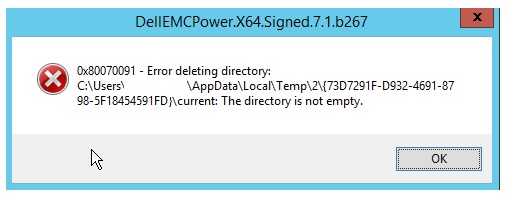
Figura 2: Mensaje: Error al eliminar el directorio
Mensaje de error observado en ### bootstrapper_2023-06-30_14-05-21_24128.log:
2023-06-30 14:05:21    Extracting embedded files for component 'ppremoveall': 1 CAB(s)
2023-06-30 14:05:21    Resolved CAB path 'C:\administrator\AppData\Local\Temp\2\{3A4C2982-F5D1-4F5F-A0A6-69F376E72612}\current' for component 'PPREMOVEALL'
2023-06-30 14:05:21    Extracting 'SETUP_PPREMOVEALL_1.CAB' for component 'PPREMOVEALL'
2023-06-30 14:05:21    Extracting: C:\Users\administrator\AppData\Local\Temp\2\{3A4C2982-F5D1-4F5F-A0A6-69F376E72612}\current\ppRemoveAll.exe
2023-06-30 14:05:21    Done: C:\Users\administratorAppData\Local\Temp\2\{3A4C2982-F5D1-4F5F-A0A6-69F376E72612}\current\ppRemoveAll.exe
2023-06-30 14:05:21    -- Executable: C:\Users\administrator\AppData\Local\Temp\2\{3A4C2982-F5D1-4F5F-A0A6-69F376E72612}\current\PPRemoveAll.exe -no
2023-06-30 14:05:21    PPRemoveall started (C:\Users\administrator\AppData\Local\Temp\2\{3A4C2982-F5D1-4F5F-A0A6-69F376E72612}\current\PPRemoveAll.exe -no)
2023-06-30 14:05:27    PPRemoveall finished (0)
2023-06-30 14:05:27    Deleting temporary directory
2023-06-30 14:07:31    Error: 0x80070091 - Error deleting directory: C:\Users\administrator\AppData\Local\Temp\2\{3A4C2982-F5D1-4F5F-A0A6-69F376E72612}\current: The directory is not empty.
2023-06-30 14:07:31    EMC PowerPath installer finished, return code=-1
Causa
El problema se debe a la opción de Windows "aplicación de firma del controlador" que está habilitada de manera predeterminada y es más estricta cuando se trata del seguimiento y la verificación de los controladores de dispositivos que se intentan instalar en un sistema Windows determinado.
Resolución
La desactivación temporal de la verificación de firma del controlador soluciona este problema.
- Deshabilite la verificación de firma en el host con el comando
bcdedit /set testsigning on
- Reinicie el host.
- Instalación de PowerPath
- Vuelva a habilitar la característica de verificación de firma en el host con el comando
bcdedit /set testsigning off
- Reinicie el host.
Propiedades del artículo
Número del artículo: 000215545
Tipo de artículo: Solution
Última modificación: 01 jul 2026
Versión: 3
Encuentre respuestas a sus preguntas de otros usuarios de Dell
Servicios de soporte
Compruebe si el dispositivo está cubierto por los servicios de soporte.