IDPA: There Are Currently 2 Usable Fault Domains. The Operation Requires 1 More
Summary: PowerProtect DataProtection (DP) Series Appliance and IDPA: There Are Currently 2 Usable Fault Domains. The Operation Requires 1 More Usable Fault Domains.
This article applies to
This article does not apply to
This article is not tied to any specific product.
Not all product versions are identified in this article.
Symptoms
When creating snapshots, Avamar Internal Virtual Machine (VM) backups fail with "There are currently 2 usable fault domains. The operation requires 1 more usable fault domains."
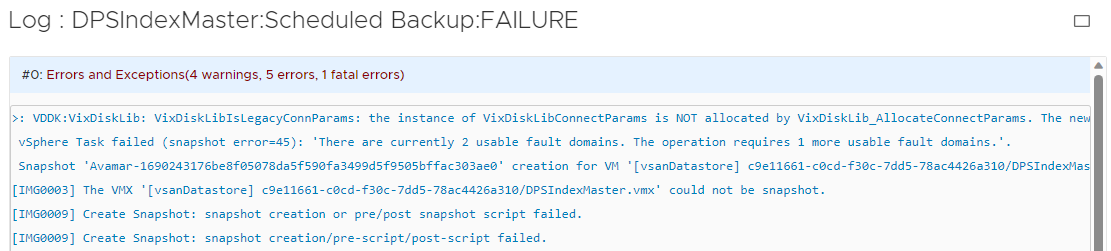
On vCSA:

Cause
An insufficient number of Fault Domains are present in the environment for component placement.
IDPA uses "vSAN Default Storage Policy." If one node has issues, snapshots fail to be created for the VM.
One more hosts on vSAN are offline.
One more hosts on vSAN are in maintenance mode or decommissioned state.
Because of this, objects go red which is an indication of a none healthy node, run:
esxcli vsan health cluster list -w

Resolution
IMPORTANT: Red objects must return to a healthy state, run the following command to monitor:
esxcli vsan debug object health summary get
1. Connect to vCenter (VCSA) and Check for any none responding ESXi.
Check iDRAC for any hardware issues. If the node stopped responding, collect TSR logs and power cycle (cold boot) from iDRAC UI.
Once the node is back online, reconfigure for vSphere HA from VCSA.
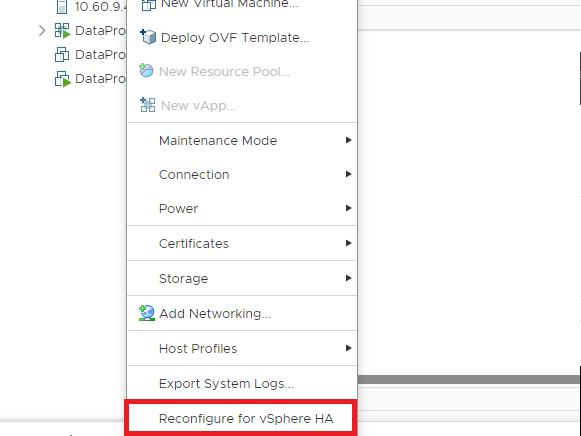
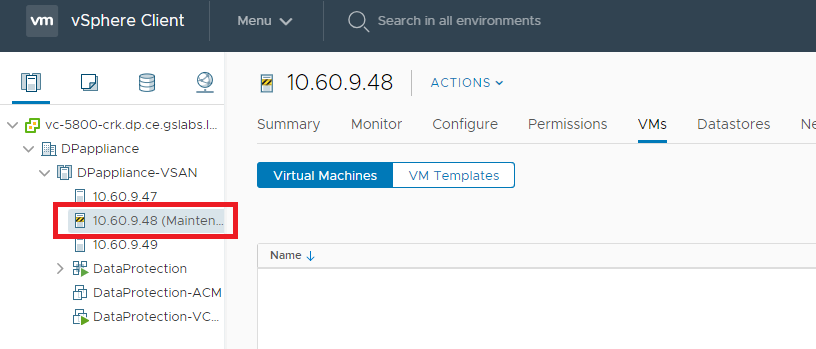
2. Connect to VCSA and Check for any ESXi showing into maintenance mode.
Right click - Go to Maintenance Mode - Exit Maintenance Mode.
3. ESXi node in decomState
To resolve this, run the below command on any ESXi. Confirm that there are no hosts in Decom State. Anything other than "0" means that there is a host in decommissioned mode.
Example below shows node # 2 in decomState mode.
for i in $( cmmds-tool find -f json -t HOSTNAME | grep -iE "uuid" | awk '{print $2}'| sed "s/\"//g" |sed "s/\,//g"); do cmmds-tool find -u $i -f json | grep -E "decom|hostname" | awk '{print $2,$3}' ;done | sed 'N;s/\n/ /'[root@esx2-5800-crk:~] for i in $( cmmds-tool find -f json -t HOSTNAME | grep -iE "uuid" | awk '{print $2}'| sed "s/\"//g" |sed "s/\,//g"); do cmmds-tool find -u $i -f json | grep -E "deco
m|hostname" | awk '{print $2,$3}' ;done | sed 'N;s/\n/ /'
{"decomState": 6, {"hostname": "esx2-5800-crk.dp.ce.gslabs.lab.emc.com"},
{"decomState": 0, {"hostname": "esx1-5800-crk.dp.ce.gslabs.lab.emc.com"},
{"decomState": 0, {"hostname": "esx3-5800-crk.dp.ce.gslabs.lab.emc.com"},
To resolve this, connect to ESXi SSH using root and run following command:
localcli vsan maintenancemode cancel
Affected Products
PowerProtect DP5300, PowerProtect DP5800, PowerProtect DP8300, PowerProtect DP8800, Integrated Data Protection Appliance Family, Integrated Data Protection Appliance Software, PowerProtect DP5900, PowerProtect DP8400, PowerProtect DP8900Article Properties
Article Number: 000216032
Article Type: Solution
Last Modified: 18 May 2026
Version: 7
Find answers to your questions from other Dell users
Support Services
Check if your device is covered by Support Services.