Cyber Recovery. Не удается войти в пользовательский интерфейс после модернизации до версии 19.14
Сводка: Не удается войти в пользовательский интерфейс после успешного обновления до Cyber Recovery 19.14.
Данная статья применяется к
Данная статья не применяется к
Эта статья не привязана к какому-либо конкретному продукту.
В этой статье указаны не все версии продуктов.
Симптомы
В конце обновления программного обеспечения Cyber Recovery (CR) до версии 19.14 отображается сообщение об успешном обновлении:
23.09.05 13_07_36: Cyber Recovery has been successfully upgraded from 19.8.0.2-156 to 19.14.0.2-16...
Однако при попытке входа в пользовательский интерфейс Cyber Recovery появляется сообщение об ошибке внутреннего сервера:
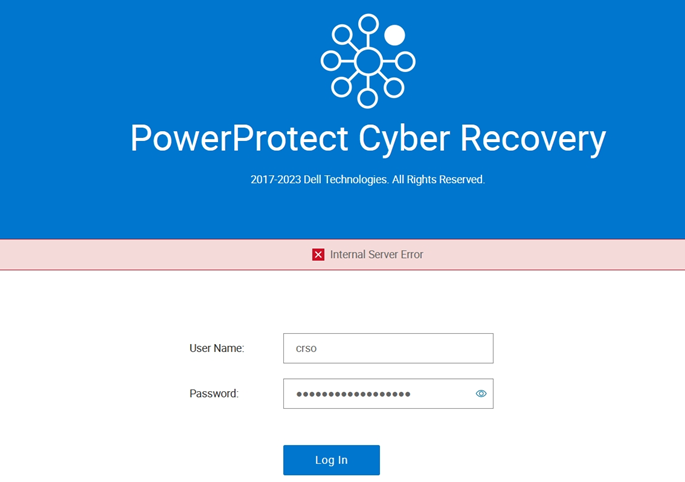
Рис. 1. Сообщение об ошибке при входе в Cyber Recovery
Выполнение следующей команды в интерфейсе командной строки Cyber Recovery показывает, что Mongo и другие контейнеры вышли из системы:
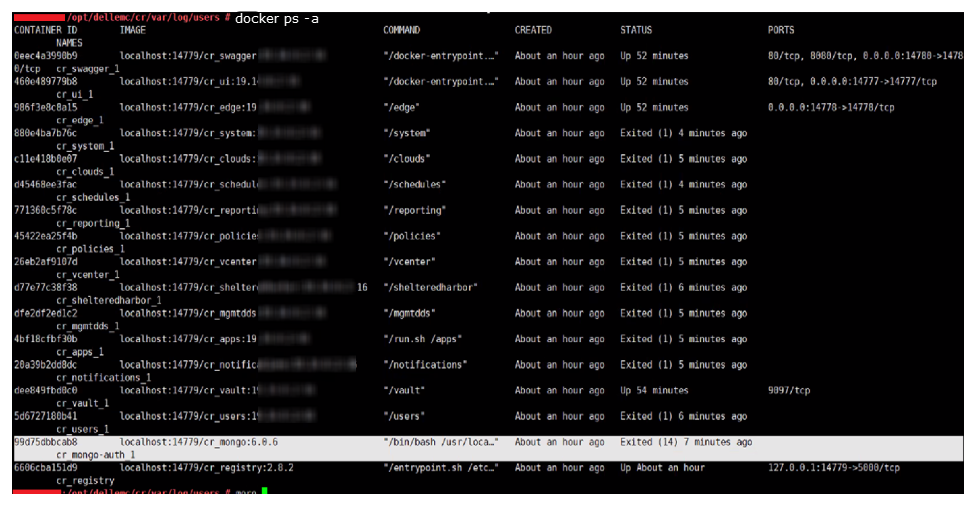
Рис. 2. Mongo и другие контейнеры вышли.
ПРИМЕЧАНИЕ. Это Cyber Recovery представляет собой установку Open Virtual Appliance (OVA).
Причина
В одном случае исправление безопасности Cyber Recovery не было применено перед обновлением программного обеспечения Cyber Recovery.
Разрешение
Чтобы временно устранить эту проблему, выполните следующие действия.
- Перед обновлением убедитесь, что у вас есть последняя резервная копия Cyber Recovery. Скопируйте его во внешнее расположение. Последняя резервная копия находится по адресу:
/opt/dellemc/cr-configs or /var/lib/dellemc/cr-configs
- Выполните следующую команду, чтобы остановить службу CR:
crsetup.sh --stop
- Выполните следующую команду, чтобы применить обновления безопасности:
./cyber-recovery-osupdate-<current release>.bin
- Выполните следующую команду, чтобы перезагрузить сервер Cyber Recovery Server:
reboot
- Проверьте, доступен ли пользовательский интерфейс Cyber Recovery.
Затронутые продукты
PowerProtect Cyber RecoveryСвойства статьи
Номер статьи: 000217327
Тип статьи: Solution
Последнее изменение: 17 Sep 2025
Версия: 4
Получите ответы на свои вопросы от других пользователей Dell
Услуги технической поддержки
Проверьте, распространяются ли на ваше устройство услуги технической поддержки.