Integrated Data Protection Appliance - Avamar 密碼未同步
摘要: IDPA 儀表板 UI 中顯示 Avamar 密碼不同步
本文章適用於
本文章不適用於
本文無關於任何特定產品。
本文未識別所有產品版本。
症狀
密碼不同步的錯誤訊息顯示在 IDPA ACM 儀表板上,抱怨 Avamar Server 或 AVProxy。
下面是一個密碼不同步的範例:
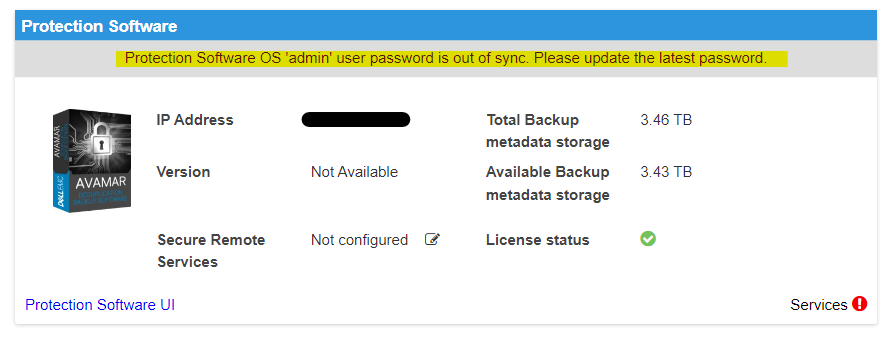
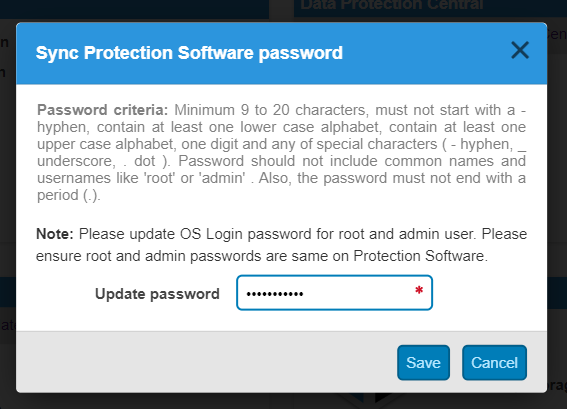
下面是一個密碼不同步的範例:
Protection Software Proxy 'root' user out of sync. Please ensure 'root' password is same as 'admin' password
原因
ACM 監控並報告所有單點產品,包括其硬體和虛擬機管理程式平臺運行狀況。為此,它將所有當前單點產品登錄資訊的副本保存在加密的密碼檔中。它不斷與這些目標建立聯繫,以檢查其健康情況。如果無法登入任何監控目標機器,則會在 ACM 儀表板中報告密碼未同步錯誤。
可能的原因:
可能的原因:
- 密碼已變更或直接在 Avamar 伺服器或代理端重設,而非從 ACM 儀表板重設
- 從 ACM 到 Avamar Server 或 AVProxy 查詢其狀態的網路延遲。(臨時問題)
解析度
如果在 ACM UI 中更新密碼無法解決密碼未同步問題,請按照下列步驟操作:
Avamar Server 密碼未同步的解決方案:
案例 #1:
密碼從 Avamar 端而非從 ACM UI 變更:
-
Avamar 密碼未同步 (下列一或多個 Avamar 使用者密碼已變更)
- Avamar 作業系統根使用者密碼
- Avamar 作業系統管理員使用者密碼
- Avamar Server 根使用者密碼
- Avamar Server MCUser 使用者密碼
- Avamar Server repluser 使用者密碼
- Avamar PostgreSQL 資料庫 viewuser 使用者密碼
- Avamar vProxy 作業系統 root 使用者密碼 (裝置內部代理 VM)
- Avamar vProxy 作業系統管理員使用者密碼 (裝置內部代理 VM)
解決方案:
我們強烈建議將所有 Avamar Server 和 Avamar 代理使用者密碼與 IDPA 一般密碼保持相同,但是如果需要保持不同密碼,請確定符合下列規則:
密碼規則:
如果您從 Avamar 端而非 ACM UI 變更 Avamar 密碼,IDPA 會要求 Avamar 作業系統管理員和作業系統根帳戶使用相同的密碼。MCUser、repluser、viewuser 和 Avamar Server root 使用者必須共用相同的密碼,此密碼可能與作業系統管理員和作業系統根密碼不同。
在上述密碼清單中,以相同顏色反白顯示的密碼 必須 共用相同的密碼,而且所有密碼都必須符合如下所示的 IDPA 全域密碼原則:
如果您從 Avamar 端而非 ACM UI 變更 Avamar 密碼,IDPA 會要求 Avamar 作業系統管理員和作業系統根帳戶使用相同的密碼。MCUser、repluser、viewuser 和 Avamar Server root 使用者必須共用相同的密碼,此密碼可能與作業系統管理員和作業系統根密碼不同。
在上述密碼清單中,以相同顏色反白顯示的密碼 必須 共用相同的密碼,而且所有密碼都必須符合如下所示的 IDPA 全域密碼原則:
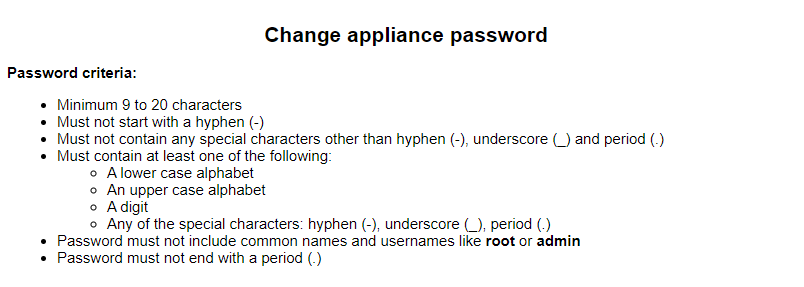
下列程序可驗證 Avamar 密碼:
- 如何確認 Avamar Server 和 Avamar 代理機器作業系統 root / admin 密碼相同?
SSH 以系統管理員身分登入 Avamar 伺服器和代理,然後
su 至具有相同密碼的根使用者,以查看密碼是否可以同時登入系統管理員和根帳戶。
- 如何驗證 Avamar Server root、MCUser 和 repluser 密碼?(Avamar Server root 與 Avamar Server 作業系統 root 不同。作業系統根是 Linux 作業系統層級的登入使用者,而 Avamar Server 根是 Avamar 應用程式層級的使用者)
SSH 以系統管理員身分登入 Avamar 伺服器,並使用不同的使用者名稱執行下列命令四次:(取代<> Avamar_Username含 MCUser、repluser、viewuser 和 root)
# avmgr logn --id=<Avamar_Username> --ap=<password>
1  Request succeeded
7161  privilege level  (enabled,create,read,backup,access,move,delete,maint,fullmanage,noticketrequired)
2  block type  (directory)
- 如何驗證 Avamar Server mcdb viewuser 密碼?
SSH 至 ACM 機器並執行:(如果您從 Avamar 機器本身執行此命令,它不會提示輸入密碼):
# psql -U viewuser -h <Avamar Server IP> -p 5555 mcdb -c "\d"
Password for user viewuser:
下列程序是變更 Avamar 密碼:
- 變更 Avamar 伺服器端密碼:
執行 change-passwords 命令以變更密碼。以下是變更所有 Avamar Server 密碼的範例 (在實際案例中,您可以選擇性地變更設定不正確的 Avamar 密碼)。
login as: admin
Password: xxxxx

admin@Avamar-svr:~/>: su -
Password: xxxxx
root@Avamar-svr:~/#:

root@Avamar-svr:~/#: change-passwords
[change-passwords version 2.1]
Identity added: /root/.ssh/rootid (/root/.ssh/rootid)
Identity added: /root/.ssh/rootid (/root/.ssh/rootid)
Identity added: /root/.ssh/rootid-save (/root/.ssh/rootid-save)

Do you wish to specify one or more additional SSH passphrase-less
    private keys that are authorized for root operations?
Answer n(o) here unless there are known inconsistencies in
    ~root/.ssh/authorized_keys files among the various nodes.
Note that the following keys will be used automatically (i.e., there is
    no need to re-specify them here):
      /root/.ssh/rootid
      /root/.ssh/rootid-save

y(es), n(o), h(elp), q(uit/exit): no
--------------------------------------------------------
The following is a test of OS root authorization with the currently
    loaded SSH key(s).

    If the authorization test fails, then you might be missing an
    appropriate private key, e.g., rootid or dpnid.
        -> In that event, re-run this program and, when prompted,
           specify as many SSH private key files as are necessary
           in order to complete root operations.

Starting root authorization test with 600 second timeout...
End of root authorization test.
--------------------------------------------------------

Change OS (login) passwords?
y(es), n(o), q(uit/exit): yes
change-passwords: INFO: Each OS password will be changed locally without further prompting as soon as you have (twice) entered a valid password.


--------------------------------------------------------
Change OS password for "admin"?
y(es), n(o), q(uit/exit): yes
Change password for user "admin".

(Entering an empty (blank) line twice quits/exits.)
> xxxxx
Enter the same OS user password again.

(Entering an empty (blank) line twice quits/exits.)
> xxxxx
BAD PASSWORD: it is too simplistic/systematic
Backup lockbox file
Backup keystore files
Backup SSV files
Flush backup
Local backup dir: /usr/local/avamar/src/lockbox_backup/2023-06-26-22_00
Flush backup dir: /usr/local/avamar/var/mc/server_data/lockbox_backup
Updated with new value under name "admin".
Backup lockbox file
Backup keystore files
Backup SSV files
Flush backup
Local backup dir: /usr/local/avamar/src/lockbox_backup/2023-06-26-22_00
Flush backup dir: /usr/local/avamar/var/mc/server_data/lockbox_backup
change-passwords: INFO: The password for OS user admin has been updated on _this_ host.
change-passwords: INFO: The password will not be reverted if you later decline to update passwords/passphrases.


--------------------------------------------------------
Change OS password for "root"?
y(es), n(o), q(uit/exit): yes
Change password for user "root".

(Entering an empty (blank) line twice quits/exits.)
> xxxxx
Enter the same OS user password again.

(Entering an empty (blank) line twice quits/exits.)
> xxxxx
BAD PASSWORD: it is too simplistic/systematic
change-passwords: INFO: The password for OS user root has been updated on _this_ host.
change-passwords: INFO: The password will not be reverted if you later decline to update passwords/passphrases.


--------------------------------------------------------
Generate new SSH keys?
y(es), n(o), h(elp), q(uit/exit): no


--------------------------------------------------------
Change Avamar Server passwords?
y(es), n(o), q(uit/exit): yes

--------------------------------------------------------
Please enter the CURRENT server password for "root"

(Entering an empty (blank) line twice quits/exits.)
> xxxxx
Checking Avamar Server root password (1200 second timeout)...
Avamar Server current root password accepted.


--------------------------------------------------------
Change Avamar Server password for "MCUser"?
y(es), n(o), q(uit/exit): yes
Please enter a new Avamar Server password for user "MCUser".

(Entering an empty (blank) line twice quits/exits.)
> xxxxx
Enter the same Avamar Server password again.

(Entering an empty (blank) line twice quits/exits.)
> xxxxx
Accepted Avamar Server password for "MCUser".


--------------------------------------------------------
Change Avamar Server password for "root"?
y(es), n(o), q(uit/exit): yes
Please enter a new Avamar Server password for user "root".

(Entering an empty (blank) line twice quits/exits.)
> xxxxx
Enter the same Avamar Server password again.

(Entering an empty (blank) line twice quits/exits.)
> xxxxx
Accepted Avamar Server password for "root".


--------------------------------------------------------
Change Avamar Server password for "repluser"?
y(es), n(o), q(uit/exit): yes
Please enter a new Avamar Server password for user "repluser".

(Entering an empty (blank) line twice quits/exits.)
> xxxxx
Enter the same Avamar Server password again.

(Entering an empty (blank) line twice quits/exits.)
> xxxxx
Accepted Avamar Server password for "repluser".


--------------------------------------------------------
Change the viewuser password?
y(es), n(o), h(elp), q(uit/exit): yes
Checking Administrator Server status...
Enter the NEW viewuser password.
Enter ? or help for help.

(Entering an empty (blank) line twice quits/exits.)
> xxxxx
For verification, re-enter the NEW viewuser password.
Enter ? or help for help.

(Entering an empty (blank) line twice quits/exits.)
> xxxxx

--------------------------------------------------------
Do you wish to proceed with your changes on the selected node?
        Answering y(es) will proceed to make changes.
        Answering n(o) or q(uit) will not proceed.

y(es), n(o), q(uit/exit): yes
Changing OS passwords...
[Logging to /usr/local/avamar/var/change-passwords.log...]
Done changing OS passwords...
Changing Avamar Server passwords...
Suspending maintenance cron jobs
Checking Administrator Server status...
Stopping Administrator Server...
Changing the passwords for the local Avamar Server...
The passwords for the local Avamar Server have been changed.
Starting process of updating Administrator and Enterprise Manager configurations...
Running script to update Administrator and Enterprise Manager configurations on node 0.s...
[Logging to /usr/local/avamar/var/change-passwords.log...]
Done with updating Administrator configuration on node 0.s...
Starting process of updating client configurations...
Running script to update client configuration on all+...
[Logging to /usr/local/avamar/var/change-passwords.log...]
Updating client configuration on node 0.0...
Done updating client configuration on 0.0...
Starting process of updating mccli configuration files...
Running script to update mccli configuration files on node set "0.0"...
[Logging to /usr/local/avamar/var/change-passwords.log...]
Done with updating mccli configuration files on node 0.0...
Checking Administrator Server status...
Starting Administrator Server...
Resuming maintenance cron jobs
Starting process of updating viewuser password...
Checking Administrator Server status...
Stopping Administrator Server...
Running script to update mcdb viewuser password on node 0.0...
[Logging to /usr/local/avamar/var/change-passwords.log...]
Done with updating mcdb viewuser password on node 0.0...
Checking Administrator Server status...
Starting Administrator Server...
Stopping EMT subsystem
Starting EMT subsystem

--------------------------------------------------------
Done.
NOTES:
- If mccli (the Administrator command line interface)
      is used from any remote user accounts, then please update
      the password in each remote account's copy of the mccli
      preferences/configuration file, typically
      ~USER/.avamardata/var/mc/cli_data/prefs/mcclimcs.xml.
- Please be sure to resume schedules via the
        Administrator GUI or via 'dpnctl start sched'.

#: dpnctl start sched
Identity added: /home/admin/.ssh/admin_key (/home/admin/.ssh/admin_key)
dpnctl: INFO: Resuming backup scheduler...
dpnctl: INFO: Backup scheduler resumed.
dpnctl: INFO: No /usr/local/avamar/var/dpn_service_status exist.
- 變更 Avamar 代理端密碼:
以下是變更代理管理員和根帳戶密碼的範例 (先以 root 身分登入,然後同時變更管理員和根帳戶密碼):
login as: admin
Password: xxxxx

su -
Password: xxxxx

# passwd admin
New password: xxxxx
BAD PASSWORD: it is too simplistic/systematic
BAD PASSWORD: is too simple
Retype new password: xxxxx
passwd: password updated successfully

# passwd root
New password: xxxxx
BAD PASSWORD: it is too simplistic/systematic
BAD PASSWORD: is too simple
Retype new password: xxxxx
passwd: password updated successfully
符合所有 Avamar 密碼規則後,請前往 ACM UI,重新整理 ACM UI 瀏覽器頁面,然後按一下「不同步」錯誤訊息,系統會提示您為一或多位使用者輸入新密碼,並據此更新密碼。(有時在您輸入正確密碼後,它仍然顯示密碼不同步錯誤,請等待幾分鐘,然後再次刷新您的 Web 瀏覽器頁面。根本原因顯示在案例 #2 中)。
案例 2
ACM 嘗試查詢其端點產品時,因網路延遲導致密碼未同步錯誤:
-
這是暫時性問題,通常需要在 1-2 分鐘後重新整理 ACM 頁面即可解決。這是已知問題,Dell 工程團隊正在努力開發未來版本中的修正程式。
案例 3
即使密碼已同步並在 Avamar 上運作,ACM 仍會因為 SSH 故障或與 AV 的測試連線失敗,而顯示 AV 密碼不同步。這可能是因為 SSH 問題導致 ACM 無法登入 AV,例如最近在 AV sshconfig 上所做的變更、加密交涉等。
- 執行從 ACM 到 Avamar 伺服器的測試 SSH 連線。如果失敗,請登入 Avamar 伺服器並重新啟動 SSH 服務:
# service sshd restart
- 如果這樣做沒有幫助,請收集錯誤消息、故障排除您執行的步驟,並向 Dell 技術支援部門提出票證以尋求進一步説明。
案例 4
當 ACM 無法執行 MCSDK 呼叫至 Avamar 以驗證這些使用者密碼時,Avamar MCUser 或 viewuser 可能會顯示不同步。如果 ACM MCSDK 呼叫由於各種原因而無法呼叫 Avamar,可能會發生這種情況。
- IDPA:ACM 報告在升級至 2.7.1 升級或應用 Avamar 19.4 MCS 修補程式333618後,Avamar Server 密碼不同步 (需要以 Dell 支援註冊使用者身分登入才能檢視文章)
- IDPA:ACM UI 在備份伺服器儀表板上顯示錯誤「備份伺服器 viewuser 使用者密碼未同步。更新最新密碼」
如果上述提供的情況和解決方法無法解決問題,請執行下列步驟:
- SSH 以 root 身分登入 ACM,並停止和啟動 ACM Web 應用程式服務:
# service dataprotection_webapp restart
# service dataprotection_webapp statu
- 重新整理 ACM 網頁並登入,會顯示「裝置啟動進度」。與所有裝置元件重新同步需要一些時間,完成後,它會返回到 ACM 儀表板。(這不是重新啟動裝置的程序)
- 如果問題仍無法解決,請向 Dell Technologies 提出支援工單。
Avamar 密碼相關的 KB 參考:
受影響的產品
PowerProtect DP4400, Integrated Data Protection Appliance Family, Integrated Data Protection Appliance Software文章屬性
文章編號: 000217330
文章類型: Solution
上次修改時間: 18 5月 2026
版本: 6
向其他 Dell 使用者尋求您問題的答案
支援服務
檢查您的裝置是否在支援服務的涵蓋範圍內。